
FAQ
1.What is Video Bitrate?
Video bitrate refers to the number of data bits transmitted per unit of time during data transmission. The unit we generally use is kbps (kilobits per second). Basic Formula: Bitrate (kbps) = File Size (KB) x 8 / Time (Seconds)
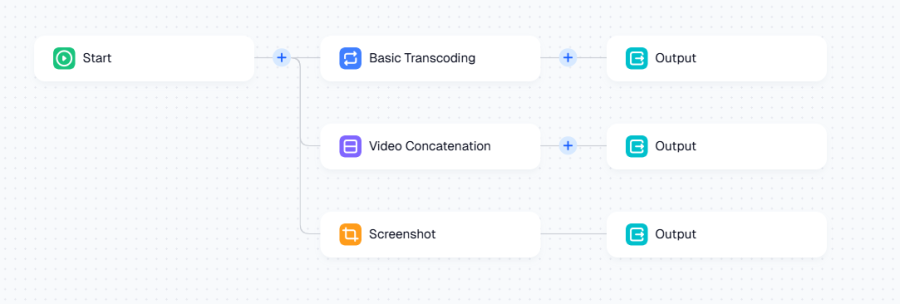
2.Does it support multiple processing tasks for a single input source simultaneously?
Yes. As shown in the figure below, you can add multiple serial transcoding processes in the workflow.
3.Can I output transcoded files directly to AWS S3 or other third-party storage?
No. While the input source supports third-party storage, the Output Path must be VMRack Object Storage. This is a common configuration error for users, so please double-check.
4.Why does my task show "Waiting" after submission?
It may be because the queue is full or you have set a lower priority. Please check the task accumulation status in Queue Management.
5.Does it support video slicing?
Yes. When the container format is HLS, configuring slice format and data slicing mode is supported.
6.How to add dynamic watermarks?
Add an image watermark in the workflow and set a dynamic image in GIF or APNG format.
7.What is the "Waived Amount" displayed in the bill?
This is a billing benefit provided to you by VMRack.
Reason: Our billing system is accurate to 4 decimal places, while actual payments are accurate to 2 places (cents).
Result: In the monthly unified settlement, the system automatically summarizes all unsettled fractional remainders. If the summarized total remainder is less than $0.01, the system will directly waive (write off) this fee, and you do not need to pay it.
8.How is the monthly Free Tier deducted?
VMRack provides competitive free resource packages monthly, and the system prioritizes deduction during settlement; billing starts only for the excess part.
Quota Details: 200 Minutes of Transcoding, 1000 Snapshots.
Note: Free quotas automatically refresh on the 1st of each month and cannot be rolled over to the next month. Penalty fees do not occupy free quotas.
9.If a transcoding task fails, will fees or Free Tier quota be deducted?
No. The system only bills for successfully processed transcoding tasks and snapshots.
10.Video transcoding failed, what is the reason?
Task failure refers to situations where various types of sub-tasks provided by media processing (transcoding, video splicing, snapshot, etc.) fail. You can view the error code in the node of the Task Details and determine the error type based on the returned error message. Common reasons include: Source file corruption, encrypted video cannot be decoded, or source file download timeout.
- Products
- VPS Hosting
- VPS HostingUnmetered
- Bare Metal
- GPU Rental
- CDNPublic Beta
- Custom CDN
- Object StoragePublic Beta
- TranscoderPublic Beta