
Transcoder
Transcoder is a cloud-based audio and video processing service. It provides an economical, elastic, and highly scalable method to convert multimedia data into formats suitable for playback on all platforms.
Built on cloud server architecture, Transcoder transforms the traditional approach of media processing. It eliminates the need for purchasing, building, and managing expensive hardware or configuring complex transcoding software. It allows you to obtain transcoding capabilities on demand, maximizing your ability to meet business needs while avoiding resource waste.
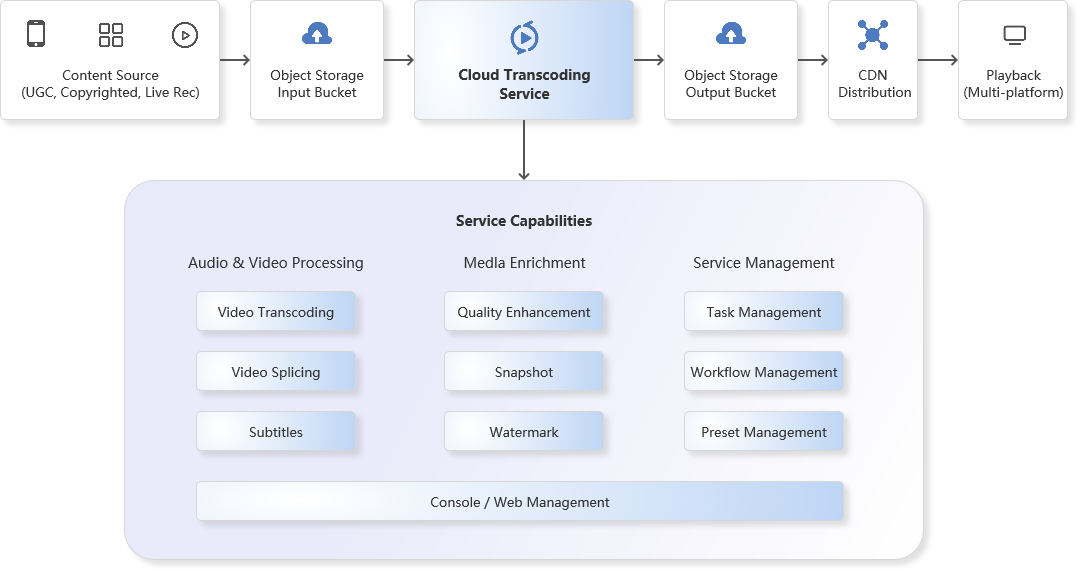
Product Functions
Transcoder converts source video files into formats with different bitrates and resolutions to meet the needs of users with varying network bandwidths and terminal devices. It supports the following functions:
Audio & Video Transcoding
Transcoding is the process of converting an original audio/video stream into another audio/video stream. It is an offline task. Through transcoding, you can change the encoding format, resolution, and bitrate of the original stream, making it suitable for different terminals and network environments.
Transcoding can achieve:
Goal | Description |
Adapt to More Terminals | Convert original video into formats with stronger terminal adaptability (e.g., MP4) so video resources can be played on more devices. |
Adapt to Different Bandwidths | Convert video into multiple outputs like Fluent, SD, and HD, allowing users to select the appropriate bitrate based on their current network environment. |
Improve Playback Efficiency | Move the MOOV atom metadata of MP4 files from the end to the beginning (MOOV Atom Relocation), enabling the player to start playback immediately without downloading the entire file. |
Save Bandwidth | Adopt more advanced coding methods (e.g., H.265) to significantly reduce bitrate while maintaining original picture quality, saving bandwidth costs. |
Supported Coding Formats, Resolutions, and Bitrate Parameters:
Parameter | Type | Detailed Description |
Input Formats | Container Formats | MP4, MKV, MOV, AVI, WMV, RMVB, VOB, FLV, MPEG-TS, WebM |
Video Codecs | AV1, AVS2, H.264/AVC, H.264 intra, H.263, H.263+, H.265/HEVC, MV-HEVC, H.266/VVC, MPEG-1, MPEG-2, MPEG-4, MJPEG, VP8, VP9, RealVideo, Windows Media Video, WMV2, Quicktime. | |
Audio Codecs | AAC, ADPCM, AMR, DSD, MP1, MP2, MP3, PCM, RealAudio, Windows Media Audio, VORBIS, AC-3. | |
Output Formats | Container Formats | FLV, MP4, HLS |
Video Codecs | AV1, H.264, H.265 | |
Audio Codecs | MP3, AAC, AAC_HE |
Watermark
Adding a watermark involves superimposing specific images or text onto the video screen at a designated position during transcoding or snapshot generation. It is an online task. Transcoder supports the following types:
Image Watermark: Formats like PNG, GIF, or APNG. Can be a brand logo or icon, used to declare video copyright.
Text Watermark: Set text content to indicate video copyright ownership and increase product recognition.
Watermark Specifications:
Parameter | Description |
Watermark Type | Supports Image and Text watermarks. |
Adaptive Scaling | Automatically scales proportionally based on the width of the video. |
Text Parameters | Supports setting font, font size, and font color. |
Position | Relative position of the watermark on the video screen. |
Timeline | Controls the time range during which the watermark appears. |
Video Snapshot
Snapshot is the process of capturing images from specific locations in a video and generating image files. Transcoder supports the following types:
Single Snapshot: Captures a frame at a specified time point to use as a video cover.
Multi-Snapshot: Captures multiple images at specified time intervals.
Snapshot Specifications:
Parameter | Description |
Format | Output format of the snapshot file. Currently supports JPG, PNG. |
Image Size | Specifies snapshot resolution. Format: Width x Height. Range: Long side \[176, 3840\], Short side \[144, 2160\]. Must be a multiple of 4. |
Start Time | Captures snapshot within the start and end time of the specified video. |
Sampling Interval | Sampling by time interval: e.g., capture every 10s. The number of snapshots depends on the video duration. |
Video Splicing
Used to splice multiple specified video clips into a single video. You can customize the following relevant parameters.
Parameter | Description |
Container Format | Target video format: mp4, flv, mp3. |
Resolution | Target video resolution. Format: Width x Height. Range: Long side \[176, 3840\], Short side \[144, 2160\]. Must be a multiple of 4. |
Peak Bitrate | Uses this parameter to restrict the peak bitrate of the output video stream. |
Audio Padding | Fills silence/audio into video files that lack an audio track during splicing. |
Auto Padding | When video file resolutions are inconsistent, automatically adds black borders to the video for proportional scaling. |
Product Advantages
Built for Efficient Transcoding
A hyperscale distributed transcoding cluster supports fragmented transcoding to significantly boost transcoding speed. It adjusts transcoding resources on demand, auto-scales, and flexibly handles high-concurrency transcoding requests.
Stable and Smooth Playback Experience
Supports custom personalized transcoding templates to convert media files into MP4/MKV/HLS files with different resolutions, bitrates, and frame rates, providing an Ultra-HD and smooth video experience.
Rich Input Source Support
Integrates with EasyLink Object Storage, Amazon S3, DigitalOcean Spaces, Aliyun (Alibaba Cloud), Tencent Cloud Storage, and other S3-compatible storage services, supporting seamless data transfer.
Quality Enhancement: Clearer and More Vivid
Adopts super-resolution technology to restore image details while repairing blurs and noise. It supports focused restoration for portraits, revealing more details and improving the visual effect of the video.
Data Encryption: Rock-Solid Video Security
Provides content encryption services based on DRM algorithms and multiple keys. It effectively safeguards your video resources, preventing file leakage or theft.
Application Scenarios
Video Websites: Transcoder covers mainstream formats and supports multiple resolutions and bitrates, solving the need for video websites to guarantee the viewing experience for users with different network bandwidths.
Online Education: With ultimate encoding compression capabilities, it can significantly reduce video file size while maintaining the clarity of the original video in online education scenarios, saving storage and bandwidth costs.
Broadcasting & Media: Features high-speed and stable fragmented transcoding capabilities. Supports multi-task concurrency and dynamic scaling, as well as 2K/4K UHD transcoding, meeting the broadcasting industry's needs for high efficiency and ultra-high-definition content transcoding.
Self-media / Content Creators: Achieves copyright protection by embedding brand logos via watermarks. Simultaneously supports the rapid creation and encapsulation of multi-language subtitles to meet localization needs for multi-region and multi-platform distribution.
- Products
- VPS Hosting
- VPS HostingUnmetered
- Bare Metal
- GPU Rental
- CDNPublic Beta
- Custom CDN
- Object StoragePublic Beta
- TranscoderPublic Beta