
Violation Handling
This document aims to clearly outline the measures the platform will take, the corresponding instance statuses, and the remediation or appeal processes you need to follow when your Bare Metal instance violates the Terms of Service and related terms of use. Please strictly adhere to the Terms of Service and use cloud resources responsibly.
Any illegal or non-compliant usage is strictly prohibited, including but not limited to:
Abusing services in a harassing or threatening manner.
Spam, SPIM, or SPIT activities.
Copyright infringement and DMCA violations.
Network probing or port scanning activities.
Activities such as cryptocurrency CPU mining that consume excessive CPU resources.
Excessive resource usage, such as severely consuming disk I/O, CPU, or high bandwidth.
All illegal activities, including but not limited to pornography, gambling, drug-related activities, fraud, hacking, DDoS attacks, etc.
Data mining, scraping, and any similar activities that violate third-party service terms.
Using abusive/threatening language towards our staff, and any other behavior we reasonably deem unacceptable.
Violation Warning
Trigger Reason: The instance's behavior has committed a first-time, minor violation of the Terms of Service, such as posing security risks or causing mild resource overconsumption.
Instance Status: The instance will be stopped by the system, and its status will change to "Stopped".
Your Actions:
Log in to the console promptly to check the warning notification in your in-platform messages or registered email to understand the specific violation details.
Thoroughly investigate and rectify the instance's usage behavior, content, or configuration as instructed in the notification.
After confirming the issues are resolved, you can manually click the "Start Server" button for the instance in the console to restore service, which will transition its state back to "Running".
Violation Suspension
Trigger Reason: The violation is relatively severe, or previous warnings were not addressed promptly.
Instance Status: The instance will be suspended, and its status will change to "Violation Suspension." You will be unable to perform any operations on it, such as starting, restarting, or logging in.
Your Actions:
Log in to the console promptly to check the warning notification in your in-platform messages or registered email to understand the specific violation details.
Thoroughly investigate and rectify the instance's usage behavior, content, or configuration as instructed in the notification.
After confirming the issues are resolved, you can manually click the "Start Server" button for the instance in the console to restore service, which will transition its state back to "Running".
Abuse
Trigger Reason: The instance is involved in clear abusive activities, such as launching external network attacks, sending spam, distributing malware, or engaging in illegal activities like pornography or gambling.
Instance Status: The instance is suspended, and the console provides clear, time-bound remediation instructions.
Your Action Process (must strictly follow the console instructions):
1. Log in to the console. View the information about the violating instance in the dashboard pop-up or instance list, then click "Resolve Now" to see the detailed remediation steps.
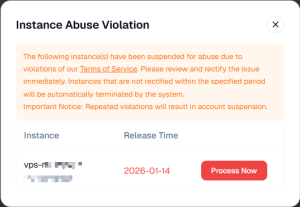
2. Data Migration (if required): You may add an allowlist to log in to the Bare Metal and migrate important data. This step can be skipped.
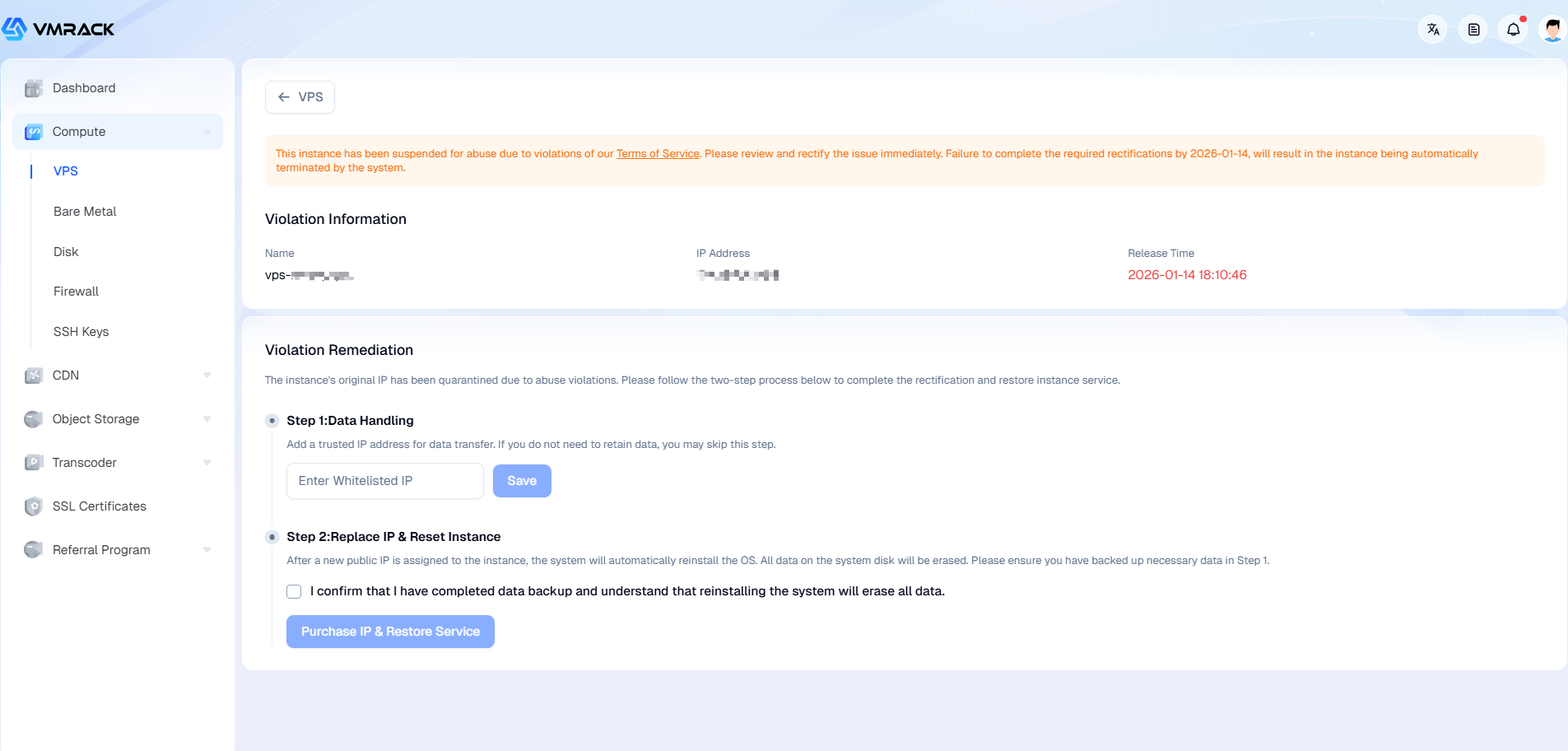
3. Replace IP & Reinstall: On the Abuse remediation page, click "Purchase New IP & Restore Service".
This action will automatically assign a new public IP address to the instance and simultaneously reinstall the system. All data on the system disk will be cleared.
4. After the remediation process is completed, the instance will typically resume running.
Critical Deadline: This type of penalty has a fixed remediation period. If you fail to complete the console-guided remediation process within the specified timeframe, the system will automatically release the instance upon expiration.
- Products
- VPS Hosting
- VPS HostingUnmetered
- Bare Metal
- GPU Rental
- CDNPublic Beta
- Custom CDN
- Object StoragePublic Beta
- TranscoderPublic Beta