VMRack
Home
Products
Solutions
Pricing
Support
Referral Program
Help Documentation
VPS
Billing Overview
Expiration and Renewal
Quick Start Guide
Connect to Instance
Instance Management
Storage Management
Network and Security
Violation Handling
Resource Transfer
Private IP Address
FAQ
CDN
Billing Overview
Quick Start
Console Guide
FAQ
Object Storage
Billing Overview
Quick Start
Console Guide
FAQ
Transcoder
Billing Overview
Quick Start Guide
Task Management
Workflow Management
Preset Management
Queue Management
FAQ
Bare Metal Server
Billing Overview
Expiration and Renewal
Quick Start Guide
Connect to Instance
Instance Management
Network and Security
Violation Handling
Resource Transfer
FAQ
  1. Help Documentation
  2. /
  3. Object Storage
  4. /
  5. Console Guide

Console Guide

This chapter will introduce in detail how to perform advanced operations such as domain configuration, cost optimization, and resource management in the console.

Bucket Configuration

In the bucket list, you can view the usage overview, basic information, domain name, and other information of the bucket.

Prerequisite: A bucket has been created. For specific steps, please refer to Create Bucket.

  • Log in to the Object Storage Console.

  • In the left navigation bar, click Bucket List, and click the target bucket name on the Bucket List page.

  • You can view and modify various configuration information of the bucket on the bucket details page.
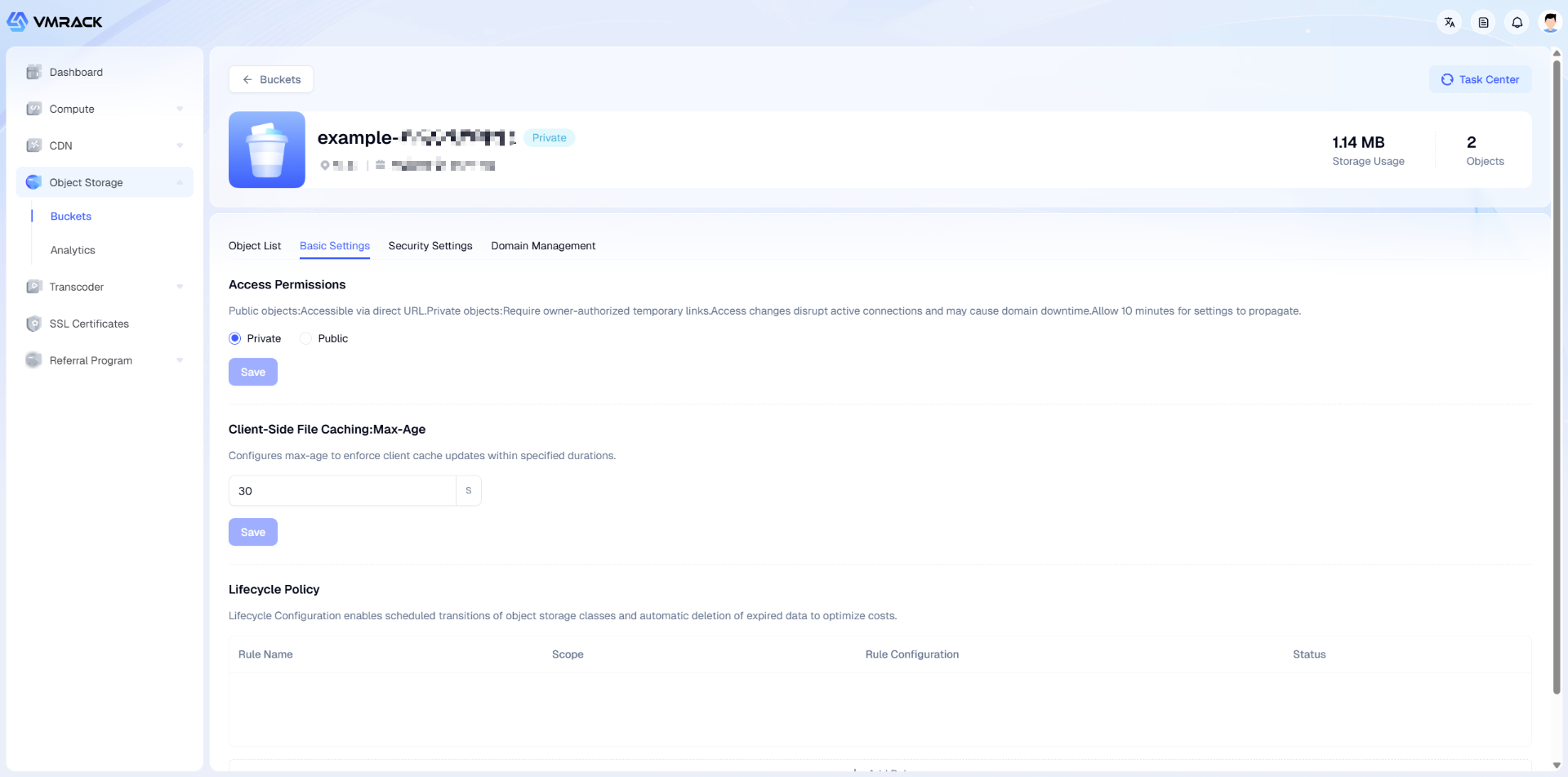
Bucket Configuration

You can view/modify the following information on this page:

Module

Parameter

Description

Basic Configuration

Access Permission

Permissions for accessing the bucket:

  • Private: Only the owner can access files (by obtaining a temporary signed link).

  • Public: Files can be accessed via direct external links.

Client Caching

Set the cache update time (in seconds) for files in the user's browser.

Lifecycle

Set rules to let the system automatically modify storage types or delete files.

  • Supports taking effect on the entire bucket or specific prefixes.

  • Supports user-defined time periods.

  • Supports two operations: Delete File or Convert to Low Frequency Storage.

Security Settings

CORS Settings

Allow or deny corresponding JavaScript cross-origin requests based on needs.

1.Allowed Origins: Specify the sources allowed for cross-origin requests.

  • Format Requirement: Must include protocol, domain, and port (if non-standard). One per line.

  • Match Rule: Supports using wildcards for fuzzy matching (e.g., https://.example.com ). Each line can contain at most one wildcard.

  • Note: Setting to * indicates allowing requests from any source; it is recommended to specify specific domain names in production environments to reduce security risks.

2.Allowed Methods: Specify the allowed cross-origin request HTTP methods.

  • GET: Allow fetching resources (Most common).

  • PUT: Allow uploading or replacing resources.

  • POST: Allow submitting data or uploading.

  • DELETE: Allow deleting resources.

  • HEAD: Only allow fetching resource metadata (like headers) without returning the body.

3.Allowed Headers: Specify custom Headers allowed to be carried in actual requests.

  • Scenario: When the client request contains custom headers (like x-vm-meta-author or authorization Token), they must be listed here, otherwise the preflight request (Preflight) will fail.

  • Format Requirement: One per line. If using wildcard * (indicates allowing all Headers), then it can only be a wildcard and cannot be mixed with other character strings.

4.Expose Headers: Specify response Headers permitted to be accessed by scripts.

  • Default Limit: By default, browsers scripts can only access 6 basic response headers (Cache-Control, Content-Language, Content-Type, Expires, Last-Modified, Pragma).

  • Config Description: If the frontend script needs to read other Headers (like ETag or custom x-vm-request-id), they must be listed here one by one.

  • Format Requirement: One per line, wildcards are not supported.

5.Max Age: Specify the cache validity period for preflight requests (OPTIONS).

  • Unit: Seconds.

  • Function: Within the validity period, when the browser initiates the same type of cross-origin request again, it does not need to send an OPTIONS preflight request again, but can send the actual request directly. This significantly reduces network round trips (RTT) and improves performance.

  • Recommendation: Recommended to set to 600 or higher.

Hotlink Protection

Controls external access permissions to object storage resources by verifying the HTTP header Referer field, effectively preventing resource theft and bandwidth abuse.
Once enabled, the system will immediately perform Referer verification on all access requests to the storage bucket.

1.Empty Referer Access: Controls whether to allow requests with empty or missing Referer headers.

  • Allow: Allows users to enter the URL directly in the browser address bar to access resources, or allows HTTPS pages to initiate requests to HTTP resources (usually without Referer).

  • Deny: High security mode. Mandates that requests must carry a Referer header, and the value must strictly match the list rules below. Usually used to prohibit direct downloading of resources.

2.Mode:

  • Blocklist: Only rejects requests from domains in the list; allows all other sources.

  • Allowlist: Only allows requests from domains in the list; rejects all other sources.

3.Domain/IP List: Specify the controlled source addresses.

  • Format Specification: Enter a domain name or IP address per line.

  • Wildcard Support: Supports using asterisk as a wildcard (e.g., .example.com matches www.example.com, img.example.com, etc.).

Note: Domain names do not need to include http:// or https:// prefixes.

Domain Management

Domain

Specify a custom address for accessing storage bucket resources.

Enable HTTPS

Enable SSL/TLS encrypted transmission.

  • Function: Resolves browser "Not Secure" warnings and prevents data from being hijacked or tampered with during transmission.

  • Effective Time: After configuration update, it usually takes about 10 minutes to take effect globally.

Select Certificate

Bind an SSL certificate matching the domain name.
The system will automatically detect valid certificates uploaded or applied for in the "SSL Certificates" module. If there are no available certificates, you can click "Upload Certificate" or "Apply Certificate" to jump quickly.

File and Directory Management

On the "File List" tab of the bucket, you can manage resources.

Folder Operations

  • Create: Click the "Create Folder" button to build multi-level directories.

  • Delete: Click the delete icon on the right side of the folder to delete that folder.
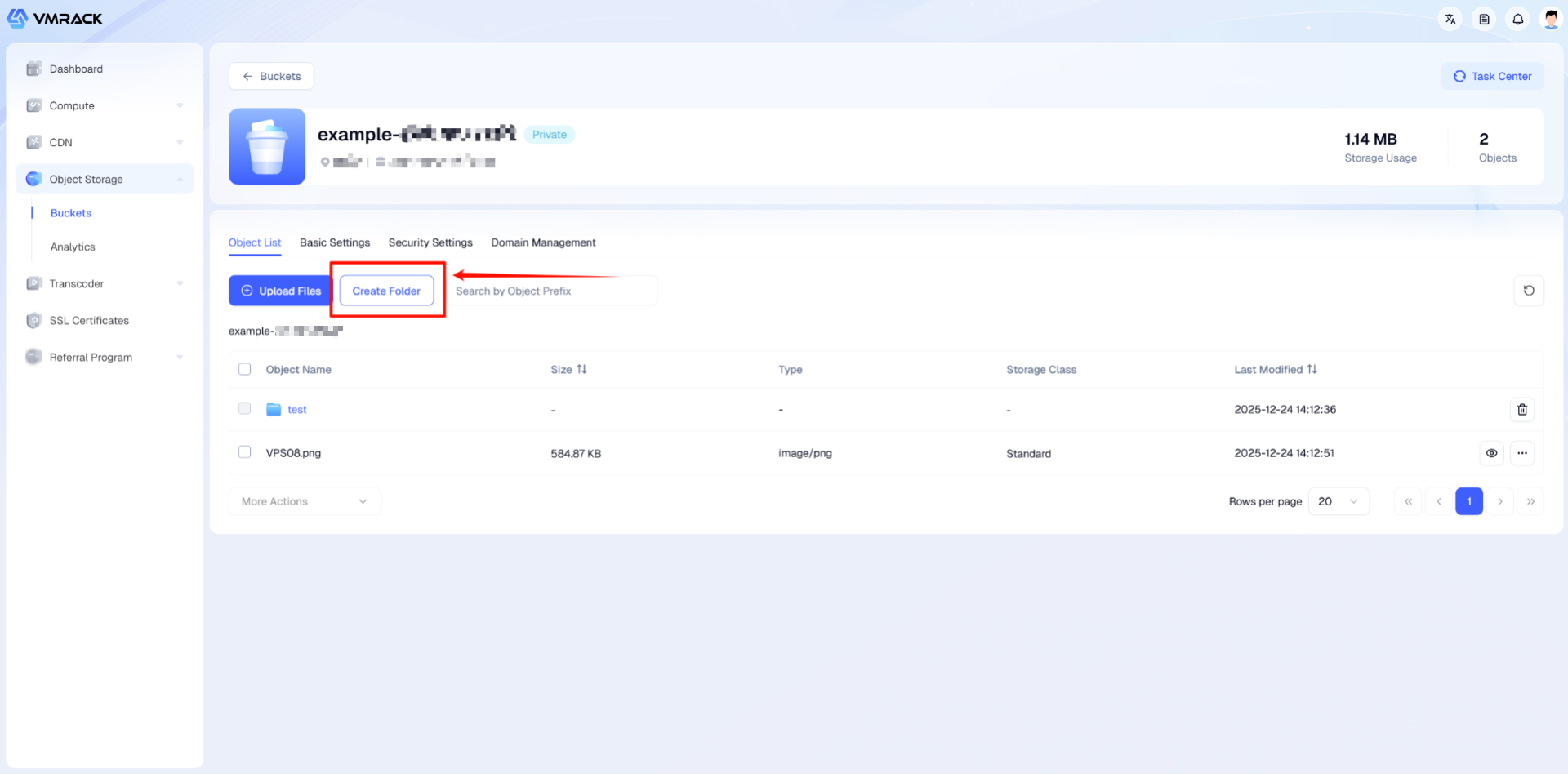
File and Directory Management

Single File Operations

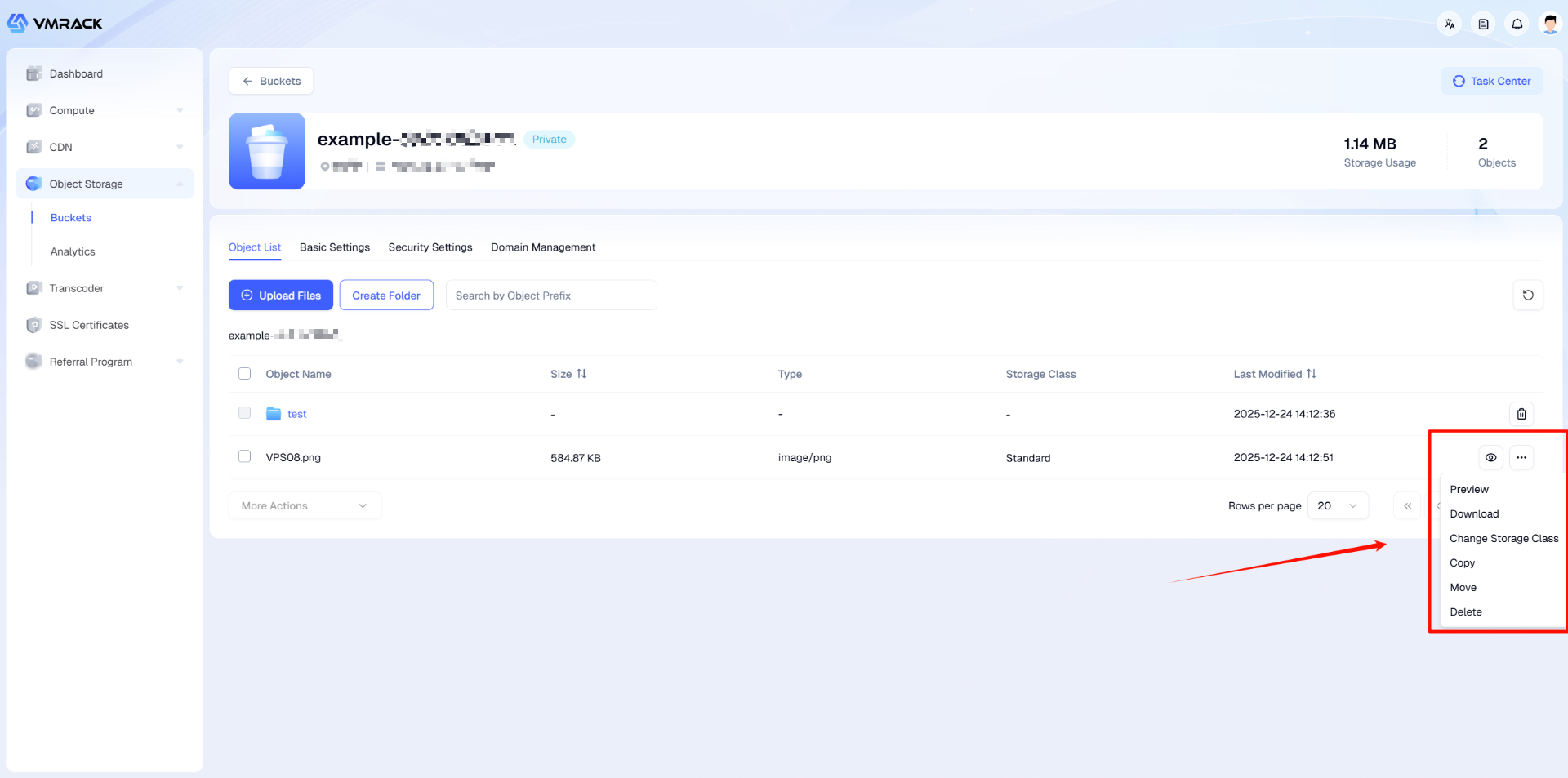
Click the"More"button on the right side of the file to bring up the full menu.

  • Preview/Download: Quickly view or retrieve the file.

  • Change Storage Class: A popup window to quickly switch between Standard and Low Frequency storage.

  • Copy/Move: Migrate files to other folders.

  • Delete: Permanently remove the file.

Single File Operations

Batch Operations

  • Select: Check the checkboxes on the left side of the list (Supports "Select All").

  • Menu: Click the "More Actions" dropdown menu below the list.

  • Execute: Perform batch operations such as Change Storage Class, Copy, Move, or Delete.
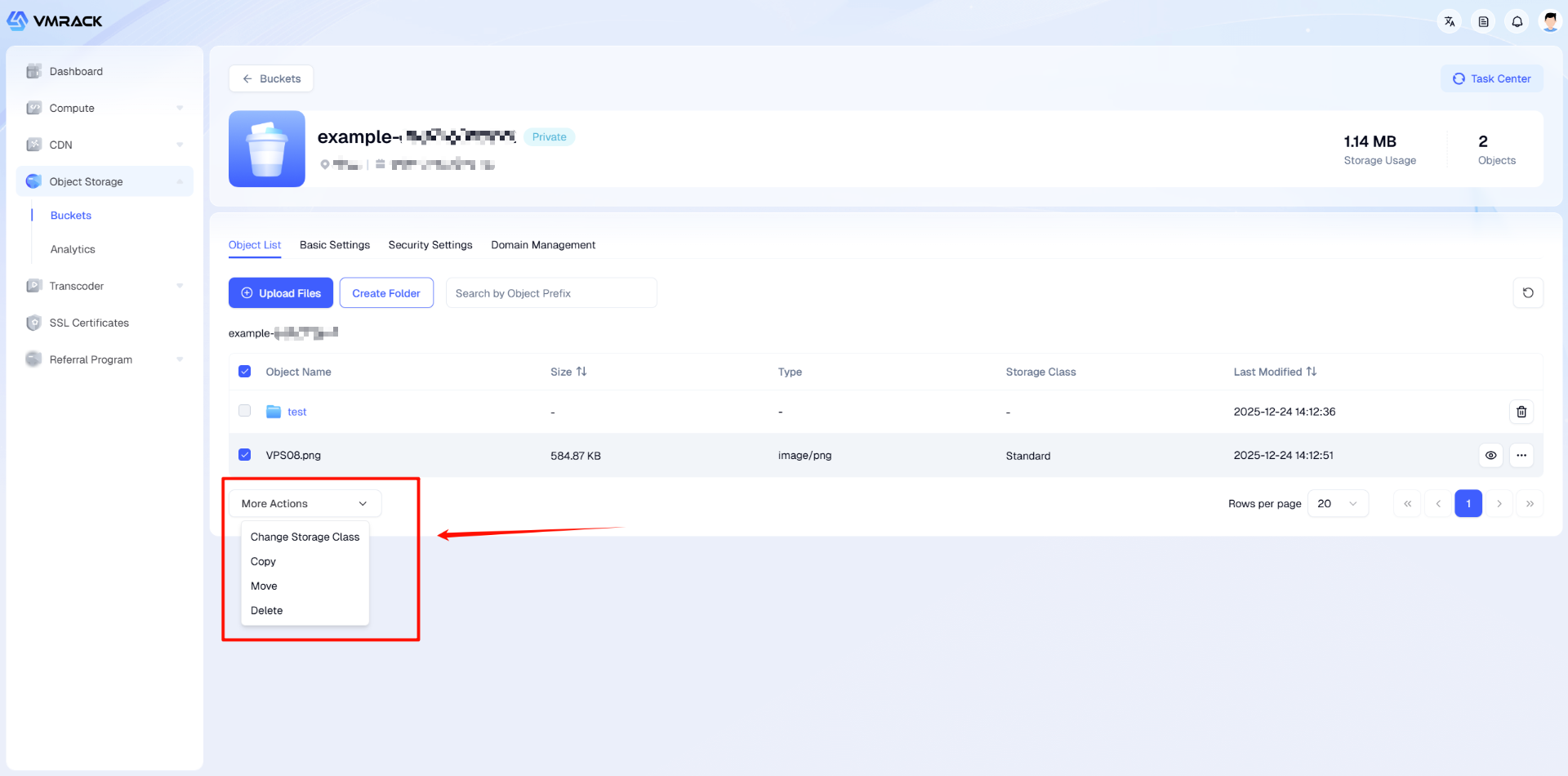
Batch Operations

File Configuration

On the file details page, you can view information such as file type, size, external link URL, and custom metadata.

  • On the file list page, click the file name or the "Preview" button to enter the file details page.

  • On the file details page, you can view file information, copy the URL, modify the storage class, and customize metadata.
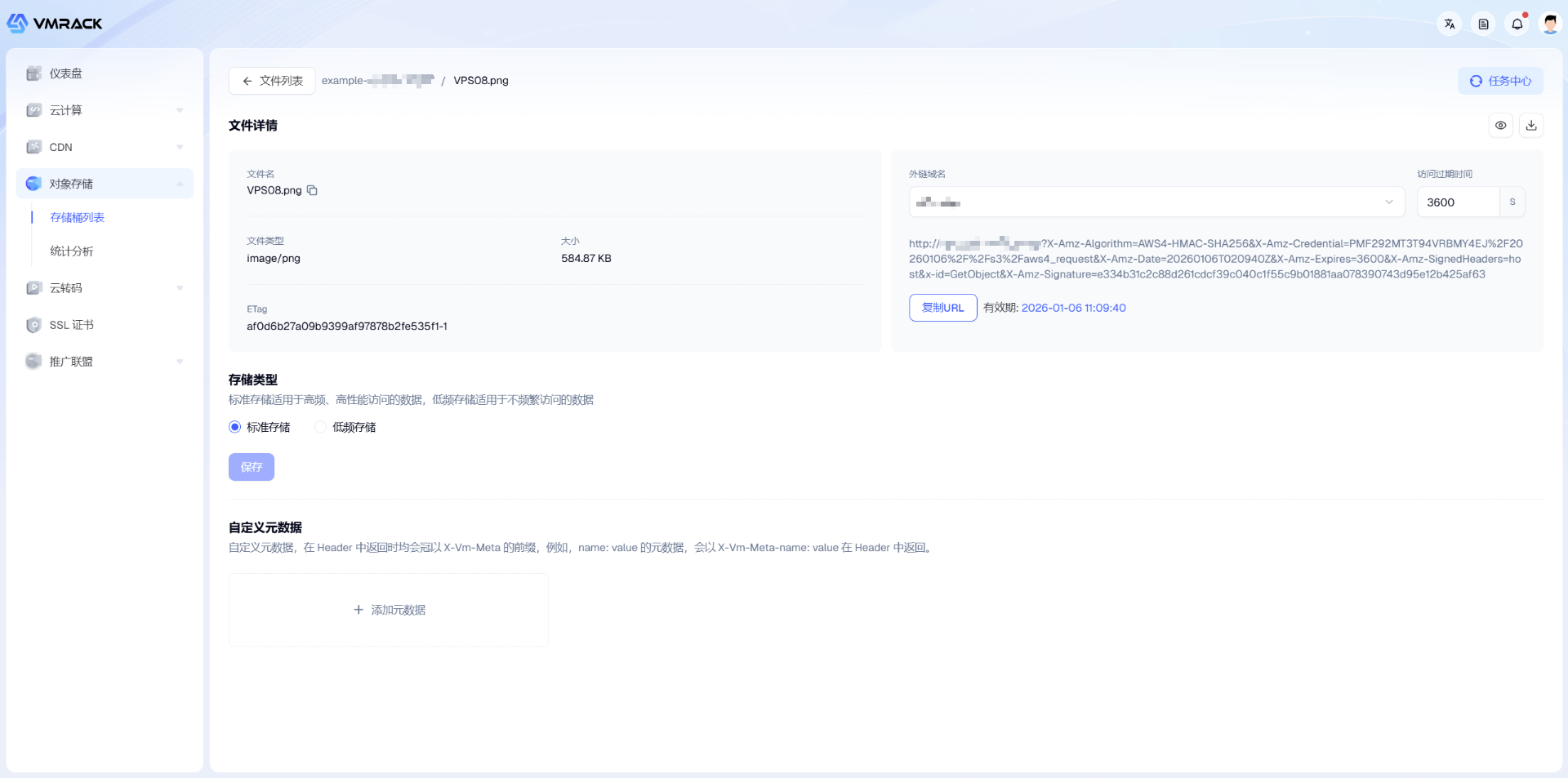
File Configuration

You can view/modify the following information on this page:

Module

Parameter

Description

File Information

File Type

MIME type, determines how the browser handles the file (e.g., image/png will display directly, application/zip will trigger a download).

ETag

Digital fingerprint of the file.
The unique identity fingerprint of the file, usually the MD5 hash value of the file content, used for client-side cache validation and file integrity verification.

File Link

External Domain

Specifies the domain used to generate the link.

  • Prerequisite: If the interface prompts "Domain not configured", links cannot be generated. You must bind a custom domain first.

  • Selection Advice: Prioritize choosing your business domain (e.g., img.mysite.com) rather than the system default long domain name to improve link professionalism and access speed.

Link Expiration

Sets the validity period of the private link signature (Unit: Seconds).

  • Mechanism: For files with "Private" permission, the URL must carry a signature parameter (Signature) to be accessed. This time determines how long the signature remains valid.

  • Default Value: 3600 (1 hour). Recommended to adjust according to actual business needs to avoid security risks caused by setting it too long.

URL

Copiable complete access link.

  • Link Composition: Contains X-Amz-Algorithm (Algorithm), X-Amz-Credential (Credential), X-Amz-Signature (Core Signature), and other authentication parameters.

  • Validity: The link is only valid within the "Expiration Time" set above; accessing it after expiration will return 403 Forbidden.

Storage Class

High Performance

Extreme performance, specifically designed for I/O intensive business.
Adopts NVMe all-flash architecture, providing microsecond-level latency and extremely high throughput. Suitable for scenarios like AI model training, big data analysis, and high-frequency transaction logs.

<ac:structured-macro ac:name="unmigrated-wiki-markup" ac:schema-version="1" ac:macro-id="92619612-cf82-4776-b9f5-409d4b85a931"><ac:plain-text-body><![CDATA[

Standard Storage

[Recommended] General-purpose high-performance storage, balancing performance and cost.
]]></ac:plain-text-body></ac:structured-macro>
Provides stable millisecond-level response, making it the preferred choice for most businesses (such as website images, video on demand origins, App data).

Low Frequency

Low-cost storage, suitable for cold data stored for a long term.
Low unit price, but minimum file storage duration is 30 days (early deletion under 30 days incurs a penalty fee). Suitable for infrequently accessed data like database backups and compliance log archiving.

Custom Metadata

Key

Name suffix of the Custom HTTP Header.

  • System Rule: The system will automatically add the X-Vm-Meta- prefix. For example, if you fill in author, the actual generated Header is X-Vm-Meta-author.

  • Input Limit: Only allows lowercase letters, numbers, underscores, and hyphens. Cannot start with a hyphen. Max 50 characters, cannot be empty.

Value

Content value of the Custom HTTP Header.

  • Function: Used to carry business data in the HTTP response header (e.g., user-id: 1001 or version: v2) for the client program to read without changing the file content itself.

  • Input Limit: Only allows lowercase letters and numbers. Max 100 characters, cannot be empty.

Statistical Analysis

Click the "Statistical Analysis" button in the left menu to view global usage data.

  • Core Metrics: Total size and total count of object files under various storage classes.

  • Trend Charts: Switch tabs to view historical trends in different dimensions, including upstream/downstream traffic statistics and request count statistics.

  • Multi-dimensional Filtering: Supports precise filtering by time range, region, and bucket to help you analyze resource consumption of specific businesses.

You can view detailed statistical information on the Statistical Analysis page:

Module

Parameter

Description

Usage Overview

High Performance Storage Usage

Total occupied capacity of "High Performance Storage" type files under the current account.

High Performance File Count

Total number of "High Performance Storage" type files.

Standard Storage Usage

Total occupied capacity of "Standard Storage" type files under the current account.

Standard Storage File Count

Total number of "Standard Storage" type files.

Low Frequency Storage Usage

Total occupied capacity of "Low Frequency Storage" type files under the current account.

Low Frequency File Count

Total number of "Low Frequency Storage" type files.

Trend Indicators

Upstream Traffic (Inbound) Stats

Displays traffic trends generated by clients uploading files to the bucket.

Downstream Traffic (Outbound) Stats

Displays traffic trends generated by clients downloading files from the bucket (Usually involves public network outbound fees).

Write Request Count Stats

Total volume of requests containing modification operations such as uploading files, modifying metadata, and copying files.

Read Request Count Stats

Total volume of requests containing reading operations such as downloading files, listing objects, and retrieving metadata.

Read Request Count Stats

Total volume of requests containing reading operations such as downloading files, listing objects, and retrieving metadata.

VMRack
  • Products
  • VPS Hosting
  • VPS Hosting
    Unmetered
  • Bare Metal
  • GPU Rental
  • CDN
    Public Beta
  • Custom CDN
  • Object Storage
    Public Beta
  • Transcoder
    Public Beta
  • Solutions
  • Bring Your Own IP (BYOIP)
  • Customized Server Solutions
  • Colocation Services
  • Resources
  • Pricing
  • Help Documentation
  • Articles
  • Developer Center
  • Referral Program
  • Contact
  • Company
  • About Us
  • Terms of Service
  • User Agreement
  • Privacy Policy
  • Service Level Agreement