This chapter will introduce the core functional modules of the VMRack CDN console in detail, helping you manage sites, analyze statistics, and configure security policies.
Site Management
Here you can view the status of all added sites and perform management operations.
Site Status
CNAME [!]: Indicates that the DNS CNAME record has not taken effect or is configured incorrectly.
CNAME [✓]: Indicates that the DNS resolution is successful, and the CDN has started serving you.
Delete Site
Operation: Click the "Delete" (Trash icon) button on the right side of the site list.
Warning: This operation is irreversible. Once deleted, all configurations (cache rules, certificates, etc.) for the site will be lost immediately.
Input: You must enter the site name (e.g., www.example.com) to confirm deletion.
Site Configuration
Enter the site details page to customize various site information according to business needs.
Origin Configuration
Used to define how CDN nodes fetch data from your origin server. Accurate configuration ensures correct source retrieval.
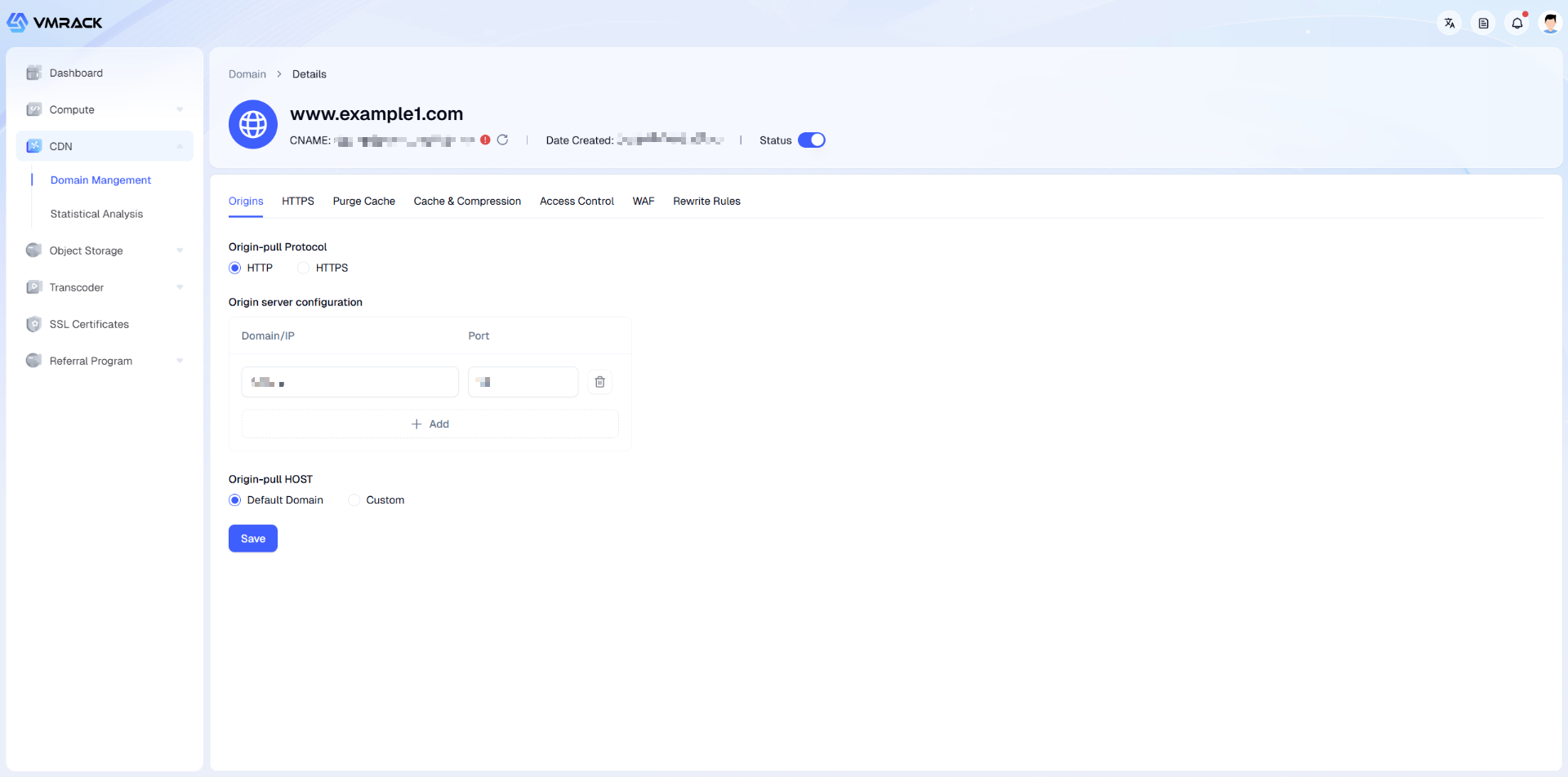
You can view/modify the following information on this page:
Module | Parameter | Description |
Origin Protocol | HTTP | Use plaintext protocol for origin fetch. Action: CDN nodes will request resources from the origin server via HTTP protocol (default port 80). Scenario: Even if the client uses HTTPS to access the CDN, the CDN can switch to HTTP for origin fetch, which reduces the SSL decryption load on the origin server.
|
| HTTPS | Use encrypted protocol for origin fetch. Action: CDN nodes will request resources from the origin server via HTTPS protocol (default port 443). Scenario: For extremely high data transmission security requirements (full-link encryption).
Note: The origin server must be configured with a valid SSL certificate at this time, otherwise origin fetch will fail.
|
Origin Configuration | Domain / IP | Physical address of the origin server. IP Address: Public IP of the server (e.g., 1.2.3.4). Supports adding multiple IPs for load balancing. Origin Domain: Such as CNAME origin address (e.g., AWS S3 domain, OSS domain).
|
| Port | Port number listed by the origin station. HTTP: Defaults to 80. HTTPS: Defaults to 443. Custom: If your origin uses a non-standard port (e.g., 8080), please specify it here, otherwise CDN will be unable to connect.
|
Origin HOST | Default (Domain itself) | Use the accelerated domain as the Host header. Example: User visits www.example1.com, CDN carries Host: www.example1.com in the request header during origin fetch. Applicable: When the site domain configured on the origin server matches the accelerated domain.
|
| Custom | Specify a specific domain name as the Host header. Principle: Determines which specific Virtual Host on the origin server the request is sent to. Example: If the origin server is Object Storage (like S3), you usually need to enter the specific domain of the bucket (e.g., my-bucket.s3.amazonaws.com). Key Point: This is the credential for the CDN to tell the origin "which website I want to see". If entered incorrectly, the origin may return a 404 or 403 error.
|
HTTPS
Used to configure the site's encrypted access policy.
Note: Before enabling any HTTPS-related modes, you must first possess a valid SSL certificate in the system.
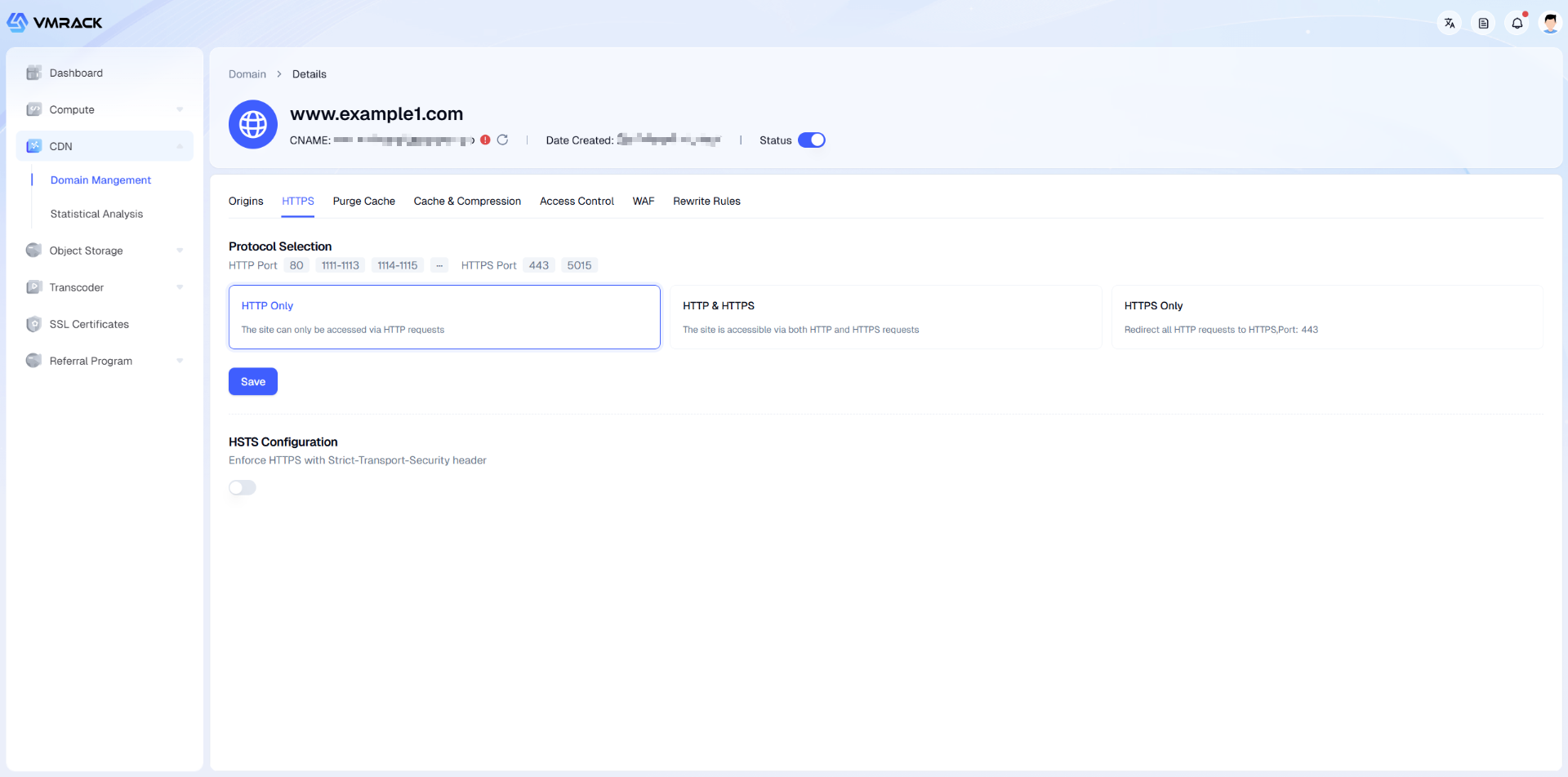
You can view/modify the following information on this page:
Module | Parameter | Description |
Protocol Selection | HTTP Only | Only allows access via plaintext HTTP protocol. |
| HTTP & HTTPS | Dual protocol coexistence mode. Action: Listens on both 80 (HTTP) and 443 (HTTPS) ports. Prerequisite: Must bind a valid SSL certificate, otherwise the configuration cannot be saved. Scenario: Compatible with legacy clients or during HTTPS migration transition.
|
| Force HTTPS | Forced redirect encryption mode. Action: The system will automatically redirect all HTTP (80) requests to HTTPS (443) via 301. Prerequisite: Must bind a valid SSL certificate. Advantage: Ensures full-link encryption security and complies with search engine (SEO) preference rules.
|
Certificate Configuration | Select Certificate | Bind an SSL certificate to the current domain.
After clicking "Select Certificate >", a selection panel will pop up: Existing Certificate: If you have uploaded or applied for a certificate before, simply click to select it from the list. No Available Certificate: If the list is empty, you can operate via the panel shortcuts:
Upload: Manually paste your CRT/Key file content. Apply: Apply online for free Let's Encrypt or ZeroSSL certificates.
(Note: For detailed steps on certificate upload and automated application, please refer to the "SSL Certificate Management" chapter of this document.)
|
Advanced Security | HSTS Configuration | HTTP Strict Transport Security protocol.
Once enabled, the browser will be forced to convert all requests for this domain to HTTPS locally. Please ensure your certificate remains valid for a long time, otherwise users will be unable to access the site after the certificate expires. |
Purge Cache
When your origin files are updated (e.g., replacing images or modifying CSS/JS code), but users still access the old version, use this function to force cached files on CDN nodes to expire immediately, thereby retrieving the latest content.
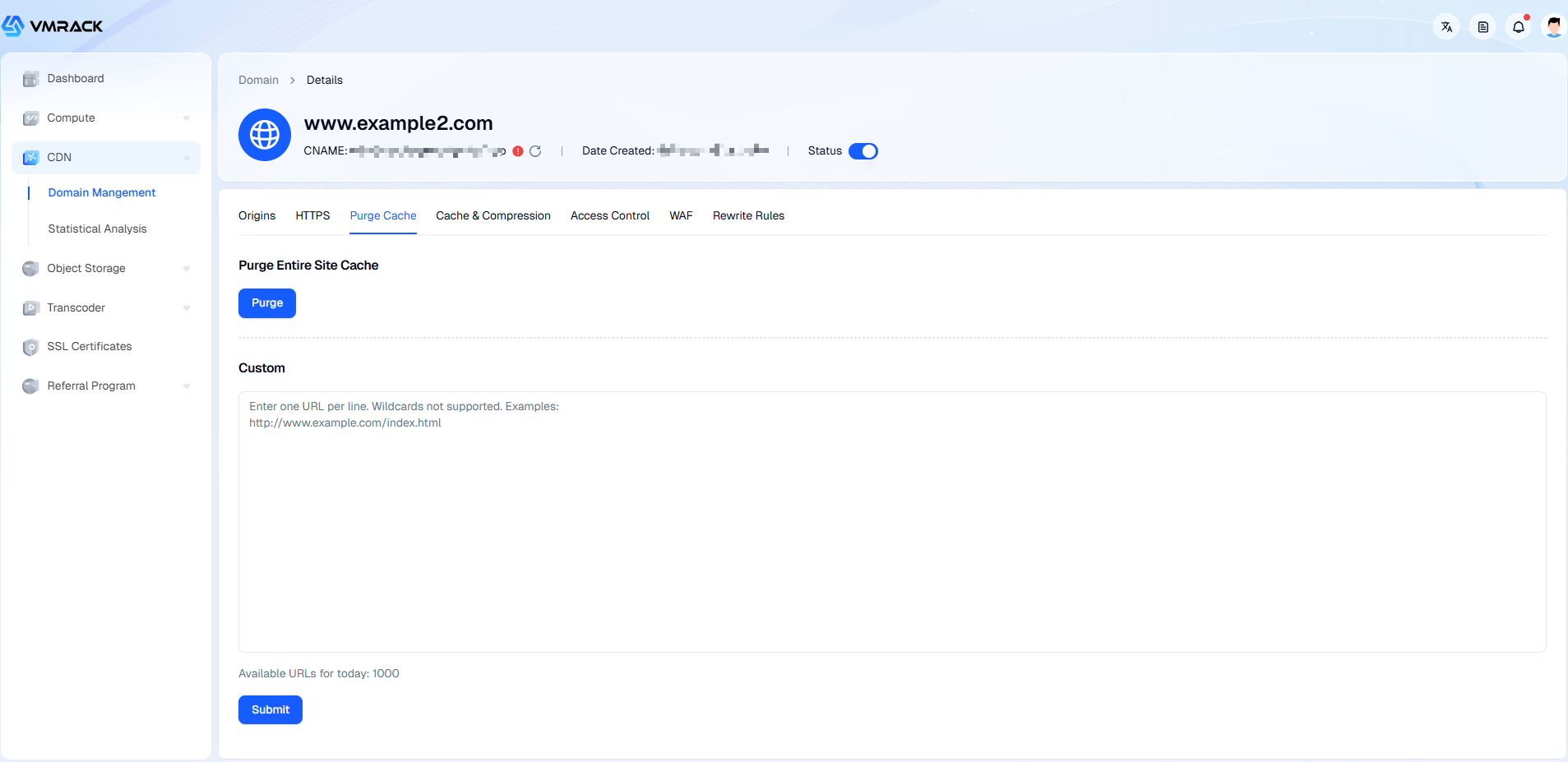
You can view/modify the following information on this page:
Module | Parameter | Description |
Purge All | Purge | Clears the cache for all files under this domain with one click. Action: Forces all caches for this domain on CDN nodes to expire. Risk Warning: After operation, all user requests will instantly bypass the CDN and hit your origin server directly (Origin Fetch). For high-traffic sites, this may cause excessive load or even downtime on the origin server. Please use with caution; it is recommended only during major site revisions or off-peak hours.
|
Custom | URL Input Box | Specify specific URLs for precise purging (Recommended). Format Requirement: Must be a complete URL including the protocol header (e.g., {+}http://www.example.com/index.html+). Input Rule: One URL per line. Restriction: Wildcards are not supported (e.g., .jpg or /images/ are invalid); must specify exact file names.
|
| Submit | Execute the purge task. Quota Limit: The "Remaining quota for today" (e.g., 1000) will be displayed at the bottom of the page. This is to prevent system congestion caused by abuse; please plan your daily refresh volume reasonably. Effective Time: Usually takes effect network-wide within a few minutes after submission.
|
Cache Optimization
Used to finely control caching behavior on CDN nodes and browser-side caching strategies. Reasonable configuration can significantly improve site loading speed, reduce origin pressure, and save traffic costs.
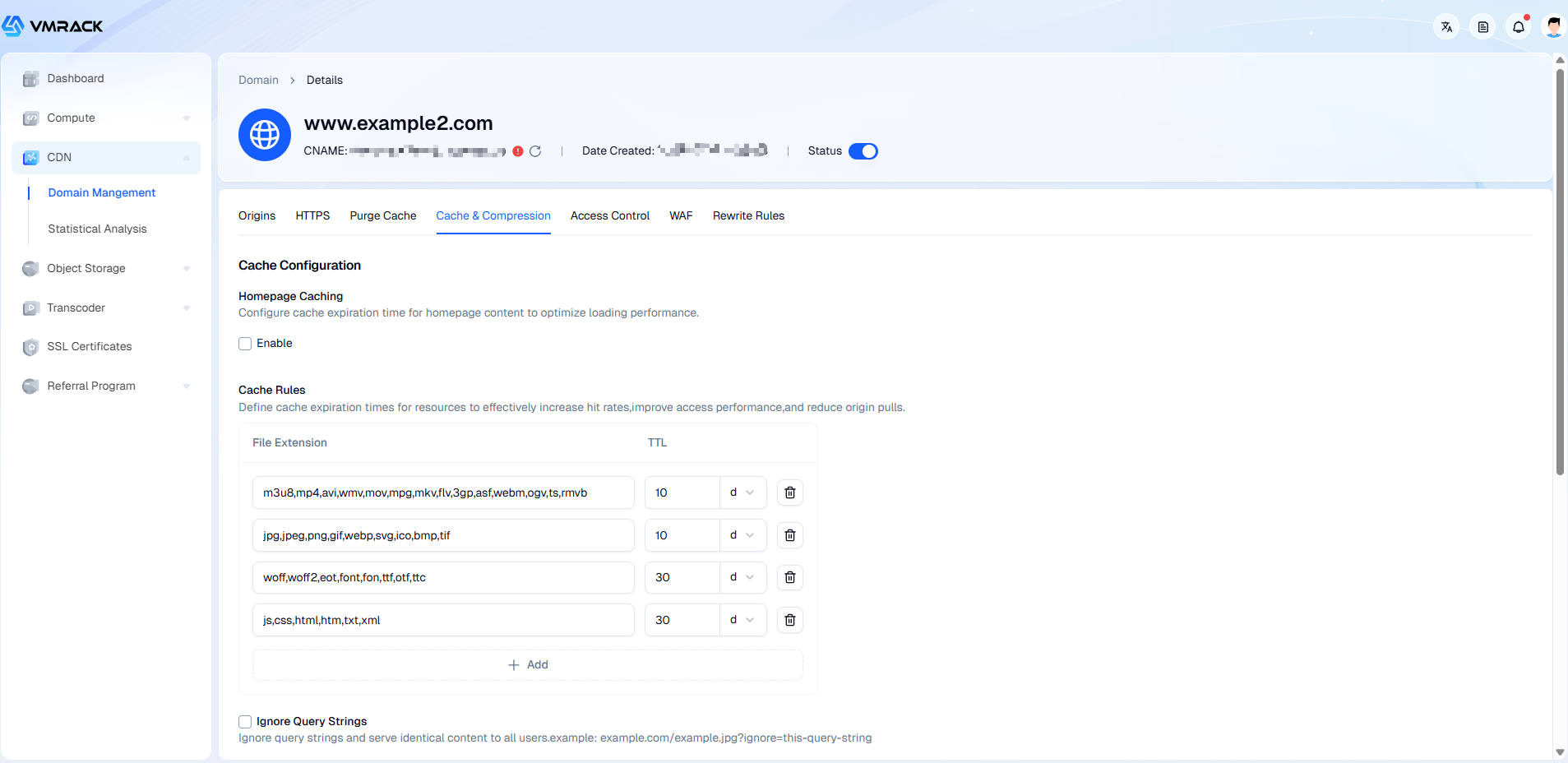
You can view/modify the following information on this page:
Module | Parameter | Description |
Cache Configuration | Homepage Caching | Specialized caching strategy for the website root directory. |
| Cache Rules | Set cache expiration time (TTL) based on file suffixes. Config Logic: You can set different cache times for different file types. For example:
Images/Video (.jpg, .mp4): Content is stable, recommended setting longer (e.g., 30 days). Web Code (.html, .js, .css): Updates faster, recommended setting shorter (e.g., 1 hour or 1 day).
Priority: If a file matches multiple rules simultaneously, the sequential order or most precise match rule typically takes effect.
|
| Ignore Query Strings | Key switch to improve cache hit rate. Off (Default): a.jpg?v=1 and a.jpg?v=2 are treated as two different files, triggering separate origin fetches and caching. On: Parameters after the question mark are ignored. a.jpg?token=xyz and a.jpg are treated as the same file, returning the same cached content. Applicable Scenario: If your URL parameters are used only for tracking (e.g., ?from=google) and do not affect file content, please enable this item to save traffic.
|
Browser Cache TTL | Configuration Mode | Controls local caching behavior of the end-user browser. Follow Origin: CDN will not modify the response, completely following the Cache-Control strategy returned by the origin server. Custom: Force overwrite the browser's cache time, issuing directives from the CDN.
|
| Time Unit | Supports fine-grained time granularity control.
When "Custom" mode is selected, supports the following units: Seconds: Suitable for API interfaces or real-time data requiring extreme freshness. Minutes/Hours: Suitable for news information, web code, etc., requiring moderately frequent updates. Days: Suitable for images, installation packages, etc., that do not change for a long time.
|
Performance Optimization | Smart Compression | Automatically compresses text-type files. Function: System automatically identifies .js, .css, .html, .xml, etc., text files and compresses them during transmission. Effect: Can reduce volume by 60%-80%, significantly speeding up webpage loading speed. Notes:
MD5 Change: Compression changes file volume and hash value. If your business relies on MD5 checksum for integrity (e.g., App upgrades), please do not enable. Size Threshold: Only applies to files larger than 1 KB (compression significance is low for small files). Priority: If the client supports it, the Brotli algorithm with higher compression rate is used first, followed by Gzip.
|
Access Control
Used to configure security protection policies for the CDN. By identifying request sources (Referer) or verifying encrypted signatures (Token), it prevents your resources from being stolen by unauthorized sites, thereby avoiding unnecessary traffic losses.
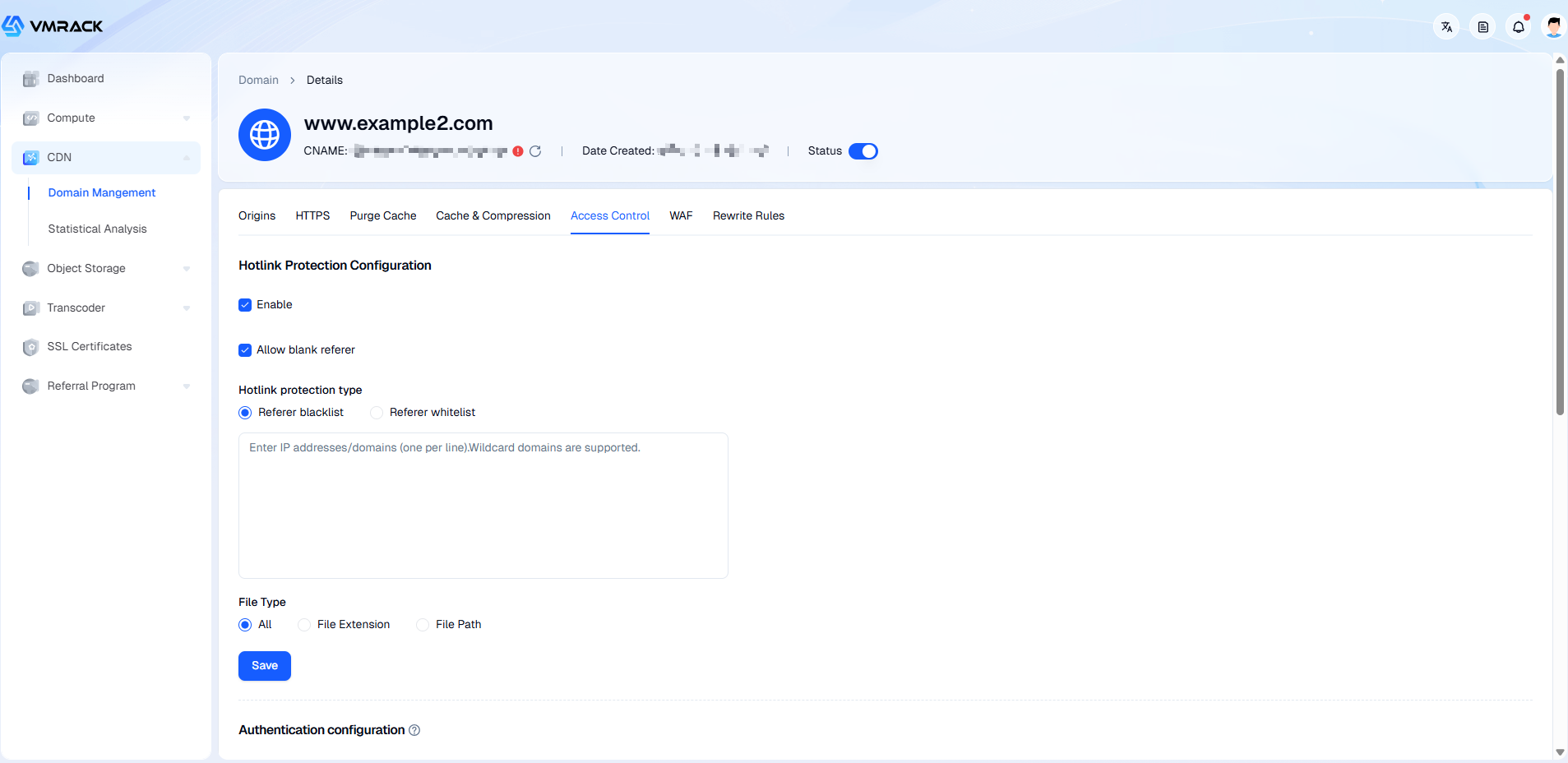
You can view/modify the following information on this page:
Module | Parameter | Description |
Hotlink Protection
| Enable Status | Enable / Disable
Basic switch for the hotlink protection function. |
| Allow Empty Referer | Whether to allow Referer requests. Allow (Checked): Allows requests with empty Referer headers to access the URL directly, or requests allowed by programs not carrying Referer. Reject (Unchecked): Requests must carry a Referer header that complies with the rules. Note: Disabling this prevents opening images directly in a browser tab; otherwise access will be directly rejected.
|
| Mode | Blocklist/Allowlist Strategy Blocklist: Domain names in the list are forbidden from access (Lenient mode). Allowlist: Only domain names in the list are allowed access (Strict mode, recommended).
|
| Domain List | Input the source addresses (Block/Allow list content) to be controlled.
Based on the interface prompt, supports the following formats (one per line): Domain: Exact match, e.g., www.google.com IP Address: Directly input the source IP, e.g., 1.2.3.4 Wildcard: Supports wildcard , e.g., .example.com
Note: *.example.com does not include example.com. If you need to match both, please write them on two separate lines.
|
| File Type | Define which resources the hotlink protection rule applies to. All: Checks Referer for all requests across the site. File Extension: Only checks specific file types. Enter extensions in the box (e.g., jpg,png,mp4), separated by commas. Case-insensitive. File Path: Only checks files under a specific directory. Write the path in the box (e.g., /private/).
|
URL Signing
| Signing Mode | URL Signing Selection Type A (Parameter Mode): http://domain/file?sign=<md5>&t=<time> (Recommended) Type B (Path Mode): http://domain/<time>/<md5>/file Type C (Path Mode): http://domain/<md5>/<time>/file |
| Mode A | 1.Signing Key: Server-side core secret key, used to calculate the MD5 signature. Please ensure the key used by your backend code matches this exactly. 6-128 bits, consists of lowercase letters and numbers. Click "Random Generate" to get a high-strength password.
2.Signature Parameter: The parameter name used to pass the signature value in the URL. Explanation: The CDN node reads the parameter value with this name for verification. Rule: 1-40 bits, cannot start with a number.
3.Validity Period: The life cycle of the signature (seconds). For example, 1800 (30 minutes). If exceeded, the link becomes invalid (403). 4.Time Format: The time binary format used when generating the signature. Standard Unix timestamp (e.g., 1582791032). Used to calculate generated signatures and check validity. 5.Signing Scope: Specifies the protection range. All Files: Strictest mode. All requests across the site (including images, JS, CSS, videos) must carry a valid signature, otherwise access is denied. Specify File Extension: Allowlist logic. Only files with the filled-in extensions (e.g., .mp4, .flv) are verified. Other files (like images) can be accessed directly. Specify File Path Prefix: Blocklist logic. Only files under the filled-in path (e.g., /vod/, /pay/) are verified. Files outside this path do not require signatures.
|
| Mode B | 1.Signing Key: Server-side core secret key, used to calculate the MD5 signature. Please ensure the key used by your backend code matches this exactly. 6-128 bits, consists of lowercase letters and numbers. Click "Random Generate" to get a high-strength password.
2.Validity Period: The life cycle of the signature (seconds). For example, 1800 (30 minutes). If exceeded, the link becomes invalid (403). 3.Time Format: Uses hexadecimal format. The server generates the URL by converting the Unix time to a hexadecimal string (lowercase). Otherwise, the CDN cannot parse the time. 4.Signing Scope: Specifies the protection range. All Files: Strictest mode. All requests across the site (including images, JS, CSS, videos) must carry a valid signature, otherwise access is denied. Specify File Extension: Allowlist logic. Only files with the filled-in extensions (e.g., .mp4, .flv) are verified. Other files (like images) can be accessed directly. Specify File Path Prefix: Blocklist logic. Only files under the filled-in path (e.g., /vod/, /pay/) are verified. Files outside this path do not require signatures.
|
| Mode C | 1.Signing Key: Server-side core secret key, used to calculate the MD5 signature. Please ensure the key used by your backend code matches this exactly. 6-128 bits, consists of lowercase letters and numbers. Click "Random Generate" to get a high-strength password.
2.Signature Parameter: Parameter name for storing the signature value in the URL. Explanation: CDN extracts the MD5 value from the URL based on this parameter name. Rule: 1-40 bits, cannot start with a number.
3.Time Parameter Name: Defines the parameter name for putting the time in the URL. Explanation: CDN extracts the time from the URL based on this parameter name. Example: If expire is entered, the URL must carry &expire=<time>. Rule: 1-40 chars.
4.Validity Period: The life cycle of the signature (seconds). For example, 1800 (30 minutes). If exceeded, the link becomes invalid (403). 5.Time Format: Time binary format. Pattern C supports two formats, must correspond to the server generation logic. Hexadecimal (Unix Time): Uses standard Unix timestamp converted to hex string (Shorter, recommended). Decimal (Unix Time): Uses standard Unix timestamp integer.
6.Signing Scope: Specifies the protection range. All Files: Strictest mode. All requests across the site (including images, JS, CSS, videos) must carry a valid signature, otherwise access is denied. Specify File Extension: Allowlist logic. Only files with the filled-in extensions (e.g., .mp4, .flv) are verified. Other files (like images) can be accessed directly. Specify File Extension Non-Auth: Blacklist logic. Filled extensions (e.g. .jpg, .png) do NOT undergo verification (Public Access). All files other than these require signing.
|
Search Engine Crawler Restrictions | Crawler Blocking Switch | After enabling, intercepts request spiders from common search engines like Googlebot and Baiduspider. Suitable for test environments or private resources that you do not want to be indexed. |
Security Configuration
Used to build a higher-level website protection system, supporting refined access control based on request characteristics (such as IP, Header, URI, etc.), and frequency limits for CC attacks.
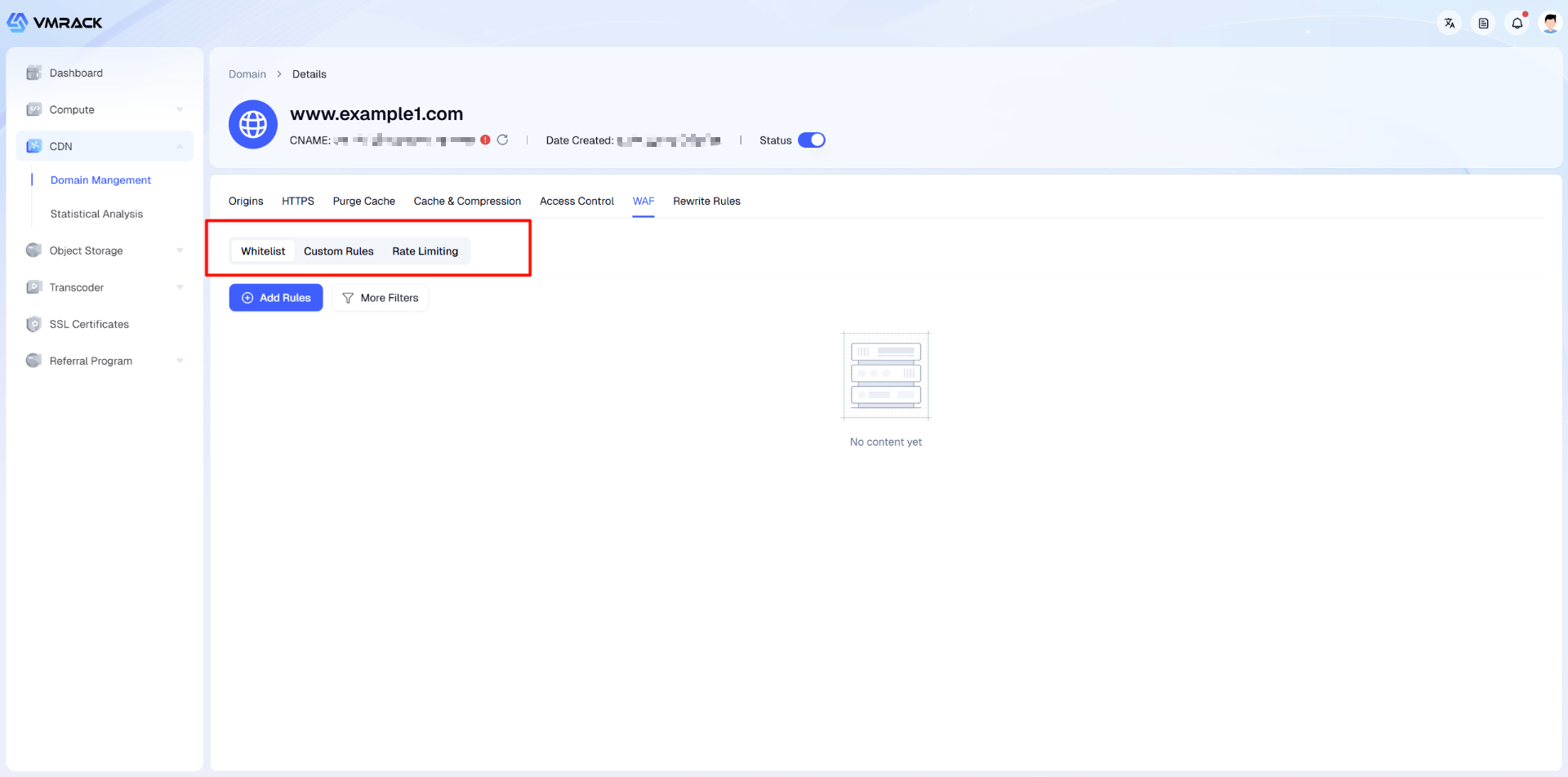
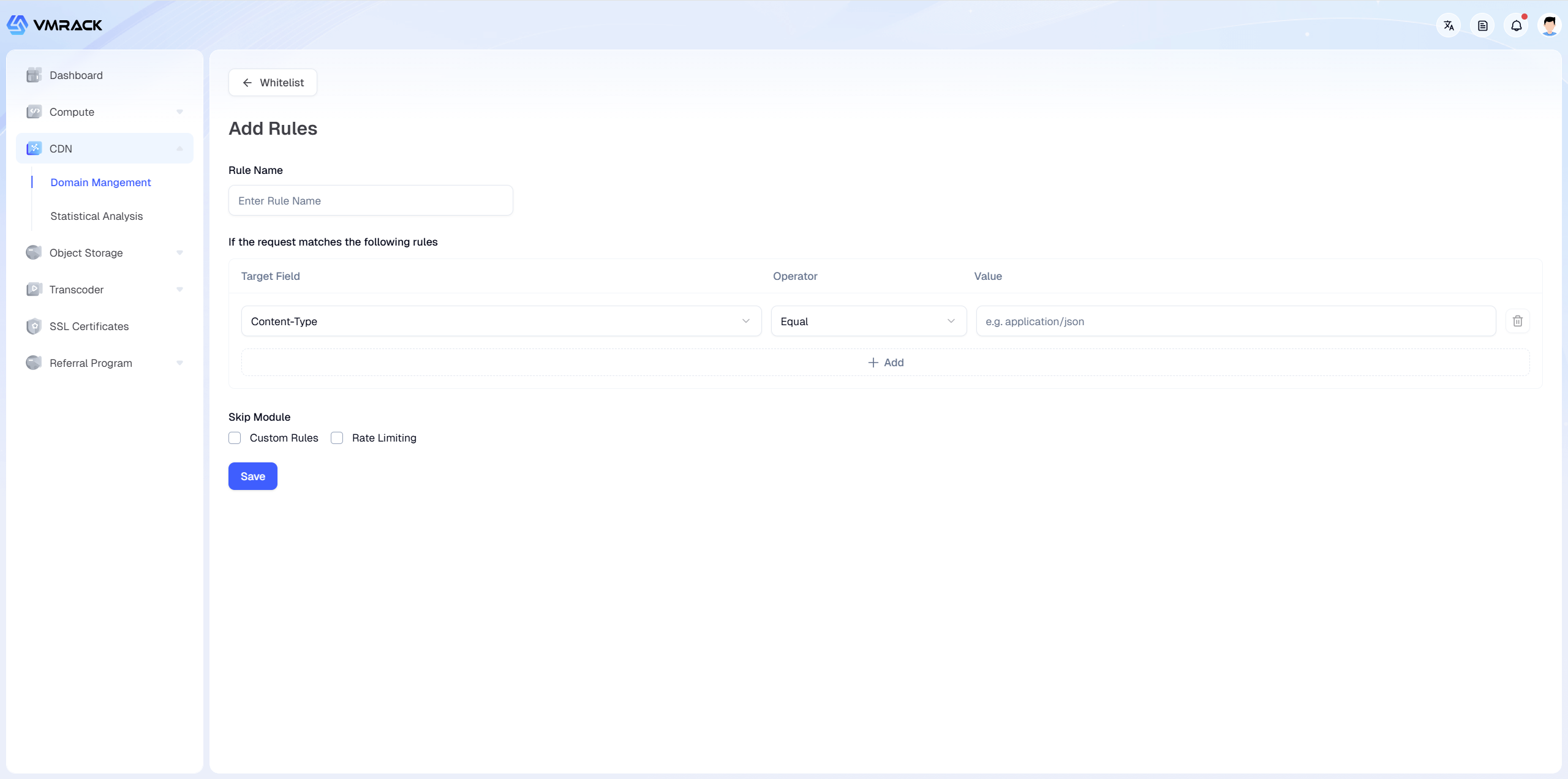
Whitelist: Set IPs or Headers that are always allowed.
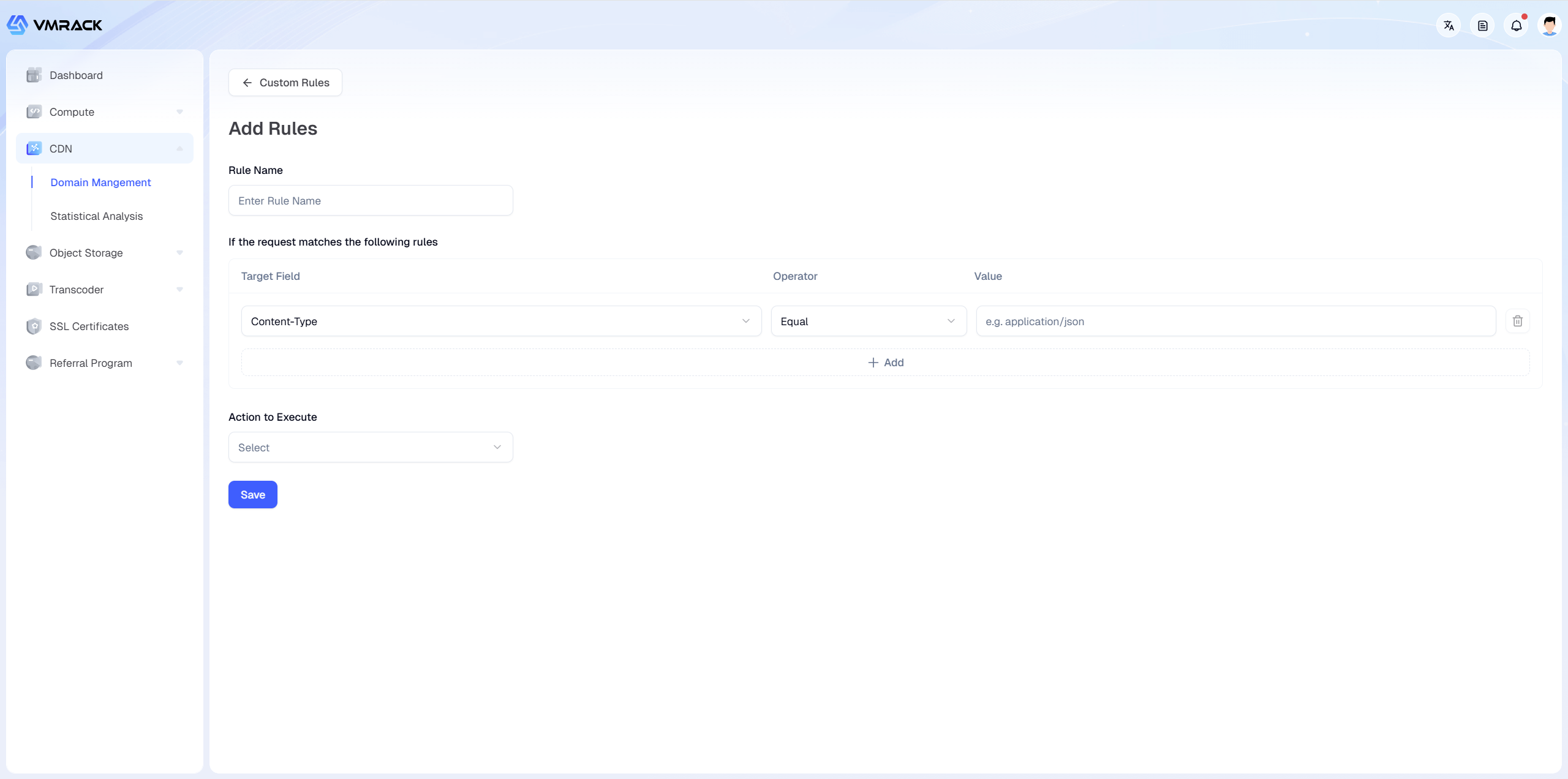
Custom Rules: Flexibly define WAF blocking logic (e.g., blocking specific User-Agents or regions).
Rate Limiting: Limits request frequency for a single IP to defend against CC attacks.
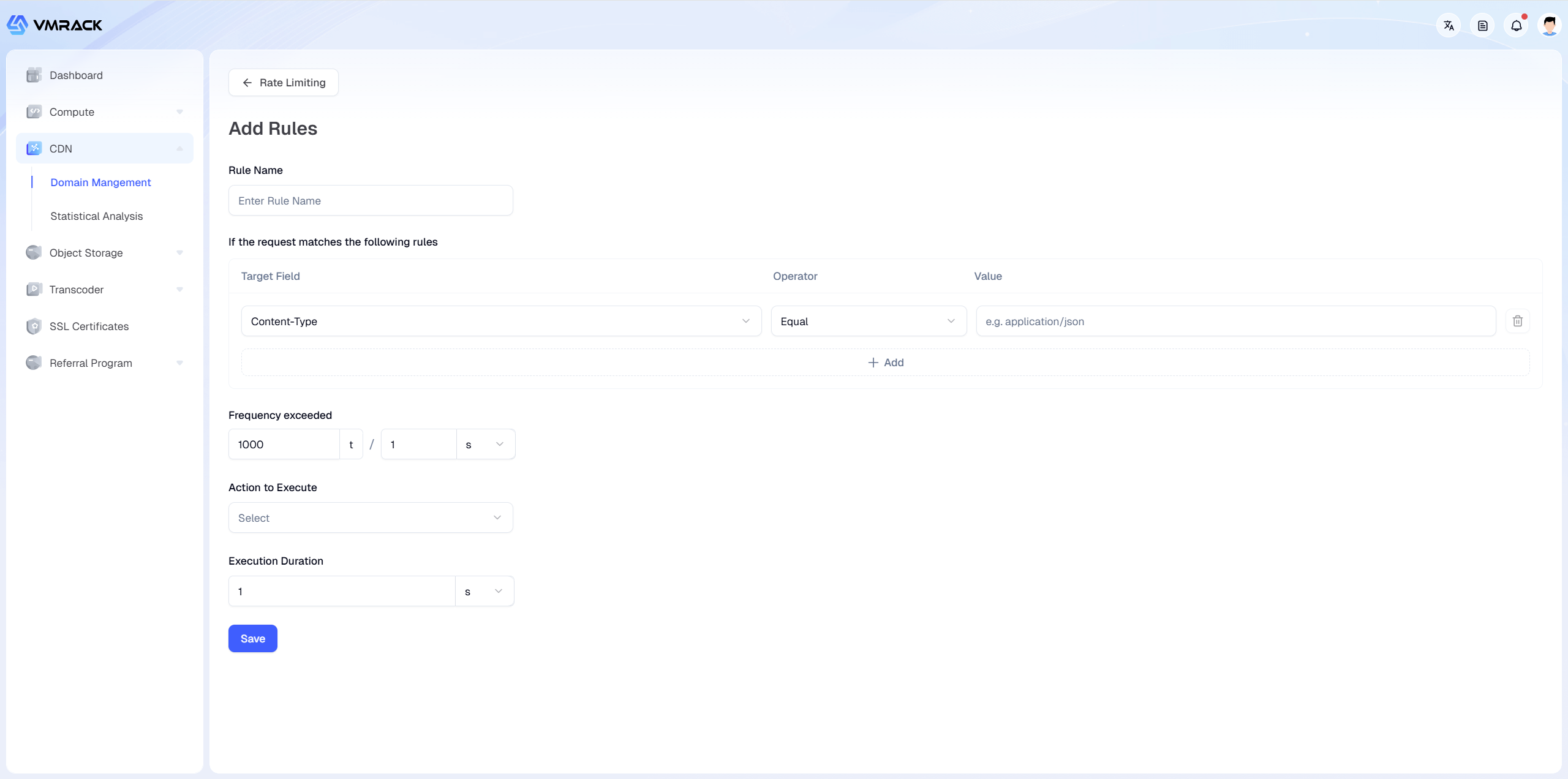
You can view/modify the following information on this page:
Module | Parameter | Description |
Whitelist | Rule Name | Customize rule name, e.g., Allow-Office-IP or Payment-Callback. |
| Match Rule | Define criteria considered "Trusted" to support logic combination. Target Field: e.g., IP, URL, User-Agent, Content-Type, etc. Operator: e.g., Equal, Not Equal, Regex Match, etc. Value: Specific feature values (e.g., Office public IP address).
|
| Skip Module | Specify modules to bypass after a whitelist hit. Custom Rules: Once hit, subsequent custom blocklist rules will not be triggered even if they match. Rate Limiting: Once selected, request frequency limits will not apply (Anti-CC whitelist).
|
Custom Rules | Rule Name | Customize rule name, e.g., Block-SQL-Injection or Block-Scrapers. |
| Match Rule | Define malicious request characteristics. Target Field: e.g., IP, URL, User-Agent, Content-Type, etc. Operator: e.g., Equal, Contains, Regex Match, etc. Value: Specific feature values (e.g., Public IP of the malicious crawler).
|
| Action | Handling method for hit rules. Block: Directly reject access, return 403. Observe: Do not intercept, only record in logs. Used to test if new rules misjudge valid users. JS Challenge: Return a piece of JavaScript code. The browser executes and calculates automatically. Simple crawlers cannot execute it (Silent verification). Captcha: Pop up a man-machine verification page (CAPTCHA/Slider). Suitable for high-risk scenarios where it's uncertain if the visitor is a real human.
|
Rate Limiting | Rule Name | Customize rule name, e.g., Limit-Login-API or Anti-CC-Global. |
| Match Rule | Define effective scope. Target Field: e.g., IP, URL, User-Agent, Content-Type, etc. Operator: e.g., Equal, Contains, Regex Match. Value: Specific feature values (e.g., Target URL).
|
| Frequency Threshold | Conditions triggering the limit. Format: Times / Time unit. Time unit can be set to minutes, seconds. Example: Set to 1000 / 1 s, means if a single client initiates over 1000 requests within 1 second, protection triggers immediately.
|
| Action | Punishment measures after triggering threshold. Usually choose Block or JS Challenge. |
| Block Duration | Length of punishment. Value: Custom ban duration. Time Unit: Can be set to hours, minutes, seconds.
|
Rewrite Rules
Used to handle advanced URL rewrite and Header modification requirements. You can dynamically modify URL paths or HTTP header information during the request processing on CDN nodes without changing the origin code.
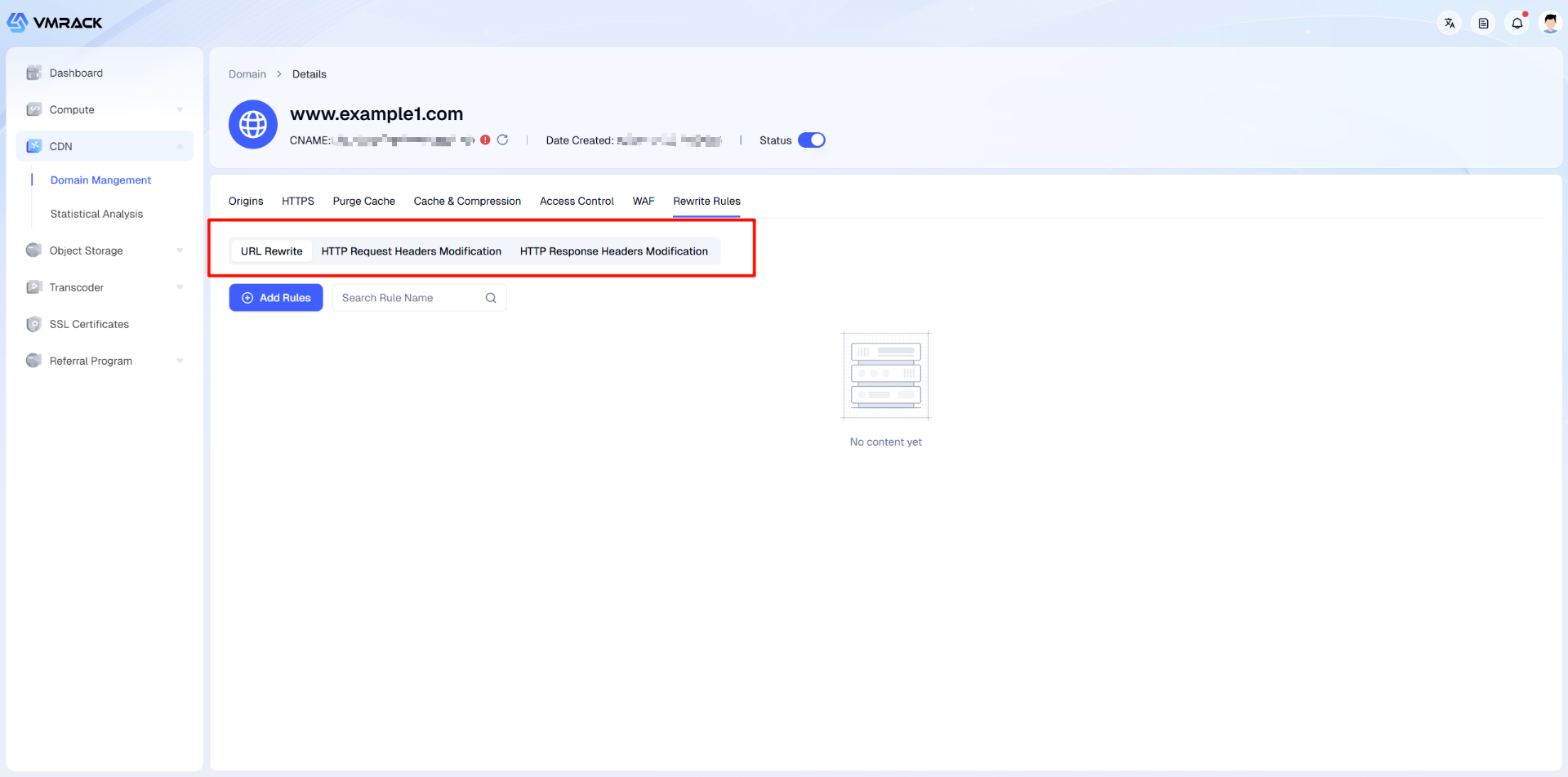
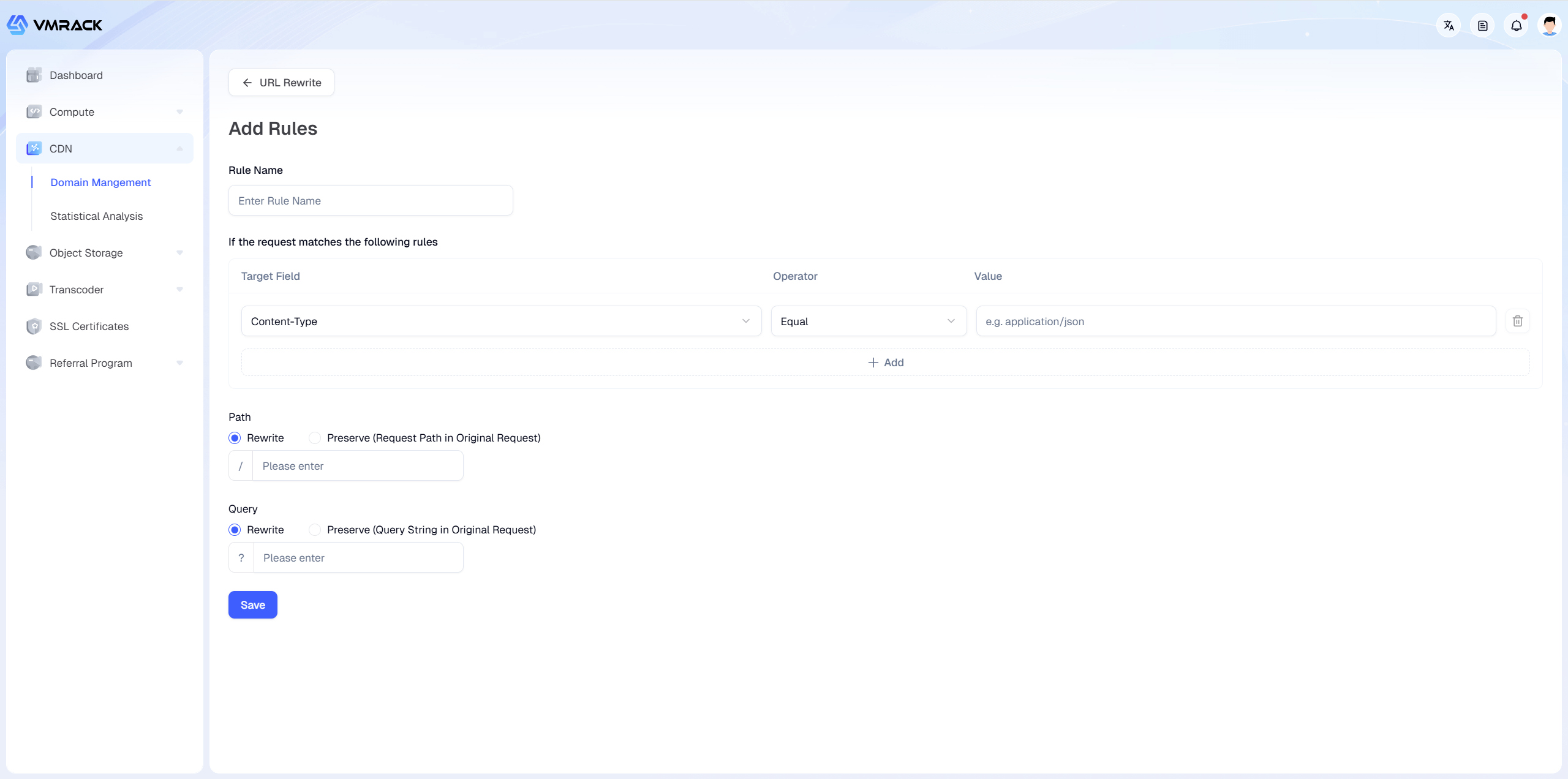
1.URL Rewrite: Used to modify the URL structure of the user's request before the request reaches the cache or origin.
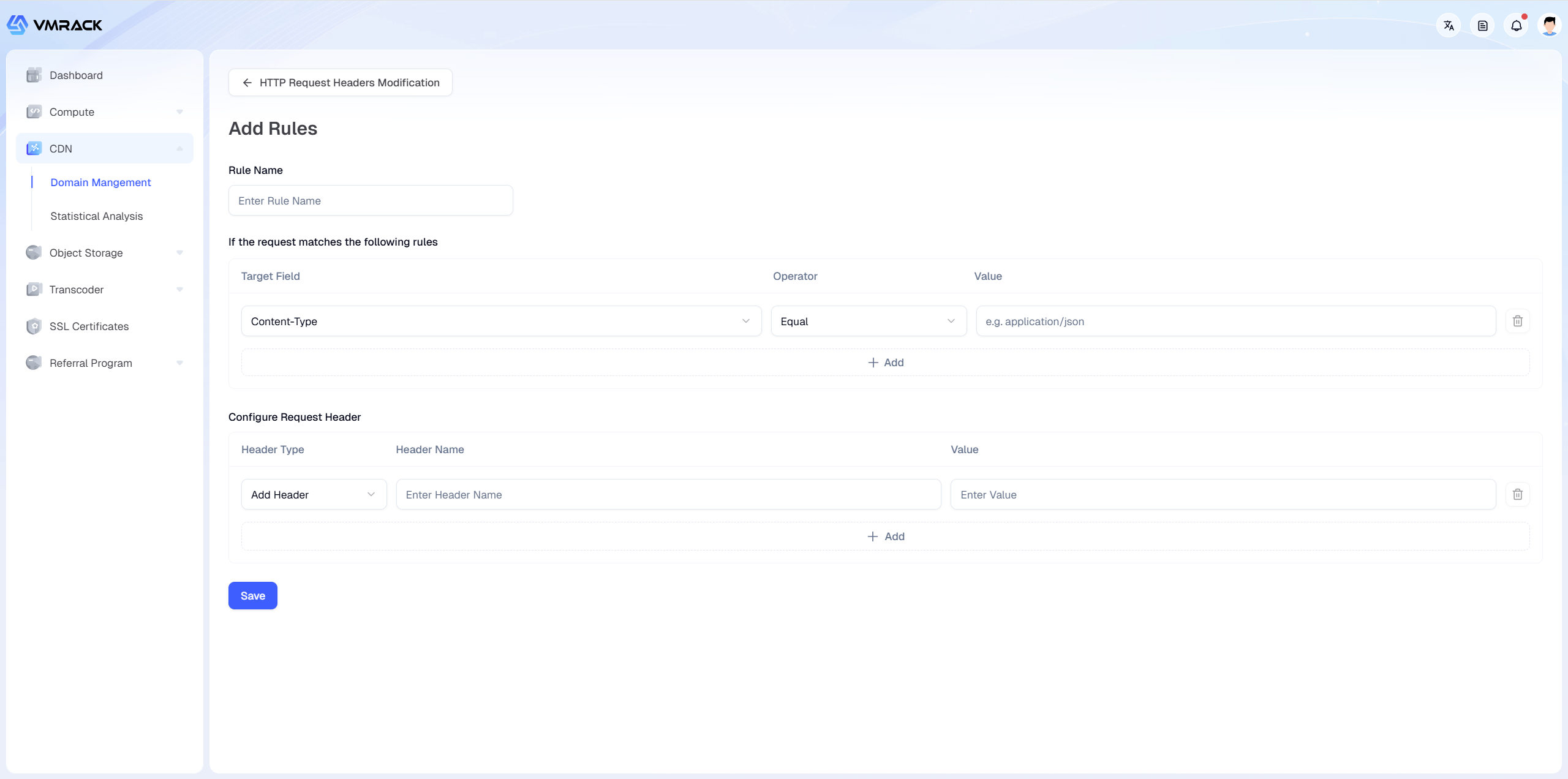
2.HTTP Request Header Modification: Add, delete, or modify request headers, used for passing private parameters, privacy protection scenarios, etc.
3.HTTP Response Header Modification: Used for cross-origin configuration, security hardening, custom identification scenarios, etc.
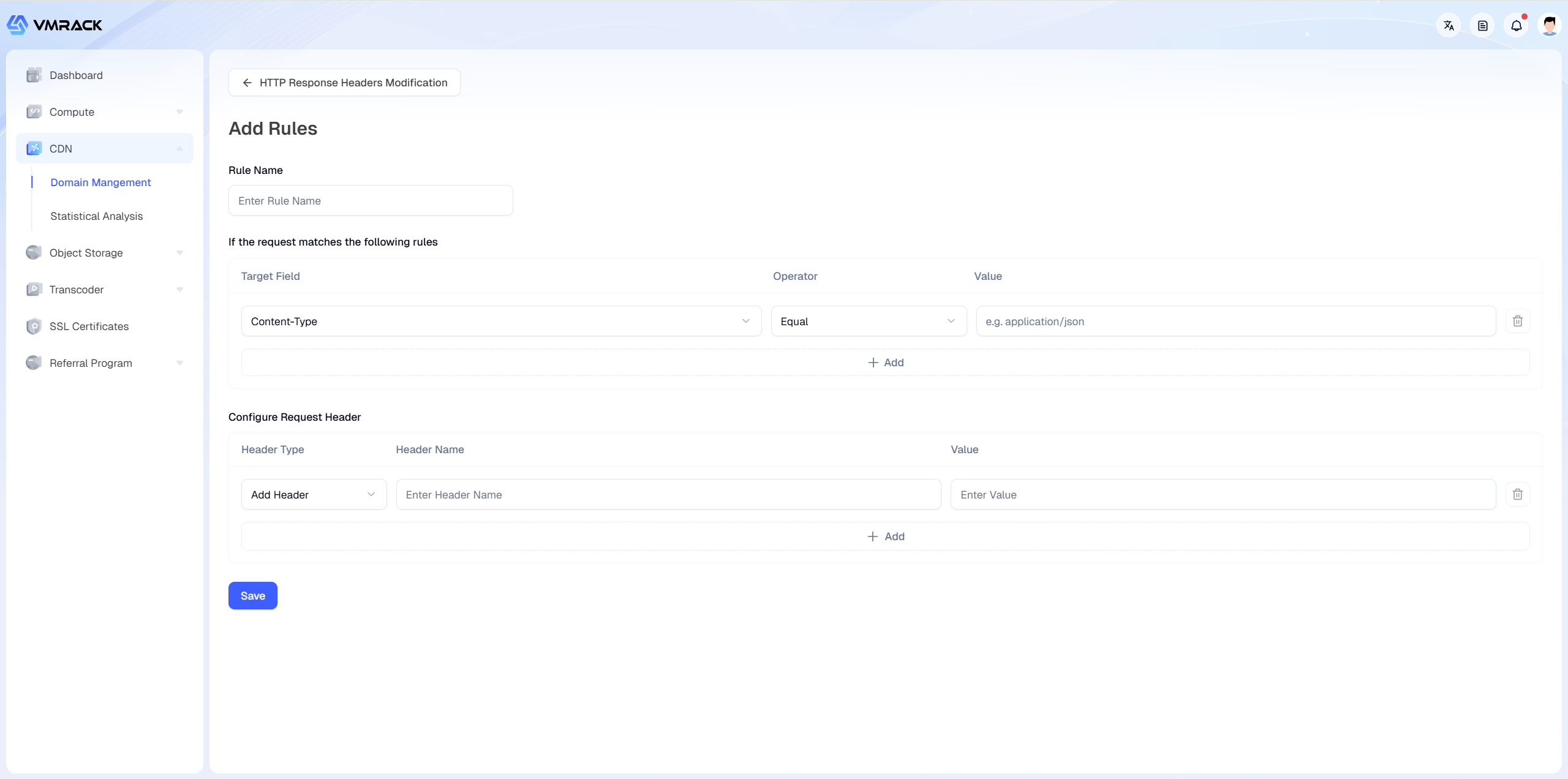
You can view/modify the following information on this page:
Module | Parameter | Description |
URL Rewrite | Rule Name | Customize rule identifier, e.g., Rewrite-API-V1. |
| Match Rule | Define effective scope. Target Field: e.g., IP, URL, User-Agent, Content-Type, etc. Operator: e.g., Equal, Contains, Not Equal, Regex Match, etc. Value: Specific feature values (e.g., Company's public IP address).
|
| Path | Controls the path part of the URL (excluding parameters). Keep: Keeps the path in the original request unchanged. Rewrite: Modifies the path sent to the origin. Must enter a new path structure in the input box (e.g., /new-api/index.php).
|
| Query | Controls the parameter part after the URL question mark. |
HTTP Request Header Modification | Rule Name | Customize rule identifier, e.g., Add-CDN-Source. |
| Match Rule | Define effective scope, supports logic combination. Target Field: e.g., IP, URL, User-Agent, Content-Type, etc. Operator: e.g., Equal, Contains, Not Equal, Regex Match, etc. Value: Specific feature values.
|
| Configure Request Header | Define modifications to the request header (Before sending to origin). 1.Header Type:Add Header: 2.Header Name: Input Key (e.g., X-From-Cdn). 3.Value: Input Value (e.g., True, no need to fill if deleting). |
HTTP Response Header Modification | Rule Name | Customize rule identifier, e.g., Enable-CORS. |
| Match Rule | Define effective scope, supports logic combination. Target Field: e.g., IP, URL, User-Agent, Content-Type, etc. Operator: e.g., Equal, Contains, Not Equal, Regex Match, etc. Value: Specific feature values.
|
| Configure Response Header | Define modifications to the response header (Returning to client). 1.Header Action: 2.Header Name: Input Key (e.g., Access-Control-Allow-Origin). 3.Value: Input Value (e.g., *, no need to fill if deleting). |
Statistical Analysis
Provides comprehensive visual monitoring to help you grasp website traffic trends, bandwidth consumption, and security protection status in real-time.
You can view the following statistical information on this page:
Module | Parameter | Description |
Traffic Analysis | Total Traffic | Sum of traffic consumption within the selected time period.
Used to estimate billing costs. Units automatically convert to B/KB/MB/GB. |
| Bandwidth Peak | The highest transmission rate within the selected time period.
Reflects the peak concurrency value of the business. Unit: bps (bits per second). |
| Total Requests | Total number of HTTP requests initiated by users to the CDN.
Reflects the access popularity of the business. |
Security Analysis | Custom Rules | Displays the number of requests hitting "Custom Rules".
Includes the following two states: |
| Rate Limiting | Displays the number of requests triggering CC protection thresholds.
Used to judge whether high-frequency interface or DDoS attack behaviors exist. |
Security Logs | Filter Conditions | Supports multi-dimensional combined search to help you quickly locate abnormal requests from massive logs. |
| Log List | Displays core log information, including time, execution policy, domain name, etc. |
