
Connect to Instance
After the instance is successfully created, you can log in to your Bare Metal server using methods such as SSH connection or Remote Desktop connection.
Connecting to Linux Instance via SSH
Password Login
1. Run the following command to connect to the Linux Bare Metal instance.
If your local computer is a Mac OS system, you need to open the system's built-in Terminal first, then execute the following command. If your local computer is a Linux system, you can directly execute the following command. If your local computer is a Windows 10 or Windows Server 2019 system, you need to open the Command Prompt (CMD) first, then execute the following command.
ssh <username>@<hostname or IP address>
username is the default account obtained in the prerequisites. The Linux instance administrator account is usually root by default, while Ubuntu systems default to ubuntu. Please modify this based on the actual situation. hostname or IP address is the public IP or custom domain name of your Linux instance.
2. Enter the password for the Bare Metal instance, press Enter, and the login will be completed.
SSH Key Login
1. Execute the following command to set the private key file to be readable only by the owner.
If your local computer is a Mac OS system, open the system's built-in Terminal first, then execute the following command.
If your local computer is a Linux system, you can directly execute the following command.
chmod 400 <absolute-path-to-your-downloaded-bare-metal-private-key>
If your local computer is a Windows 10 system, open the Command Prompt (CMD) first, then execute the following commands in sequence.
icacls <absolute-path-to-your-downloaded-bare-metal-private-key> /grant <Windows-system-user-account>:F
icacls <absolute-path-to-your-downloaded-bare-metal-private-key> /inheritancelevel:r
2. Execute the following command to initiate the remote login.
ssh -i <absolute-path-to-your-downloaded-bare-metal-private-key> <username>@<hostname or IP address>
username is the default account obtained from the prerequisites.
hostname or IP address is the public IP or custom domain name of your Linux instance.
For example, execute the command ssh -i "Mac/Downloads/shawn_stable.pem" <username>@<IP Address> to log in remotely to the Linux Bare Metal instance.
Connecting to Windows Instance via Remote Desktop
The following steps use Windows 7 as an example.
1. On your local Windows computer, click windows, type mstsc in the "Search programs and files" box, and press Enter to open the Remote Desktop Connection dialog box, as shown below:
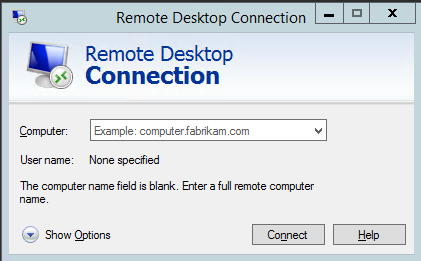
2. In the Computer field, enter the public IP address of the Windows server and click Connect.
3. In the Windows Security pop-up window, enter the instance's administrator username and password. The default administrator account for a Windows Bare Metal instance is Administrator.
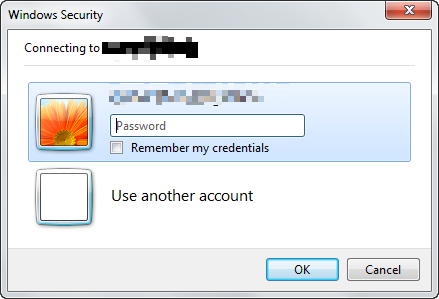
4. Click OK to log in to the Windows instance.
- Products
- VPS Hosting
- VPS HostingUnmetered
- Bare Metal
- GPU Rental
- CDNPublic Beta
- Custom CDN
- Object StoragePublic Beta
- TranscoderPublic Beta