How to Quickly Identify a Native IP Server?
What Is a Native IP Server?
A native IP server generally refers to a server that uses a native IP address, where the registered location of the IP address is in the same country or region as the server's actual physical location. For example, if a server is located in a data center in Los Angeles, USA, and its IP address is registered in the United States, it is considered a US native IP server.

The primary purpose of a native IP is to keep the IP address's geographical attributes consistent with the actual location of the data center. This is useful for network services and business scenarios that have geographical IP requirements. For example:
Cross-border e-commerce operations: Suitable for managing overseas stores and testing business operations in target markets.
Overseas website deployment: Keeps the registered geographical location of the server IP consistent with the data center's location.
Streaming media access: In some cases, it may help identify content services associated with a specific region.
Regional business testing: Used to test network access and service compatibility in different countries or regions.
Simply put, native IPs are primarily used to meet business requirements related to IP geolocation. However, they do not necessarily mean faster network speeds or cleaner IP addresses, nor do they guarantee access to specific services.
How to Check Whether an IP Is a Native IP?
So, how can you check whether a server IP is a native IP? Next, we will introduce two simple and convenient methods for native IP detection. Let's take a look!
Method 1: Check IP Geolocation Information
To determine whether a server uses a native IP, you can connect to the server via SSH and execute the following command to quickly check the country, city, and network organization associated with the server's public IP address.
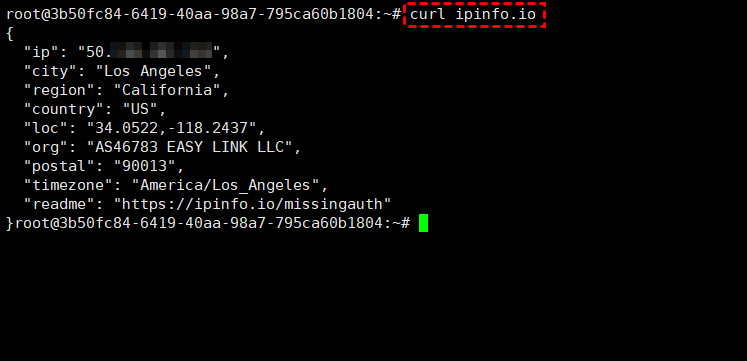
Notes:
ip: The server's public IP address.
city: The city associated with the IP geolocation.
country: The country associated with the IP address.
org: The network organization associated with the IP address.
Based on the query results, the IP address is geolocated to Los Angeles, USA, and the network organization is EASY LINK LLC. If the service provider clearly states that the server's data center is located in the United States and the IP registration information also indicates the United States, you can preliminarily determine that the server uses a US native IP.
Method 2: Use an IP Detection Tool
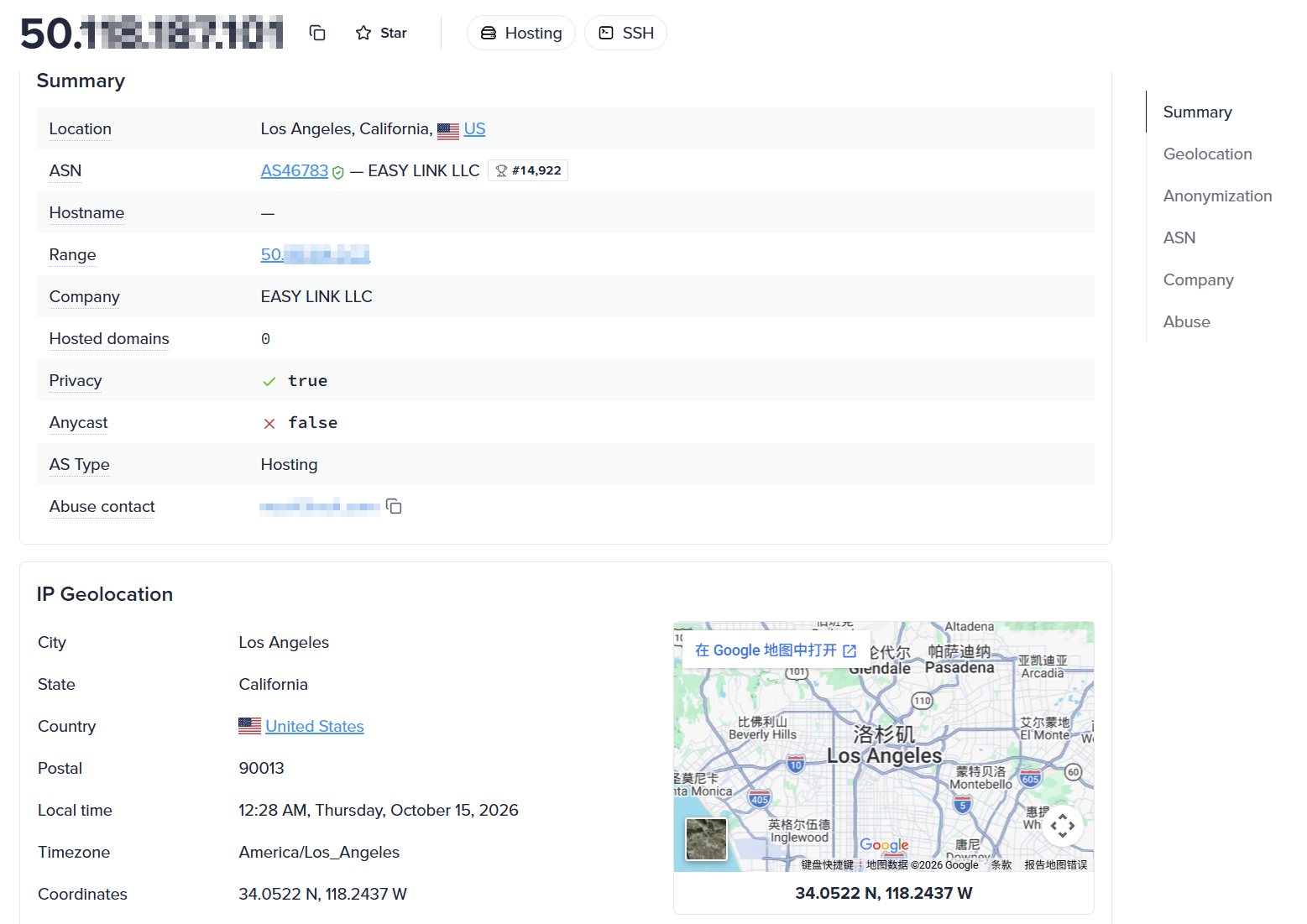
One of the most convenient ways to detect native IPs is to use an IP detection tool, such as the IPinfo website. This website allows you to quickly check information about a server IP's geographical location, network organization, and ASN type, helping you identify the IP address's registered location and network attributes.
If you need a US native IP server, you can try VMRack cloud servers. VMRack operates its own data center in Los Angeles, USA, with servers deployed in the Equinix LA4 data center. It offers US native IP addresses and various network routes, including CN2 GIA, AS9929, and CMIN2, to meet different users' network connectivity needs.

Whether you are involved in cross-border e-commerce, application development, or other business activities that require US IP addresses, you can choose a suitable cloud server configuration based on your actual use case.
Conclusion
To determine whether a server uses a native IP, you can make a preliminary assessment by checking the IP's geolocation, registration information, and network ownership, and verifying these details against the actual data center location provided by the service provider.
If you need a US native IP server, you can try VMRack cloud servers. In addition to providing US native IP addresses, VMRack also supports multiple IP configurations and private network communication to meet the network requirements of different business scenarios.


- Products
- VPS Hosting
- VPS HostingUnmetered
- Bare Metal
- GPU Rental
- CDNPublic Beta
- Custom CDN
- Object StoragePublic Beta
- TranscoderPublic Beta