Troubleshooting and solutions for SSH connection failures to remote servers
When you are just getting ready to deploy your latest code or check the runtime logs, seeing that line "Connection timed out" or "Connection refused" in the terminal can be incredibly frustrating. For operations personnel and developers, suddenly encountering an inability to connect via SSH is arguably one of the most headache-inducing daily troubleshooting scenarios. This kind of connection breakdown not only interrupts your current workflow but can also trigger anxiety regarding the stability of your production lines. As a self-developed cloud infrastructure provider under EasyLink, VMRack frequently receives requests for help from users facing blocked remote management; in reality, most of these issues are not underlying hardware failures, but rather a chain reaction caused by networks, configurations, or security policies.
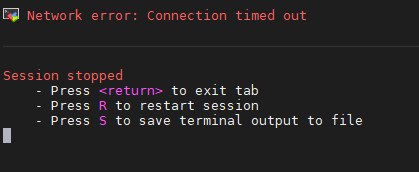
A Five-Step Step-by-Step Approach to Ferreting Out the Cause of SSH Connection Failures
Faced with a sudden login failure, we need to uncover the root cause of the SSH connection failure through progressive, layered steps.
Step 1: Local Network and Basic Connectivity Testing (Troubleshooting the Physical Network)
First, execute ping your_server_IP in your local computer's terminal. If it does not Ping through, it indicates that the local network is blocked or the server has encountered a sudden network disconnection; if it can Ping through, use telnet your_server_IP SSH_port (such as 22) to probe the port. If it displays Connection timed out, it means the traffic is being intercepted halfway; if it displays Connection refused, it represents that the network is clear, but the server system itself is rejecting the request.
Step 2: Cloud Platform Security Group Rules Verification (Troubleshooting the External Firewall)
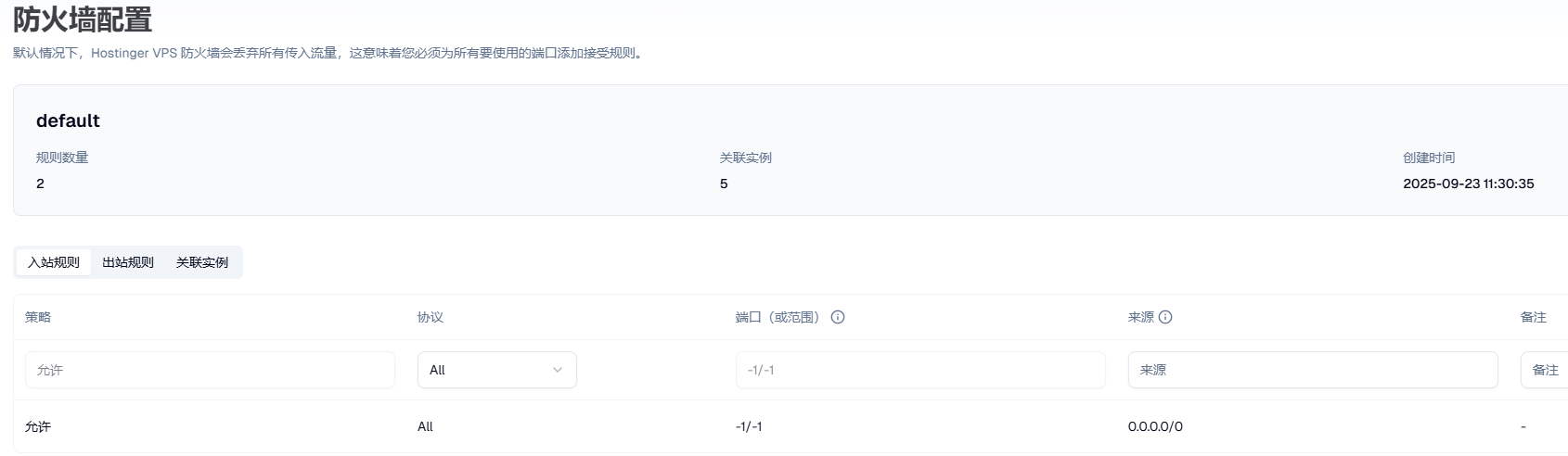
If Telnet prompts a timeout, you need to immediately log into the cloud control panel to check the corresponding inbound security group rules. Many users change the default port 22 for security reasons but forget to add a new TCP port release rule in the cloud platform's security group. Ensure that your local IP (or 0.0.0.0/0) has been permitted to access the server through that port. The figure shows the VMRack control panel's default firewall opening all ports.
Step 3: Server Internal Firewall and Service Status Inspection (Troubleshooting the Internal Environment)
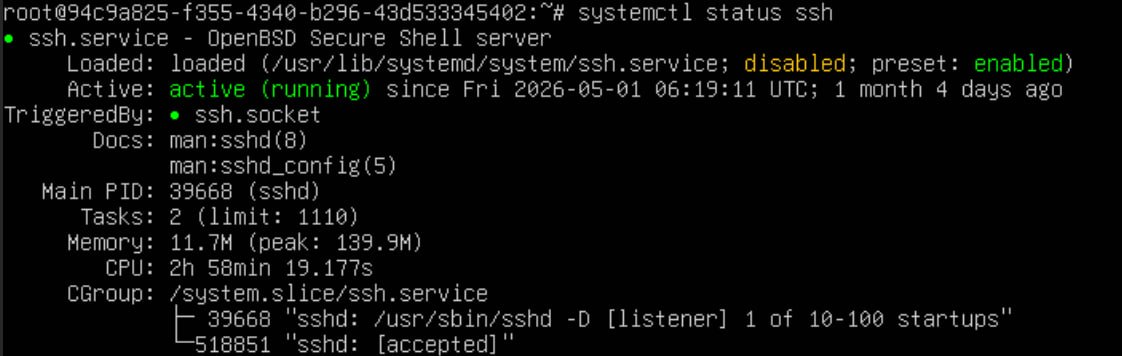
If the security group is correct, you must log into the internal system via a forced blind test using the web-side VNC console. Run systemctl status ssh to check whether the SSH service is in a Running state. If the service is normal, then execute iptables -L -n or ufw status to confirm that the internal firewall has not mistakenly blacklisted your local IP or SSH port.
Step 4: SSH Configuration File Compliance Check (Troubleshooting Policy Restrictions)
Examine the core configuration file /etc/ssh/sshd_config. Focus your check on whether the Port matches the port you are connecting to, whether PermitRootLogin allows Root user login, and whether AllowUsers restricts specific accounts. After making any modifications, you must execute systemctl restart sshd to restart the service and make it take effect.
Step 5: Permission and Key Matching Verification (Troubleshooting the Authentication Mechanism)
For users utilizing key pairs to log in, Linux's rigorous security mechanisms demand exceptionally strict file permissions. You must use the VNC to check whether the permissions of the .ssh directory in the server are set to 700, and whether the permissions of the authorized_keys file are set to 600. If the permissions are too broad (for example, accidentally changed to 777), the SSH service will automatically reject the handshake request of that key out of an anti-eavesdropping mechanism, resulting in an authentication failure.
VMRack Cloud Servers' Solid Infrastructure and Technical Support
To ensure better coping capabilities when troubleshooting faults or encountering public network fluctuations, choosing an underlying infrastructure with solid hardware and optimized routes is critical, and VMRack Cloud Servers are built precisely for this purpose. As a high-end brand deeply rooted in the US West, VMRack relies on its self-built data center located in Los Angeles. Its entire platform line is built upon high-performance AMD processors and deeply optimized for cloud virtualization environments, capable of providing continuous, stable computing power whether for daily high-concurrency applications or complex troubleshooting computational tasks. The data center strictly complies with international environmental and energy management standards, equipped with UPS uninterruptible power supplies, intelligent ventilation, Very Early Warning Fire Detection, as well as 24/7 access control monitoring and security personnel. The intelligent monitoring system can sense risks in real time and respond rapidly to incidents, ensuring the absolute stability of the infrastructure.
To satisfy the diverse overseas business needs of different users, VMRack provides a high degree of business flexibility, supporting two billing modes: data usage billing and fixed bandwidth billing, helping you strike the optimal balance between cost and performance. In terms of the product matrix, besides offering International BGP (L1) products that feature high-quality IPs and excellent international interconnection, as well as Three-Carrier Optimized VPS (L2) carrying 163+10099+CMI, VMRack also highlights its Premium Three-Carrier VPS (L3) packed with top-tier CN2 GIA + AS9929 + CMIN2 premium lines. This flagship product takes evening peak stability and ultra-low latency as its core advantages, making it highly suitable for enterprise users with rigid requirements for mainland China access quality, completely saying goodbye to SSH handshake timeouts or remote desktop lagging caused by public network packet loss during evening peak hours.
Conclusion
All in all, when facing an abrupt situation where a remote server cannot be connected via SSH, as long as you perform a step-by-step troubleshooting process following the logic of network security groups, system services, and authentication privileges, you can fundamentally locate the problem quickly and restore normal remote login. Avoiding these types of headaches at the source is inseparable from robust backend hardware and premium public network paths. Relying on its high-standard self-built Los Angeles data center, full line of AMD high-performance computing power, and multi-tier optimized three-carrier networks like CN2 GIA, VMRack provides a smooth experience comparable to dedicated servers while delivering an exceptionally solid, dependable security guarantee for your daily remote operations and overseas business expansion.
- What to do if SSH connection fails?
- What are the methods for remotely connecting to a server via SSH?
- What to do if the cloud server can be pinged but cannot be connected via SSH?
- GIA CN2 VPS Server Basic Environment Configuration and System Acceleration Tutorial
- VMRack premium VPS test across three networks

- Products
- VPS Hosting
- VPS HostingUnmetered
- Bare Metal
- GPU Rental
- CDNPublic Beta
- Custom CDN
- Object StoragePublic Beta
- TranscoderPublic Beta