How to apply for an SSL certificate using VMRack
When users visit a webpage that is not configured with an encryption protocol, the "Not Secure" warning displayed in the browser's address bar directly undermines the website's brand credibility and degrades the user experience, leading to a severe loss of potential customers. For enterprises pursuing high stability and information security, deploying standard-compliant encryption protocols is the technical foundation for ensuring compliance in online operations and enhancing data transmission security. Choosing to implement safety protection on reliable cloud infrastructure is a critical move to guarantee business continuity. This article will elaborate on how to achieve high-strength encryption for site-wide data through an SSL certificate application, ensuring absolute security in information transmission. On the VMRack official website, enterprises can easily complete the application, installation, and deployment of certificates.
Detailed Steps for Applying for an SSL Certificate on VMRack Cloud Servers
When applying for a certificate on VMRack, a clear and standardized operational process can help you truly and practically solve the pain point of blocked website access caused by the lack of a security certificate. To help your website become compliant and enable the HTTPS encrypted channel as quickly as possible, we have compiled a practical and feasible certificate acquisition and configuration process under the VMRack environment.
Step 1: Certificate Application
Go to the VMRack official website, log in after registration, enter the console, find SSL Certificates, and click Apply for Certificate.
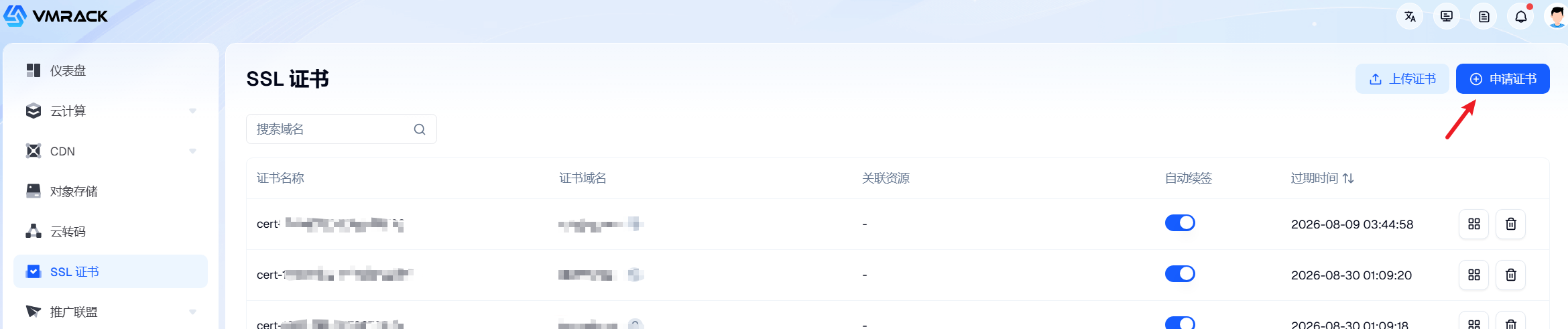
Once you enter the application interface, add the domain name that requires the certificate according to the format prompts.

Step 2: Domain Verification
After adding the domain name, you will enter the domain verification phase.
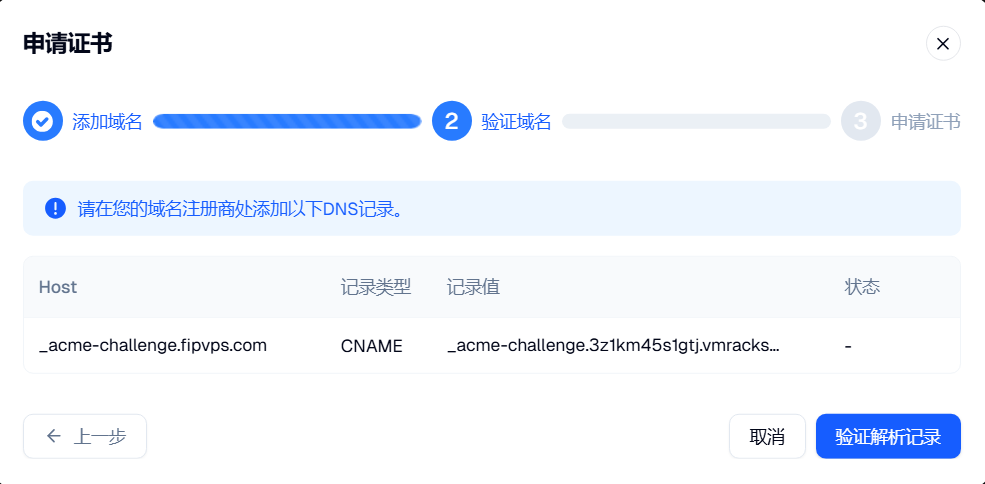
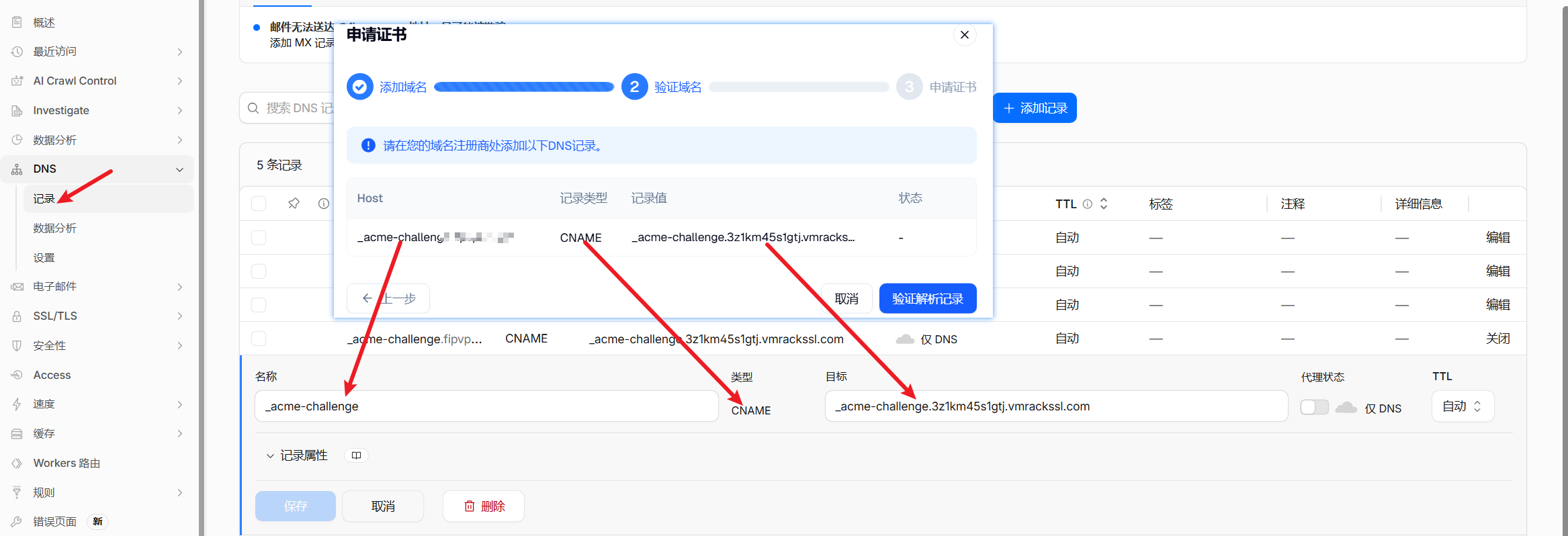
At this point, we need to perform domain DNS record resolution verification. Add a CNAME record on the platform where you purchased your domain name (taking Cloudflare as an example here), fill in the corresponding values in the appropriate positions, and click Verify Resolution Record upon completion to proceed with the certificate application.
Step 3: Download Certificate
After completing the above operations, wait for fifteen minutes, and you can find the newly applied certificate in the certificate list.

Then, click Download Certificate to view the certificate file and the private key. Simply upload the certificate file and private key to your website's backend configuration.

Once the above configuration is complete and the web service is restarted, your website will officially establish a secure encrypted channel. When accessing via a browser, a "padlock" icon representing safety and compliance will appear in the address bar.
VMRack Cloud Servers Guarantee Fast Deployment and Operation of SSL-Certified Websites
Understanding the impact of the underlying hardware and network environment on security protocols will allow you to achieve better website performance after certificate deployment. SSL/TLS encrypted communication consumes a certain amount of CPU computing resources during the handshake and data decryption phases, and it demands exceptionally fast data round-trip speeds. If server computing power is insufficient or the network link is poor, even if the certificate is correctly configured, users will still experience noticeable handshake stutters and loading delays when opening the webpage for the first time.
The VMRack cloud server platform is built on high-performance AMD processors and deeply optimized for cloud virtualization environments. Whether facing high-concurrency encrypted requests or complex computing tasks, it can provide continuous and stable computing power output. Meanwhile, for businesses with rigid access demands in mainland China or latency-sensitive operations, we are equipped with a top-tier triple-network routing line featuring CN2 GIA + AS9929 + CMIN2 to ensure that SSL handshakes and page loading can still be completed within milliseconds, even during evening peak hours. Coupled with the strict international environmental and energy management standards held by our self-built Los Angeles data center, as well as infrastructure guarantees like intelligent monitoring and 24/7 security watch, your encrypted website will run smoothly under the efficient support of powerful hardware and a gold-standard network.
Conclusion
All in all, applying for and correctly configuring an SSL certificate through the VMRack platform is an indispensable gold standard in modern web operations. Guided by this article, we believe you now have a clear understanding of how to leverage high-performance, highly reliable cloud infrastructure to build a solid line of defense for your website, safeguarding data privacy while laying a rock-solid technical foundation for the international expansion of your business.

- Products
- VPS Hosting
- VPS HostingUnmetered
- Bare Metal
- GPU Rental
- CDNPublic Beta
- Custom CDN
- Object StoragePublic Beta
- TranscoderPublic Beta