How to Change the Default SSH Port on a Server?
What Are the Benefits of Changing the SSH Port?
SSH uses port 22 by default. This port serves as the network communication entry point for the SSH remote login service, allowing users to securely manage servers remotely through the SSH protocol. By connecting to a server via SSH, you can not only make system administration more convenient but also effectively protect data during transmission.

So, what are the benefits of changing the SSH connection port? Since port 22 is the default SSH port, many automated scanning tools and attack scripts prioritize scanning this port and attempting to log in using common usernames, leaked passwords, or weak passwords.
Therefore, changing the SSH port can help reduce automated scans and malicious login attempts to some extent, lowering the likelihood of the server being targeted by unsuccessful attacks.
How to Change the Default SSH Port?
To change the SSH port, you need to modify the SSH configuration file and change port 22 to another specified port, such as 2222 or 8022. Then, restart the sshd service to apply the changes. The following are the detailed steps for changing the SSH port.
1.First, log in to your server remotely and execute the command vim /etc/ssh/sshd_config to open the SSH configuration file.
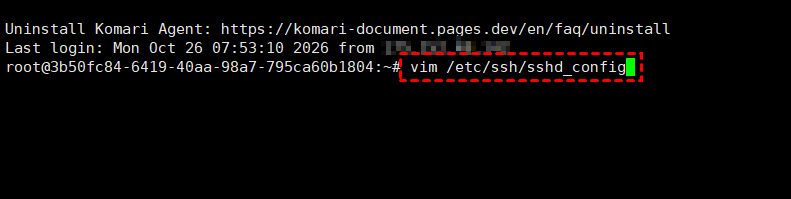
2.Next, press the I key to enter Insert mode. Find port 22 and remove the comment symbol # before it. Then, enter the port you want to use on the next line, for example, Port 8022.

Note: You can add a new port while keeping the original port as a backup. Alternatively, you can directly change port 22 to 8022.
3.After making the changes, press the Esc key, then type and press Enter to save the changes and exit the editor.
4.After changing the SSH port, execute the command systemctl restart sshd to restart the SSH service and apply the changes.
5.After completing the steps above, you also need to allow the configured port through the firewall. If you are using firewalld, you can allow the port with the following commands.
# Allow port 8022
firewall-cmd --permanent --add-port=8022/tcp
# Reload the firewall
firewall-cmd --reload
6.After changing the default SSH port, you can use SSH tools to connect to the server using the new port.
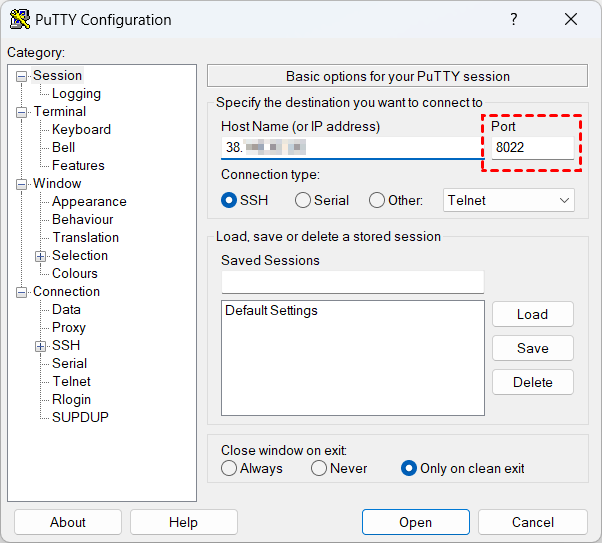
Tip: If the new port connects successfully, you can reopen the SSH configuration file and remove port 22.
Further Reading: VMRack Cloud Servers
VMRack is a global cloud infrastructure service provider offering cloud servers, bare metal servers, server colocation, cloud transcoding, and other server services. Its cloud servers use premium network routes such as CN2 GIA, AS9929, and CMIN2 to provide a more stable access experience for users across different network operators.

In addition, VMRack offers networking features such as multiple IP addresses and private network communication to meet various needs, including multi-site deployment, server cluster setup, and application and database separation. These services are suitable for overseas website development, cross-border e-commerce platform deployment, and enterprise business system development.
Conclusion
This article has introduced the specific steps for changing the SSH port and a reliable cloud server option. However, changing the port cannot completely prevent malicious attacks. It is recommended that you also enable SSH key authentication, restrict access sources, and ensure that the new port connects successfully before disabling the original port.


- Products
- VPS Hosting
- VPS HostingUnmetered
- Bare Metal
- GPU Rental
- CDNPublic Beta
- Custom CDN
- Object StoragePublic Beta
- TranscoderPublic Beta