Best-Value US Native IP VPS Recommendations!
The key to native IP VPS recommendations is not stacking up specs, but whether the IP origin, route quality and price match your needs. This guide follows three steps — criteria, selection metrics and hands-on testing — to help you find a cost-effective US VPS, and introduces the matching solutions available from VMRack's self-built Los Angeles data center.
Criteria for Judging Whether an IP Is Native
A native IP is an address allocated by the local internet registry to a local carrier or data center, where the registered location matches the actual place of use. US IP blocks are allocated by ARIN, so if the ownership records point to a US data center and the geolocation is also in the US, the IP can generally be considered native.
The opposite is a broadcast IP, which is used in one location but announced or registered in another. Neither type is absolutely better, but a broadcast IP may be geolocated inconsistently in IP databases, so location-sensitive services should pay extra attention.
Note that native does not mean residential. A native IP is still a data center IP; its ownership and geolocation are simply more accurate, making it suitable for scenarios that need location consistency, such as cross-border e-commerce back offices, overseas social media operations and application testing.
In practice, check three things: whether the ASN belongs to a US data center operator, whether the country and city shown for the IP match the data center location, and whether the results from multiple IP databases are largely consistent.
Four Key Metrics When Choosing a VPS
First, the source of the IP. A native data center IP comes directly from the data center's own resources, so its origin is clearer. VMRack relies on its self-built Los Angeles data center with full control over its resources, and offers network solutions such as multiple IPv4 addresses and private IPs, reducing the ownership uncertainty that comes with resold IPs.
Second, the route. VMRack's International BGP (L1) is a native US route connected to Cogent and Arelion, suited to services focused on local US access and international connectivity. If you mainly serve users in China and care about peak-hour latency, choose the Premium Tri-Network (L3) with the best route quality, using CN2 GIA + AS9929 + CMIN2, or the more cost-effective Optimized Tri-Network (L2), using 163 + 10099 + CMI.
Third, configuration and traffic. Cost-effective does not mean cheapest. Look for support for custom configurations, unlimited traffic and high bandwidth, so you are not forced to switch plans when your business grows and traffic or bandwidth becomes a limit.
Fourth, operating systems and services. VMRack supports mainstream Linux systems such as CentOS, Rocky, Ubuntu and Debian, as well as Windows, and accepts Alipay, PayPal, Stripe and USDT.
Post-Activation Testing and Verification Steps
Whichever provider you choose, test the VPS right after activation and before migrating production workloads. You can follow these native IP check steps:
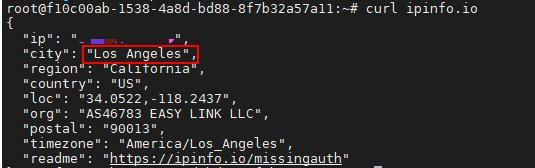
1. Query the IP information: after logging in via SSH, run curl ipinfo.io and check whether the returned country, city and ASN organization match a US data center.
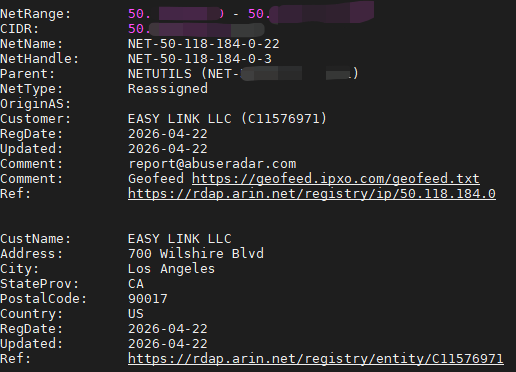
2. Verify ownership records: after installing the whois tool, run whois followed by the IP address, and review the netname, organization name and registration location.
3. Test route quality: from your local computer, run ping and traceroute (tracert on Windows) against the VPS, and record latency and packet loss during morning, midday and evening peak hours.
4. Test actual bandwidth: use speedtest-cli or iperf3 to measure upload and download speeds, and compare them with the bandwidth stated in the plan.
5. Verify service availability: visit your target websites or platforms and confirm that login, payment, playback and other functions work normally. Results may vary with each platform's risk-control policy.
Going live only after all tests meet expectations effectively lowers the risk of choosing the wrong plan.
Summary
The logic behind choosing native IP VPS recommendations is simple. This guide covered IP judgment, metric comparison and testing steps: confirm the IP origin first, then compare routes, configuration and services, and finally rely on test results. If you need a US VPS in a Los Angeles data center, you can choose among VMRack's International BGP, Optimized Tri-Network and Premium Tri-Network routes according to your business needs.


- Products
- VPS Hosting
- VPS HostingUnmetered
- Bare Metal
- GPU Rental
- CDNPublic Beta
- Custom CDN
- Object StoragePublic Beta
- TranscoderPublic Beta