What to Do If a Cross-Border E-Commerce Independent Website Loads Slowly?
Cross-border e-commerce sites that load slowly lose conversions and search rankings. Compressing images alone will not fix the problem. Start by locating the bottleneck, then optimize the page, server, network route, and content delivery in turn. Below is a practical process, in troubleshooting order.
Locate the Cause of Slowness
A cross-border e-commerce independent website usually loads slowly for one of three reasons: a slow server response, a network route that detours or drops packets, or an overly heavy page. Optimizing without measuring first often sends you in the wrong direction.
Test your pages with Google PageSpeed Insights, GTmetrix, or WebPageTest, and focus on Time to First Byte (TTFB) and Largest Contentful Paint (LCP). Google recommends keeping LCP within 2.5 seconds, and TTFB is generally best kept under 0.8 seconds.
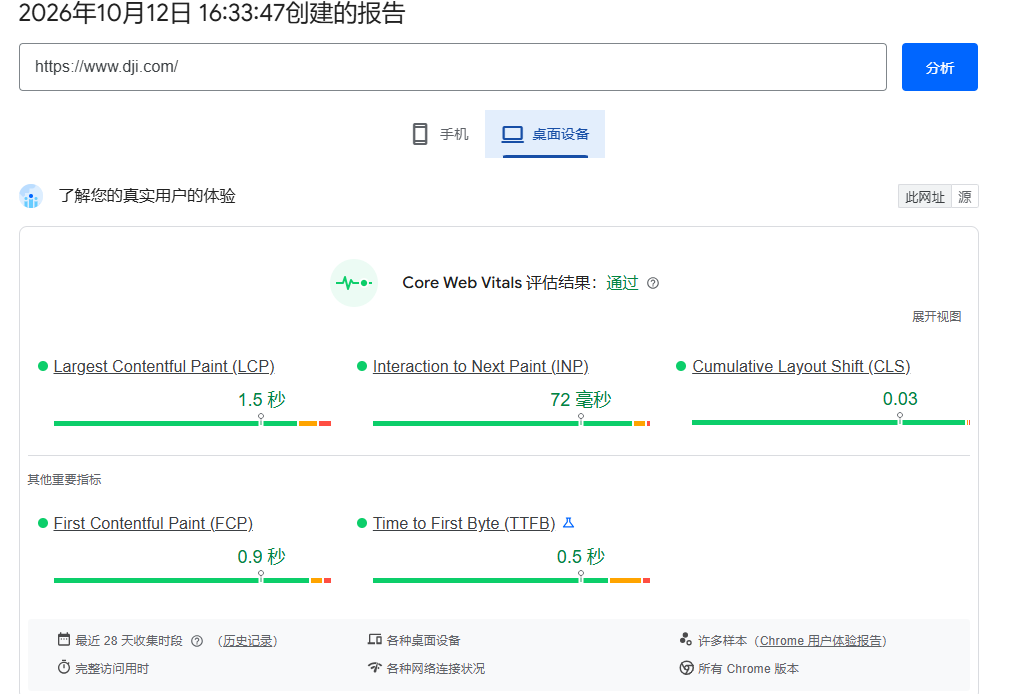
The logic is simple: a high TTFB usually points to server performance or network route problems, while a normal TTFB with a high LCP usually means images, scripts, or other page resources are too large. Test from nodes in your target markets, such as the US and Europe, rather than only opening the site locally.
You can also use ping and mtr to check the access path and watch for packet loss and latency swings. If latency rises noticeably at certain hours, such as the evening peak, the route is congested, and you should switch to a more stable route first instead of continuing to optimize the page.
Slim Down Pages and Enable Caching
Images often account for most of a page's weight. Convert images to WebP or AVIF, enable lazy loading for images below the fold, and set explicit width and height to reduce layout shift.
Third-party plugins are another common drag, such as pop-ups, live chat, and multiple analytics tags. Assess whether each one is necessary, remove those you do not need, load the rest with a delay, and combine and minify CSS and JS files.
On the server, enable Gzip or Brotli compression, browser caching, and page caching, and turn on HTTP/2 or HTTP/3. If you run WordPress, WooCommerce, or similar software, add Redis object caching to reduce the load of database queries.
Pay attention to the quality of your theme and plugins, too. A bloated theme loads a lot of unused code. Choosing a lightweight theme and regularly clearing out redundant plugins and database clutter reduces the load on the server at the source.
After every change, re-test and record the data. Comparing LCP and TTFB before and after is the only way to confirm which measures actually work.
Choose the Right Server Route and CDN
The core of cross-border e-commerce network setup is placing servers as close to your target customers as possible. If you mainly serve North America, prefer a US West Coast data center: a shorter physical distance means naturally lower latency.
If your team operates from mainland China and frequently logs in to the back end and uploads products, route quality matters just as much. VMRack operates its own data center in Los Angeles and offers premium three-network (CN2 GIA, AS9929, CMIN2) VPS, balancing stable access from China with US deployment. For sites serving mostly overseas visitors, native US routes such as Cogent and Arelion are a good option.
During big promotions, traffic spikes make bandwidth and traffic limits an easy bottleneck. VMRack supports custom configurations, unlimited traffic, and large bandwidth, and also offers CDN and object storage to speed up the delivery of static assets such as images and videos.
If you run multiple stores, you can use multiple IPv4 addresses and private IPs to separate environments by business, which makes management easier. VMRack accepts Alipay, PayPal, Stripe, and USDT, so settlement is also more convenient for overseas teams.
Before buying, ask the provider for a test IP and measure latency and packet loss from your target regions, then decide on the configuration and route.

When your business outgrows a VPS, you can upgrade to a bare metal server with dedicated hardware, so you no longer compete with other users for performance. For details, see VMRack Bare Metal Servers.
Summary
Cross-border e-commerce speed optimization follows one line of thought: measure first to locate the problem, then slim down pages and enable caching, and finally close the gaps in server routes and CDN. Working through the steps in this order usually brings clear improvements in overseas access speed and conversion.


- Products
- VPS Hosting
- VPS HostingUnmetered
- Bare Metal
- GPU Rental
- CDNPublic Beta
- Custom CDN
- Object StoragePublic Beta
- TranscoderPublic Beta