The VPS can be pinged, but web pages cannot be opened.
If your VPS can be pinged but the webpage won't open, this is a classic "network layer normal, application layer abnormal" issue. A successful ping indicates that the server's ICMP protocol response is normal and the host is reachable over the network. However, the webpage failing to load usually means the problem lies within ports 80/443, the Web service itself, or firewall policies. When encountering this situation, many novice webmasters' first instinct is to reboot the server or contact the provider for an IP change. In reality, under most scenarios, the server itself is not at fault—there is simply a configuration oversight or a rule interception at some link in the application layer. Pinpointing the correct problem layer is far more efficient than blindly rebooting. Below, we will break down the troubleshooting logic from three perspectives to help you locate and resolve the issue step-by-step.
I. First, Distinguish Between Network Layer and Application Layer Issues
Ping utilizes the ICMP protocol, which only verifies whether the server's network card and routing are reachable; it does not involve whether the Web service is running properly. On the other hand, opening a webpage relies on the TCP protocol's port 80 (HTTP) or port 443 (HTTPS)—these are two completely independent communication mechanisms. Therefore, "being able to ping" only proves that the network link is not disconnected; it cannot prove that the website service itself is fine. In many cases, users are actually encountering specific issues like the VPS port 80 failing to open, rather than a complete loss of connection at the network layer.
When troubleshooting, it is recommended to first log into your VPS and use the netstat or ss command to check if the ports are in a listening state. For example, run:
Bash
netstat -tulnp | grep 80

If you can see the corresponding port showing a LISTEN status, it means the local service is already listening normally. If there is no output at all, it indicates that the Web service has not started at all or is listening on a different port, meaning you need to fix the service-level problem first. If you confirm locally that the port is listening but external access is still unavailable, you need to further check the running status and configuration files of your Web service (such as Nginx or Apache) for errors, while also checking whether the firewall or the cloud platform's security groups have allowed the corresponding ports.
Additionally, you can use curl -I your_IP or curl -I your_domain in your local terminal to view the HTTP response header. If it returns a timeout or connection refused, it means the request never reached the Web service process. If it returns status codes like 404 or 502, it means the request has reached the server side, and the problem lies within the site configuration or backend programs.
II. Troubleshooting Common Causes of Webpages Failing to Open
Based on daily O&M (Operations and Maintenance) experience, the reasons for "can ping but cannot open the webpage" usually center around the following categories. Checking them one by one will generally locate the problem:
Firewall or Security Group Rule Restrictions: The server's built-in
iptables/firewalld, or the cloud platform's security groups failing to allow ports 80 and 443, is one of the most common reasons. Many users forget to open the corresponding ports after installing the system, causing the website to be inaccessible after going live.Web Service Not Started or Crashed: If service processes like Nginx or Apache exit abnormally, or if configuration files are modified but not reloaded, the ports will become unresponsive. You can quickly confirm whether the service is running normally using commands like
systemctl status nginx.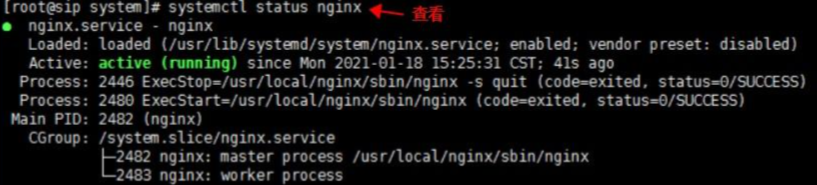
Incorrect Domain Name Resolution (DNS): If the domain name is not correctly resolved to the server's current IP, or if the DNS cache has not updated, it will create the illusion of "seemingly unopenable." It is recommended to use the
nslookupordigcommand to check whether the resolution result matches the actual IP of the server.Network Carrier Line Fluctuations: If the line quality of some VPS providers is unstable, intermittent connectivity issues may occur. This type of situation is often misjudged as a server failure; in reality, testing at a different time or switching to a different line can confirm it.
Server Resource Exhaustion: If memory is completely filled, the disk is full, or the number of connections reaches its upper limit, the Web service will fail to respond normally to new requests. Even if the process is still running, it will manifest as the webpage being unable to open. This situation requires a comprehensive judgment combined with system monitoring logs.
Note: It is worth noting that this type of problem is fundamentally different from a scenario where the VPS cannot be pinged. A VPS failing to ping usually points to a complete disruption at the network layer (such as host machine failure or upstream routing anomalies). The scenario discussed in this article features a normal network layer and an abnormal application layer only—the troubleshooting directions for the two are completely different and must not be conflated.
III. Evading Similar Issues from the Underlying Network Architecture
Beyond post-incident troubleshooting, the stability of the underlying network architecture itself deserves greater attention. Many VPS providers source their data center resources from multi-tier resale; the network equipment, IP resources, and even exit routing are not in their own hands. Once a network anomaly occurs, users often have to go through layers of feedback just to locate the actual problem node, which drastically elongates the troubleshooting cycle.
Cloud infrastructure providers like VMRack, which rely on self-built data centers in Los Angeles, utilize a completely self-developed and self-controlled VMRack Proprietary Network Architecture. Everything from the data center intranet, exit routing, and IP resource allocation to equipment selection is independently developed, operated, and maintained—rather than renting a third-party black-box network. This means that when a problem occurs, the specific node can be located much faster, rather than repeatedly troubleshooting across multi-tier resale chains, significantly shortening fault response times.
Precisely because they possess the underlying foundation of a self-built data center, VMRack can deliver capabilities that are difficult for providers reliant on third-party networks to offer:
Isolated Intranet IPs: Assigning independent intranet IPs to users to achieve low-latency intranet intercommunication between multiple VPSs or bare metal servers within the same data center. This prevents business traffic from detouring through the public network, reducing unnecessary exposure.
Flexible Combinations: Supporting the flexible combination and allocation of multiple IPv4 addresses and native IPv6 to meet the network requirements of different scenarios like web hosting, multi-domain deployment, and load balancing, without being restricted by the resource pools of carriers or upstream network providers.
Summary
When a VPS can be pinged but the webpage won't open, the core reason usually lies in the fact that the network layer is reachable but abnormalities exist at the application layer (ports, Web services, DNS, firewalls, or server resources). Through layered troubleshooting—first confirming port connectivity, then checking service running status, domain resolution, and system resource utilization—you can generally locate and solve the issue. Meanwhile, when purchasing a VPS, prioritizing providers with stable underlying network architectures, premium line resources, and sufficient defense capabilities can reduce the frequency of such problems from the source, making website operations much more worry-free.
- How to quickly resolve VPS ping issues
- What should I do if my SSH connection to the host gets stuck and doesn't move?
- What to do if the cloud server can be pinged but cannot be connected via SSH?
- Troubleshooting and solutions for SSH connection failures to remote servers
- How to solve SSH connection failure?


- Products
- VPS Hosting
- VPS HostingUnmetered
- Bare Metal
- GPU Rental
- CDNPublic Beta
- Custom CDN
- Object StoragePublic Beta
- TranscoderPublic Beta