Recommendations for useful SSH remote connection tools
How to efficiently and securely manage remote servers is often the very first hurdle for many users who are new to Linux servers. If you want to manage remote servers smoothly, a handy and powerful SSH remote connection tool is an indispensable weapon.
It not only helps us execute terminal commands but also greatly improves the efficiency of daily development and O&M (Operations and Maintenance), avoiding the low efficiency caused by the tedious operations of traditional command lines. After you deploy cloud servers or bare-metal servers, choosing the right client connection tool becomes the crucial first step to releasing the server's computing power and ensuring the efficient and smooth operation of your business.
How does an SSH remote connection work?
SSH (Secure Shell) is an encrypted network transport protocol specifically designed to provide secure transmission and management for network services over unsecure networks. For ease of management, many remote connection software tools have emerged on the market. They not only provide a basic command-line interactive interface but also deeply integrate a series of practical advanced productivity features such as file transfer (SFTP), remote port forwarding, key pair management, and automated public key deployment.
When choosing SSH remote connection software, users typically focus on features like multi-tab management, custom skins, quick shortcuts, and terminal recording. Selecting a client tool that fits your daily workflow allows you to enjoy completely autonomous resource control, lower command input latency, and a smooth operational experience comparable to native local terminals when managing servers in remote data centers.
As a cornerstone network protocol, SSH plays an irreplaceable role in ensuring data transmission security. It implements extremely secure two-way authentication between the client and the server through asymmetric encryption algorithms (such as RSA, ED25519) and switches to efficient symmetric encryption after the connection is established to protect all terminal commands and sensitive data flowing through the channel.
With the popularity of cloud-native architecture and multi-cloud deployment, modern O&M personnel use these clients not just as command input windows, but also as gateways for managing complex intranet penetration (SSH Tunneling) and dynamic port mapping. Having a deep understanding of SSH remote connections and mastering their high-level configurations can help technical teams build a remote access boundary that balances high efficiency with strong defense when facing high-concurrency, cross-regional server clusters.
Xshell
Xshell is a highly reputable Linux remote connection tool on the Windows platform. It supports multiple protocols, including SSH1, SSH2, and SFTP. It possesses extremely powerful session management capabilities and custom scripting features. With its high stability and extremely low resource consumption, it is perfectly suited for professional, advanced O&M personnel who need to manage a large number of server nodes. As a veteran terminal emulator, it performs excellently when handling heavy loads of long text output, rarely freezing or disconnecting, making it an universally recognized foundational tool in enterprise-level O&M.
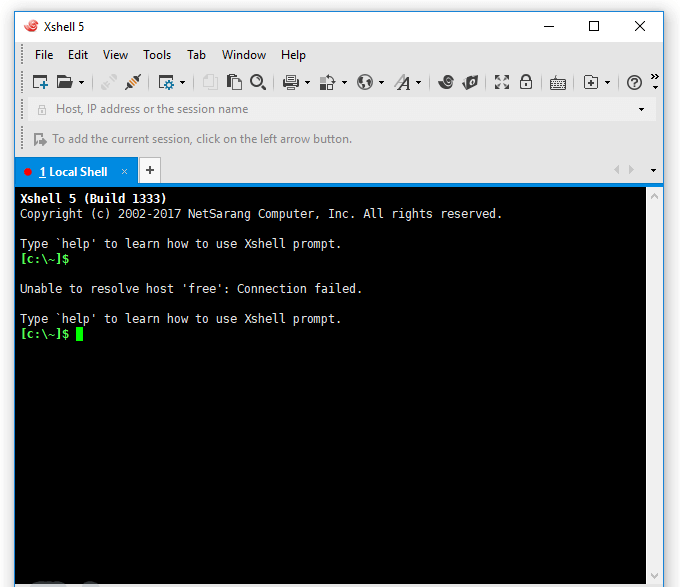
Its unique "Terminal Synchronization" feature allows users to type commands in one window and synchronously send them to multiple different server instances for execution. For users who have purchased multiple cloud servers and need to perform cross-node cluster deployment, batch system updates, or unified initialization configurations, this can substantially boost work efficiency and significantly reduce error rates caused by repetitive manual operations.
In addition, Xshell deeply integrates advanced features such as multi-tab options, keyword highlighting, dynamic port forwarding, and custom quick button groups. Users can automate complex O&M processes by writing VB, JS, or Python scripts. Furthermore, its secure terminal design standards strictly meet the demanding data compliance requirements of the vast majority of financial and confidential industries.
FinalShell: A Domestic Dark Horse Integrating Terminal and All-in-One Monitoring
FinalShell is an SSH remote connection software deeply loved by domestic developers. It is not just an SSH client, but an all-in-one server management platform. It supports Windows, macOS, and Linux across all platforms, perfectly solving the pain points of cross-platform use, and comes with excellent built-in Chinese support and cloud synchronization services. It tightly combines the originally cold command-line interface with an intuitive visual dashboard, greatly lowering the threshold for beginners to manage servers.
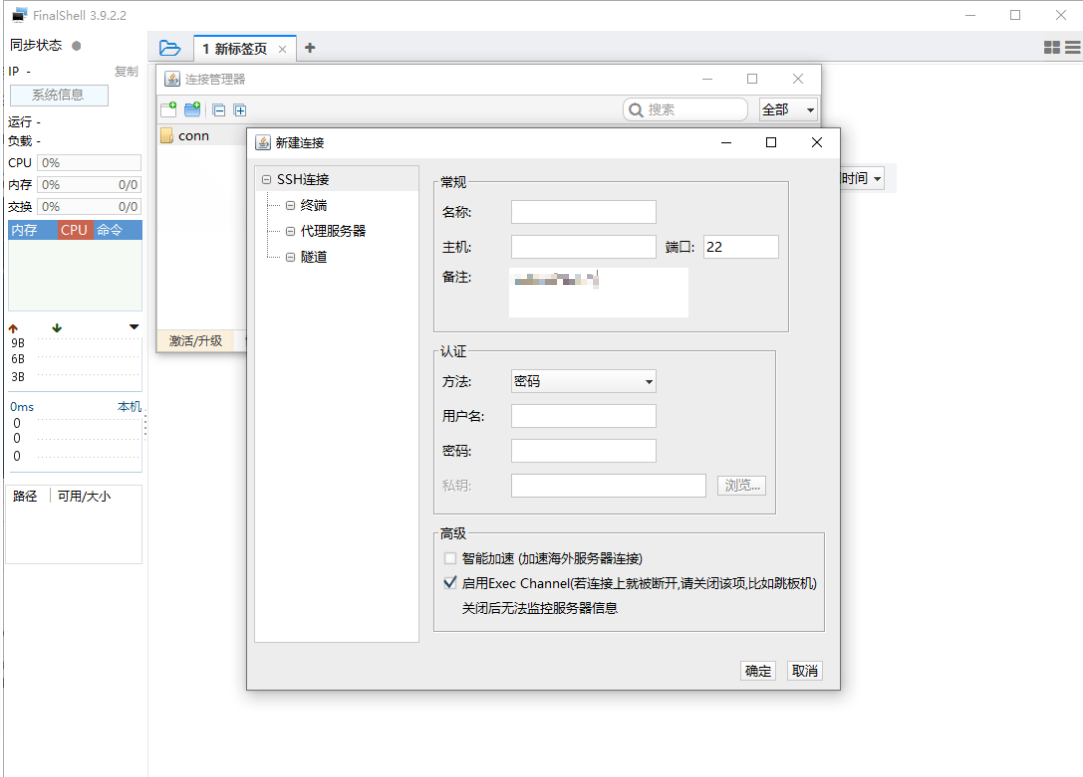
In addition to basic terminal text functionality, FinalShell can intuitively display real-time server statuses such as CPU, memory, network traffic, and disk I/O. Users can very conveniently monitor real-time system resource consumption and network packet loss rates within the FinalShell interface, quickly locating underlying performance bottlenecks to achieve the optimal balance between cost and performance.
What is even more commendable is its integrated, full-featured SFTP file manager in the lower half of the interface, which supports direct drag-and-drop file uploading, online decompression, smart text editing, and one-click permission modification through a graphical interface. Its built-in overseas acceleration feature can also optimize connection speeds in high-latency network environments. Coupled with its own process manager, users can comprehensively control the server status without needing to log into panels like Baota.
MobaXterm: The All-Around Full-Stack Terminal Workstation
If you are looking for an SSH remote connection tool that integrates various network tools into one, MobaXterm is definitely the ultimate choice. It not only features a powerful SSH terminal but also includes a built-in X11 forwarding server, multi-protocol support (RDP, VNC, FTP, etc.), and a rich set of common Unix utilities, making it a Swiss Army knife-like versatile toolbox. It provides a one-stop workstation environment for advanced engineers who frequently need to manage across protocols and mix Windows remote desktops with Linux terminals.
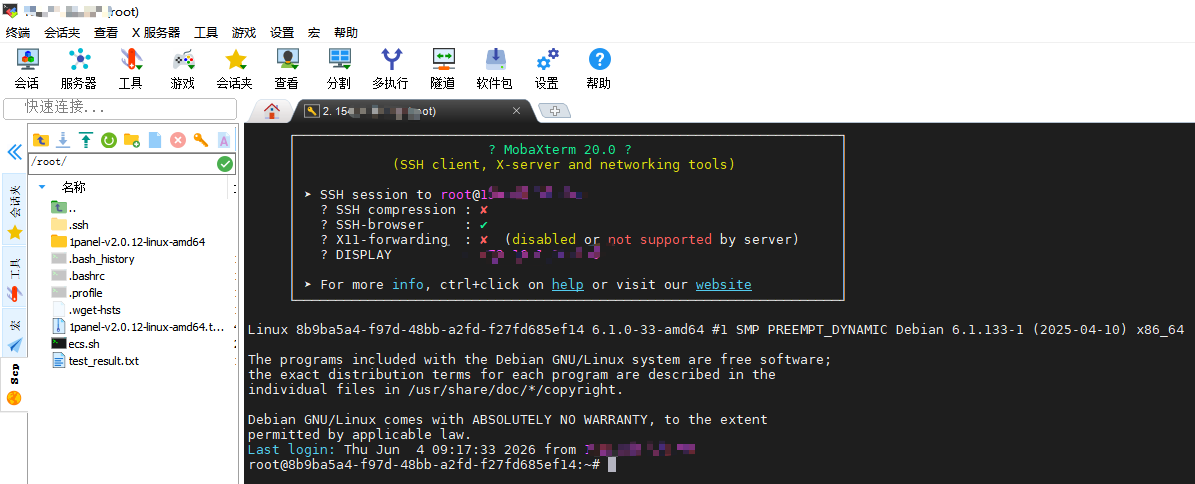
The biggest highlight of MobaXterm lies in its out-of-the-box macro recording and graphical file management functions. When you need to frequently connect to high-performance cloud servers for complex computing tasks, or even need to remotely run graphical Linux applications (such as browsers or installation wizard interfaces), MobaXterm can provide you with a seamless and highly secure professional O&M experience leveraging its efficient XServer forwarding.
At the same time, it also features a series of native practical extensions such as network port scanners, network packet captures (Sniffer), process viewers, and text comparison tools. Its Portable Edition requires no installation; once packed, it can be carried on a USB flash drive, allowing you to seamlessly restore all your server connection sessions and key credentials on any computer, anytime, anywhere.
Summary
All in all, choosing a great SSH remote connection tool can make your server O&M work twice as effective with half the effort. Whether it is the time-tested and steady Xshell, the feature-rich FinalShell with its built-in monitoring, or the all-powerful MobaXterm integrated with X11 forwarding and multi-protocol support, any of them can provide you with an excellent remote management experience. Combined with VMRack's self-built Los Angeles data center backed by over 12 years of industry experience, high-performance hardware, and top-tier three-network return-to-China lines, you will completely say goodbye to remote lag and easily enjoy efficient, stable, and modernized cloud-based O&M.

- Products
- VPS Hosting
- VPS HostingUnmetered
- Bare Metal
- GPU Rental
- CDNPublic Beta
- Custom CDN
- Object StoragePublic Beta
- TranscoderPublic Beta