How do I check the CMIN2 line on a VPS cloud server?
CMIN2 stands for China Mobile International Optimized Line. Many VPS providers write "CMIN2 Optimized" in their product descriptions, but the actual hands-on experience varies widely. How to evaluate CMIN2? This is the primary concern for many China Mobile users when purchasing overseas VPS instances. It can be verified step-by-step through several actionable methods, from the routing itself to peak-hour performance.
I. Understanding the CMIN2 Line
Before hands-on testing, let's briefly understand the composition of the CMIN2 line so you know what is normal and what is abnormal when reviewing routing data. How is the CMIN2 line? CMIN2 is an optimized line launched by China Mobile International Network (corresponding to AS58807), mainly resolving issues such as detour routing, high latency, and evening peak lag that China Mobile users often encounter when accessing overseas servers. Like Telecom CN2 GIA and Unicom AS9929, the CMIN2 line belongs to carrier-grade commercial optimized lines. Its construction and bandwidth costs are higher than standard international BGP lines, so resource guarantees are usually more sufficient, and evening peak stability is relatively better assured.
To determine whether a route is a complete CMIN2 line, it is necessary to distinguish between two directions: "outbound" and "inbound". If only one-way optimization is implemented, the actual user experience will be compromised. Only when both outbound and inbound routes are fully covered can it be considered a true premium line. Taking VMRack, which operates a self-built data center in Los Angeles, USA, as an example, its Premium Triple-Carrier VPS (L3) line combination is CN2 GIA + AS9929 + CMIN2, with targeted optimizations for both outbound and inbound routes across all three carriers. This type of two-way coverage configuration can also serve as a reference sample for evaluating whether a line is complete.
II. Detection Methods for the CMIN2 Line
There are many methods to test network lines. The following two methods basically cover all verification needs from routing paths to actual user experience. Simply follow them in order.
1. Route Tracing and AS Number Query
This step is the most direct method to determine line direction. The core is to first check which nodes the data packets pass through and whether there are detours, and then further confirm which network the landing node actually belongs to. Combining these two steps allows you to determine whether it is "true CMIN2".
Specific steps:
Install tools: Linux systems execute
apt install mtroryum install mtrto install; Mac comes built-in or install viabrew install mtr; Windows users can download the portable WinMTR tool.Execute command: For Linux/Mac, enter
mtr -rw -c 100 server_IP, where-routputs results in report mode,-wdisplays full information without truncating domain names, and-c 100sends 100 probe packets (more samples yield more reliable results); Windows users directly enter the IP into WinMTR and clickStartto run for the same duration.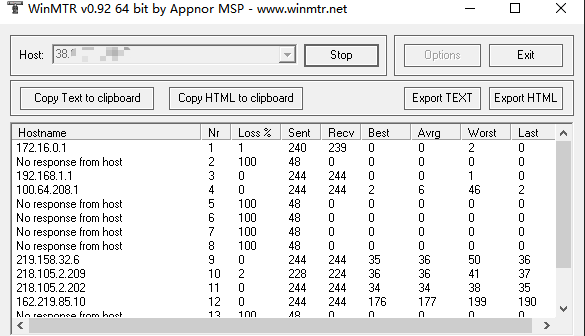
Read results: Focus on the
Loss%column. If packet loss only occurs at a specific intermediate hop and the packet loss rate recovers to 0% at subsequent nodes, it is usually fake packet loss caused by routers not responding to ICMP and is no cause for concern; what truly requires attention is whether the final landing node (the hop entering mainland China) continuously loses packets.Auxiliary path verification: Use
traceroute -n server_IP(Linux/Mac) ortracert -d server_IP(Windows) to review the complete hop count and confirm whether the path detours through unreasonable regions such as Europe or other continents. Normal CMIN2 line hop counts will not be excessively high, and the landing node should be within the domestic backbone network.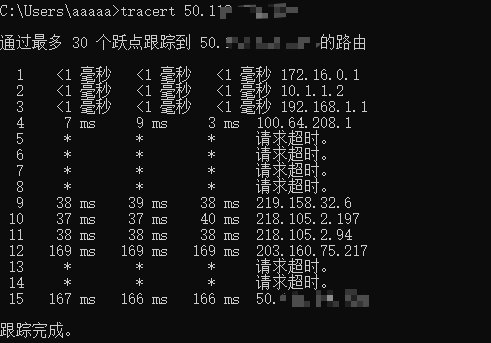
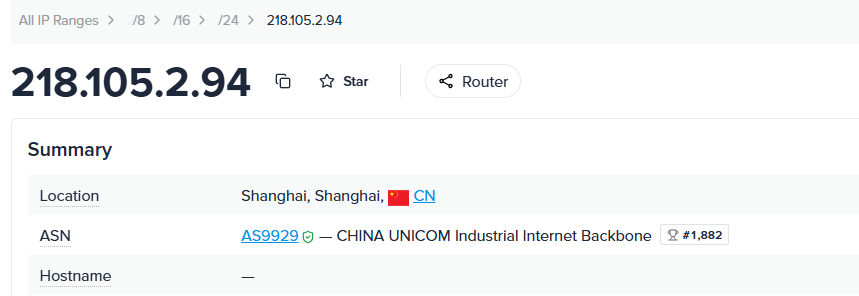
Query AS number: From the above results, find the last overseas node IP before entering mainland China (i.e., the landing gateway IP), and look up its corresponding ASN (which can be queried via webmaster tools or ipinfo).
Verify AS number: China Mobile International corresponds to
AS58807. If the queried result is indeed this AS number, it indicates that it truly routes through CMIN2. As a comparison, Telecom CN2 GIA corresponds toAS4809, while Unicom AS9929 is directly named after its own AS number. Because the test uses a China Unicom network, the tested result isAS9929; if it were a China Mobile network, it would beAS58807.
2. Verification via Online Multi-Location Speed Testing Platforms
If it is inconvenient to run commands yourself, using third-party online platforms to test simultaneously from multiple cities can also yield intuitive results.
Specific steps:
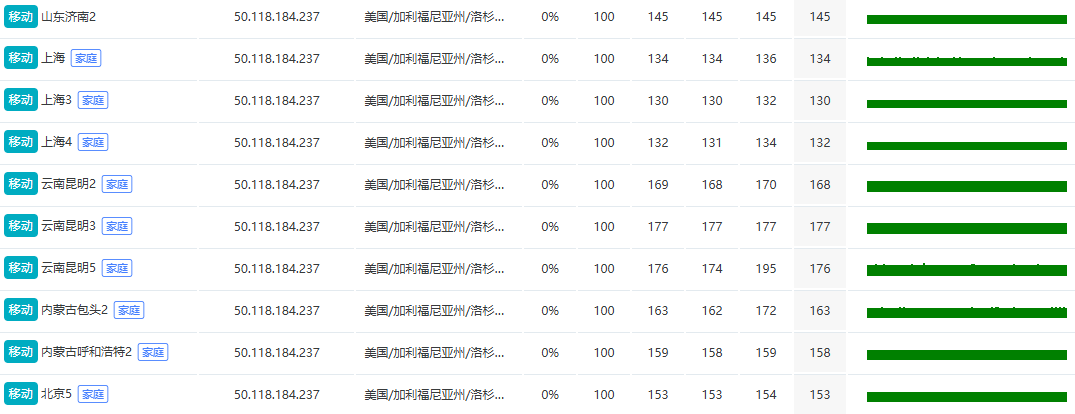
How to check the CMIN2 line? Open platforms such as ITDOG or 17CE.
Enter the server IP or domain name in the input box and select the route tracing feature.
Check local "China Mobile" carrier nodes among the test nodes to make the results more representative.
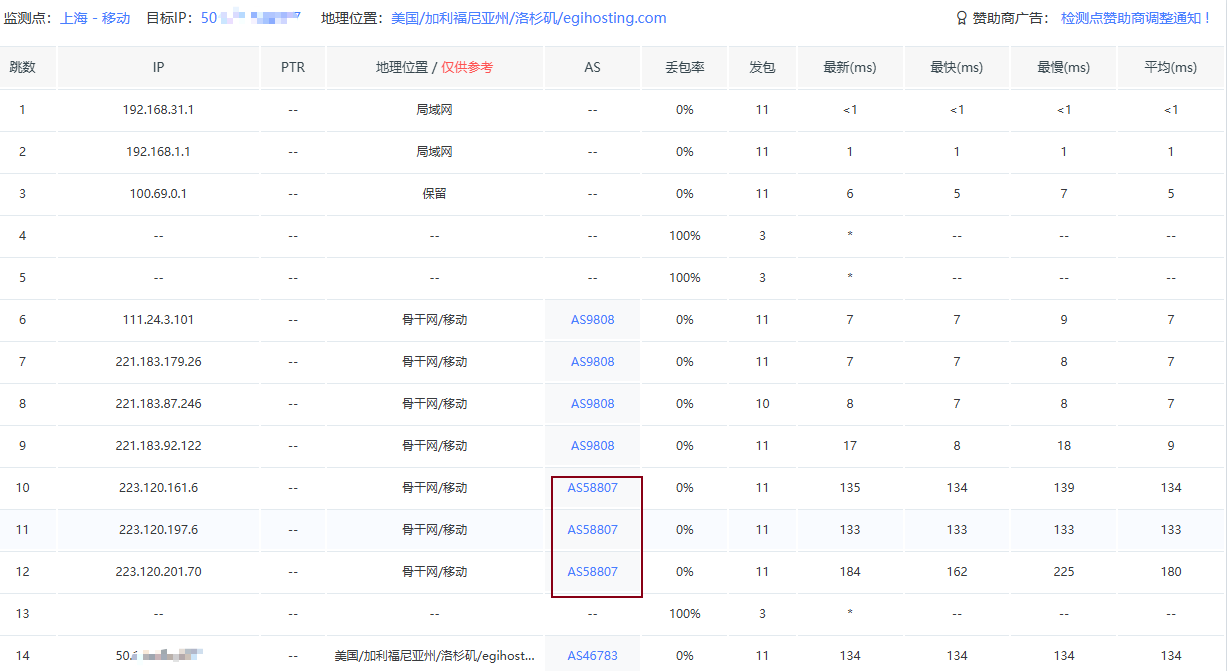
After initiating the test, view the latency, packet loss rate, and detailed routing path from each node to the target IP in the returned results. You can switch regions to focus on comparing whether data across different regions is balanced.
During evening peak hours, you can also check the packet loss of China Mobile lines using the online continuous Ping feature. A pure CMIN2 line's packet loss rate generally remains at 1% or below.
III. Making Purchases Based on Detection Results
After obtaining the detection data, do not focus solely on latency numbers. Evening peak stability and packet loss rates are the metrics that truly dictate daily usage experience. If testing reveals that routing detours significantly, AS numbers do not match, or packet loss is severe, it indicates that the line is likely only labeled as "CMIN2" with limited actual optimization. You need to be extra cautious when purchasing and not judge solely based on promotional copy on product pages.
You can also prioritize providers that operate self-built data centers and can independently control network resources. Data centers of this type usually feature more transparent line configurations and better bandwidth support. For example, VMRack operates based on its self-built data center in Los Angeles, providing comprehensive network solutions such as multiple IPv4 addresses and internal IPs. Its Premium Triple-Carrier VPS covers complete outbound and inbound optimizations for CN2 GIA, AS9929, and CMIN2 simultaneously. Users can directly use the speed-test IP on the official website before placing an order, verify it themselves using the methods above, and purchase with confidence once verified.
Summary
Overall, there are many ways to evaluate CMIN2. By thoroughly performing route tracing with AS number queries, online multi-location speed testing, and evening peak-hour testing, and making judgments based on actual test data rather than merchant marketing copy, you can accurately identify whether a line has truly implemented China Mobile optimization, thereby selecting a genuinely stable, low-latency overseas VPS product.


- Products
- VPS Hosting
- VPS HostingUnmetered
- Bare Metal
- GPU Rental
- CDNPublic Beta
- Custom CDN
- Object StoragePublic Beta
- TranscoderPublic Beta