How to Test Whether a VPS Uses CN2 GIA Routing?
What Are the Key Characteristics of CN2 GIA Routing?
After purchasing a CN2 GIA VPS, many users are unsure how to verify whether the VPS actually uses CN2 GIA routing. They may worry about paying a premium price only to receive standard routing without the expected network performance. So, how can you test whether a VPS uses CN2 GIA routing? Before introducing the testing methods, let's first look at the key characteristics of CN2 GIA routing.

CN2 GIA is China Telecom's premium network service. It uses higher-quality backbone network resources and offers significant advantages over the standard 163 backbone network and CN2 GT in terms of network performance, routing optimization, and stability during peak hours. Its main characteristics include:
Excellent Network Performance: Offers low latency, low packet loss, and stable connectivity during evening peak hours.
ASN Identifier: China Telecom's CN2 backbone network is identified by AS4809.
IP Address Characteristics: Common CN2 backbone node IP addresses use the 59.43.x.x range.
Bidirectional Routing Optimization: Both outbound and return traffic use CN2 GIA routes.
How to Check Whether a VPS Uses CN2 GIA Routing?
How can you test whether a VPS uses CN2 GIA routing? This article introduces two common methods for detecting CN2 GIA routes, helping you determine whether your VPS uses a CN2 GIA network.
Method 1. Use NextTrace to Test Network Routes
NextTrace is an open-source network traceroute tool that displays information about the routing nodes, IP addresses, ASNs, network operators, and geographical locations traversed by data packets. You can use NextTrace to quickly check whether your VPS uses CN2 GIA routing. Follow these steps:
1.How do you check whether a VPS uses CN2 GIA? First, connect to your server via SSH, then run the following command to install NextTrace.
curl -sL https://nxtrace.org/nt | bash2.After installation, run the following command to trace the route from your VPS to the target IP address.
nexttrace 180.101.50.242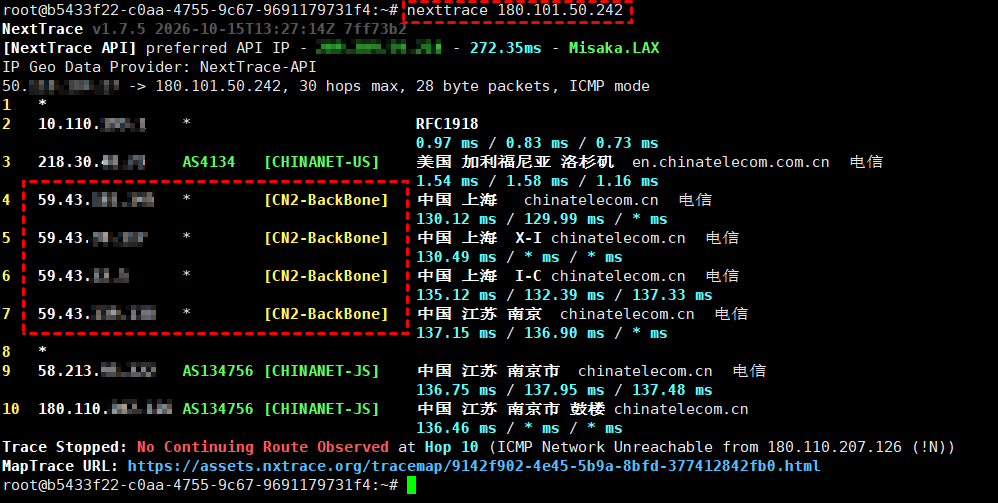
Note: 180.101.50.242 is an example destination IP address. For actual testing, you can replace it with a target IP address within China Telecom's network in mainland China.
As shown in the test results, the return route from this VPS to the China Telecom destination IP (180.101.50.242) in Nanjing, Jiangsu, passes through China Telecom's CN2 backbone network. Multiple CN2 backbone nodes using the 59.43.x.x IP range also appear along the route, indicating that the return traffic uses the CN2 network.
Method 2. Use ITDOG for Online Traceroute Testing
NextTrace can test the return route from a VPS to mainland China. However, if you also want to identify the outbound route from the VPS, you can use ITDOG's remote network probing nodes to perform the test.
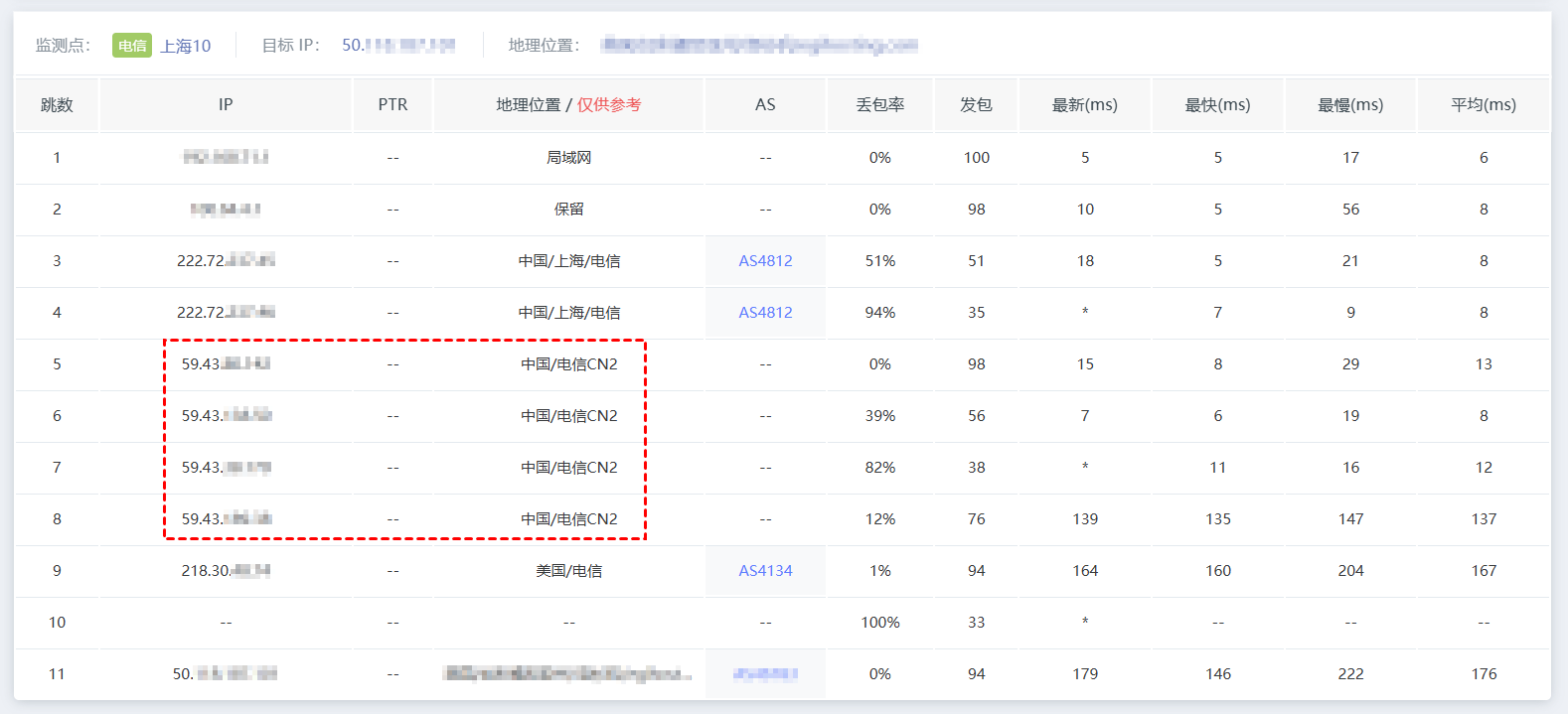
How can you identify CN2 GIA routing? With the ITDOG online network testing platform, you can select probe nodes from different regions and network operators to test whether your VPS uses CN2 GIA routing.
1.Visit the ITDOG official website and open its traceroute testing page. Enter your VPS's public IP address in the destination field, then select a China Telecom probe node to start the test.

2.Check the test results to see whether the outbound route passes through multiple China Telecom CN2 backbone nodes. If it does, this indicates that the VPS's outbound traffic to China Telecom also passes through the CN2 backbone network.
Conclusion
How can you test whether a VPS uses CN2 GIA routing? You can use NextTrace or the ITDOG website to quickly check your VPS routing. If you need to test a VPS with optimized routes for all three major Chinese carriers, you can also use these two methods to examine both outbound and return routes.
If you are looking for a server with stable network connectivity and optimized routes for all three major Chinese carriers, consider VMRack cloud servers. VMRack operates its own data center in Los Angeles, USA, and offers multiple network options, including CN2 GIA, AS9929, and CMIN2, catering to different requirements for network connectivity and server deployment.


- Products
- VPS Hosting
- VPS HostingUnmetered
- Bare Metal
- GPU Rental
- CDNPublic Beta
- Custom CDN
- Object StoragePublic Beta
- TranscoderPublic Beta