Are cheap Windows US desktop computers worth buying?
Many personal developers and small-to-medium enterprise owners share a genuine need: they are on a limited budget but require a server capable of running the Windows operating system. This is why the demand for "cheap US Windows hosting models" remains strong over the long term. Cheap does not mean low quality; the key is whether it matches your business scenario. If you are simply setting up a small website, running an ASP.NET application, or need a remote desktop for office work, low-priced US Windows hosting can fully meet your needs—there is no need to spend extra money on high configurations you won't use. Brands like VMRack, which operate relying on self-built data centers, offer budget-friendly pricing without compromising on routing and hardware resources, making them a top-priority choice for users on a tight budget.
However, if your business involves high-concurrency access, frequent transmission of large files, or has strict requirements for latency from mainland China, you must watch out for whether these so-called "cheap" models have cut corners on bandwidth and routing. Some providers lower costs through overselling and shared bandwidth, which leads to noticeable lagging during peak hours. Before purchasing, be sure to look closely at the routing configurations and resource allocation methods, rather than just comparing price figures.
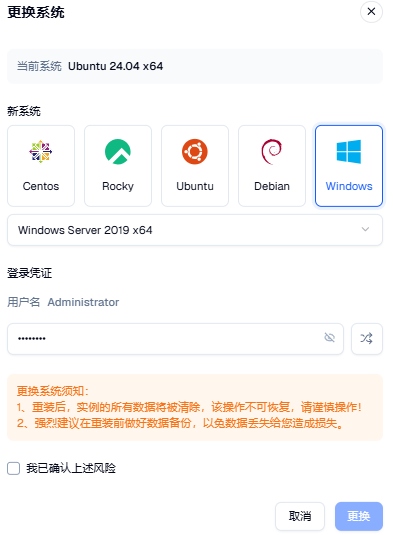
What is the Use of a Windows VPS
A Windows VPS is not simply a physical machine's Windows system moved to the cloud; its application scenarios are actually quite extensive. The most common use case is remote work and remote desktop access. Many people need a cloud environment that they can connect to at any time to run specific Windows software—such as financial software, design tools, or legacy systems requiring ActiveX control support. This type of demand is very difficult to replace with a Linux system.
Another typical use is hosting websites and applications built on Microsoft technology stacks like .NET, ASP, and MSSQL. These applications natively adapt to the Windows Server environment, making deployment much more hassle-free than struggling with compatibility issues on Linux. In addition, setting up private game servers, running automated scripts with graphical interfaces, or even hosting test tools often depends on the desktop environment and software compatibility provided by a Windows VPS.
For cross-border e-commerce practitioners, a Windows VPS is also frequently used to run store management tools and bulk operation software. Most of these tools only support the Windows system. Deploying them in the cloud allows for multi-account and multi-task operations to run simultaneously without consuming local computer resources or worrying about task interruptions due to network disconnections.
The Difference Between a Windows VPS and a Virtual Machine
Many users who are new to cloud servers often confuse the concepts of "Windows VPS" and "virtual machine" (VM). In fact, there is a clear difference between the two. A virtual machine (VM) is a broad technical concept referring to an independent system environment simulated on physical hardware via a Hypervisor. This can either be a VM you build on your local computer using software like VMware or Hyper-V, or a virtualized instance run by a cloud provider in a data center. On the other hand, a Windows VPS is the specific commercialized product of this technology in the cloud—essentially a virtual machine created for the user and hosted in a remote data center by the provider.
The difference between a Windows VPS and a virtual machine lies in management methods and network capabilities. A locally built virtual machine is limited by the local computer's hardware configuration and relies on local broadband for its network. It is typically only used for development, testing, or running temporary environments. In contrast, a Windows VPS runs in the provider's professional data center, comes with an independent public IP, stable bandwidth lines, and 24/7 hardware maintenance. Users do not need to worry about power outages, hardware failures, or other issues, making it much more suitable for production environments like long-term online websites, remote office desktops, or batch task processing.
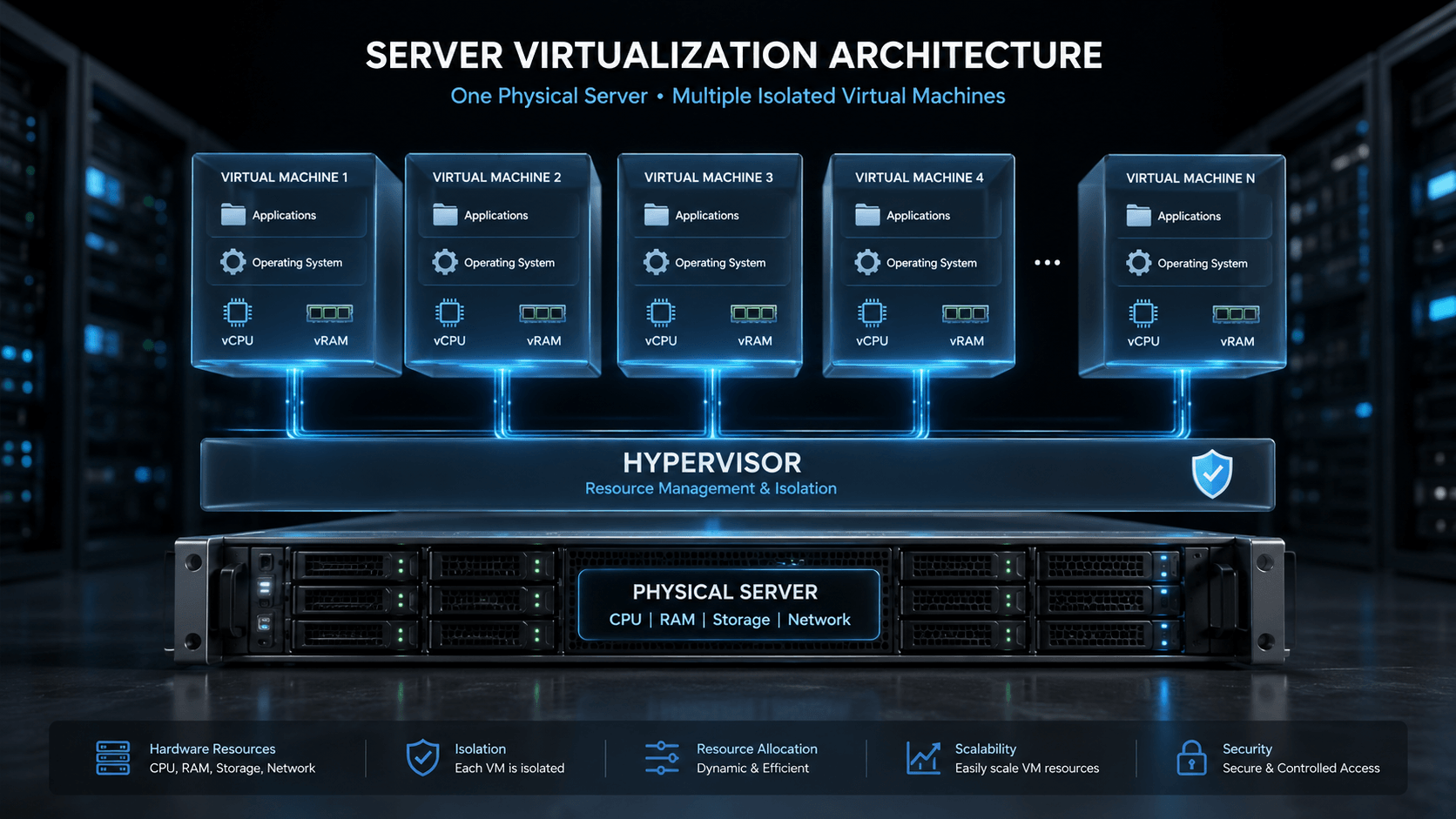
From a resource allocation perspective, although a Windows VPS is technically a type of virtual machine, providers usually employ resource isolation technologies to ensure that each instance's CPU and memory are not heavily oversold. Combined with the network architecture of a professional data center, its performance is far superior to a self-built local virtual machine environment. This is why more and more users prefer to rent a Windows VPS directly instead of dealing with local virtualization environments themselves.
VMRack Self-Built Data Center: The Differentiated Advantages of Autonomous Network Architecture
When choosing cheap US Windows hosting, few people pay attention to whether the data center is self-built or leased from third-party resources, yet this is precisely the key factor affecting the long-term user experience. Relying on over 12 years of industry experience under EasyLink, VMRack operates a fully self-built and self-controlled data center in Los Angeles. This means everything from network architecture design to IP resource allocation is free from the policy restrictions of upstream data centers—which is the core advantage that distinguishes VMRack's self-built data center from reseller providers.
The most direct benefit of a self-built data center is reflected in the flexibility of the network architecture. VMRack can plan IP resources independently based on business needs, offering users diverse options including multiple IPv4 addresses, IPv6, and private IPs. For instance, if you need multiple independent IPs for website matrix deployment or multi-account isolated operations, or if you wish to use private IPs to achieve low-latency communication between different instances in the same data center and reduce public traffic consumption—these demands are often difficult to meet flexibly with providers relying on third-party data centers, because adjusting IP resources and network policies requires layers of approval. A self-built data center, however, can configure and optimize directly from the underlying network level.
In addition to autonomy over network architecture, a self-built data center also enables VMRack to dynamically adjust routing configurations and resource scheduling strategies based on actual business load conditions. This guarantees service stability from the ground up, rather than passively relying on the O&M response speed of an upstream data center. For users who require highly customized network solutions, this autonomous and controllable data center architecture is often far more worthy of attention than mere low prices.
Conclusion
Overall, whether a cheap US Windows hosting model is worth buying depends not on the price itself, but on whether the provider can guarantee the basic standards of network routing, hardware resources, and security protection while keeping costs down. If you are looking for a solution that balances cost-effectiveness with stability, you might want to consider VMRack's Windows hosting products. Backed by the autonomous network architecture of its self-built Los Angeles data center, it delivers a more solid user experience within a limited budget. Before purchasing, it is recommended to clarify your usage scenarios and make a comprehensive judgment based on routing quality and resource allocation methods. Only in this way can you truly buy a product that offers real value for money.

- Products
- VPS Hosting
- VPS HostingUnmetered
- Bare Metal
- GPU Rental
- CDNPublic Beta
- Custom CDN
- Object StoragePublic Beta
- TranscoderPublic Beta