Recommended good US VPS with 9929 lines!
When you frequently need to remotely connect to a US server, or run latency-sensitive applications such as live streaming, cross-border office work, and game acceleration, everything might work perfectly fine during the day. However, as soon as the peak hours in mainland China arrive (8:00 PM to 12:00 AM), you experience freezes, packet loss, or even connection failures. The core reason behind this is often the quality of the return routing line. Based on practical testing experience, this article aims to find a stable and reliable US 9929 line VPS recommendation scheme to help you understand the routing principles and key purchasing points.
What Exactly is the China Unicom 9929 Premium Line?
The China Unicom 9929 premium line is a high-quality international egress line under China Unicom. Unlike ordinary 163 and 4837 lines, it is designed with a greater focus on low latency and fewer hops, showing a significant stability advantage, especially when accessed by domestic China Unicom users.
Many people confuse 9929 with CN2. Although both belong to the "premium" tier, their target user groups and optimization directions are not completely identical. CN2 GIA is more oriented toward comprehensive network-wide optimization, while 9929 focuses more on the access experience of China Unicom users. Combining the two often covers a wider domestic user base, which is why many data centers like to bundle both lines into a "Premium Routing for Three Major Carriers" solution.
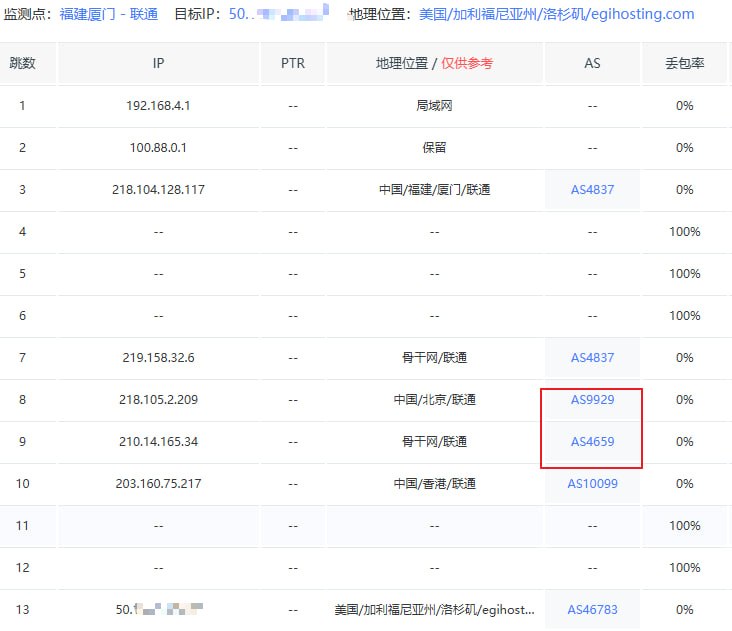
According to actual test data, the latency fluctuation of ordinary international BGP lines during peak evening hours can reach tens or even hundreds of milliseconds, and the packet loss rate also rises significantly. In contrast, servers using the 9929 line can still maintain relatively stable latency performance even during China Unicom's peak hours, with a drastic reduction in packet loss. For users running latency-sensitive applications like remote desktop work, real-time audio/video streaming, and online game acceleration, this difference directly determines whether the user experience is smooth.
What to Look for When Choosing a US VPS Product
There is a dizzying array of products on the market under the banner of US VPS recommendations claiming to use the "9929" line. To pick a truly reliable one, you cannot just look at the text on the promotional page; you need to verify it from several practical dimensions.
First is the authenticity of the line. Many merchants advertise "Premium Routing for Three Major Carriers" or "Nationwide Acceleration," but actual testing reveals that only China Telecom users enjoy smooth access, while China Unicom and China Mobile users still experience lag. A safer approach is to request a test IP before purchasing and run a real routing test using tools like MTR or Tracert to check the intermediate nodes and latency. It is especially important to test during peak evening hours, as this period best exposes the true quality of the line. Second is the stability of hardware and network. For instance, whether the data center where the server is located has stable power guarantees, fire protection, and monitoring facilities, and whether the bandwidth is dedicated or shared. These factors directly affect long-term operational stability and can be confirmed by asking customer service or checking the official website description.
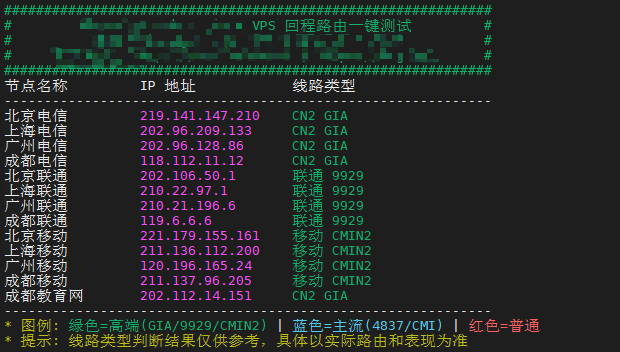
Third is the after-sales response speed and security protection capability. Servers on international lines will inevitably encounter attacks or fluctuations. A technical team that responds promptly, coupled with basic DDoS protection capabilities, is often an important standard for judging whether a provider is reliable. You can briefly test the response speed via online customer service or the ticket system before buying. Fourth is whether the price and configuration are transparent and equitable, avoiding being lured by the gimmick of "low price and high configuration" while ignoring hidden restrictions, such as excess traffic fees and bandwidth throttling rules. These terms are usually written in the fine print of the service agreement, so it is recommended to read them carefully before purchasing.
Practical Advantages of VMRack's Self-Built Data Center
VMRack's self-built data center is located in Los Angeles and serves as a self-developed cloud infrastructure platform under EasyLink, with over 12 years of industry experience.
Unlike service providers that rent third-party data center resources for resale, VMRack has autonomous control over everything from the underlying network architecture to IP resource allocation. This allows for faster response and adjustment when encountering line fluctuations or failures. This independent, self-developed technical capability also enables VMRack to achieve full-process automated deployment while supporting comprehensive network solutions, such as flexible configurations for multiple IPv4s and internal IPs to meet the network requirements of different business scenarios. Furthermore, IPv6 functionality is continuously being developed and followed up on, and it is expected to go live in the near future.
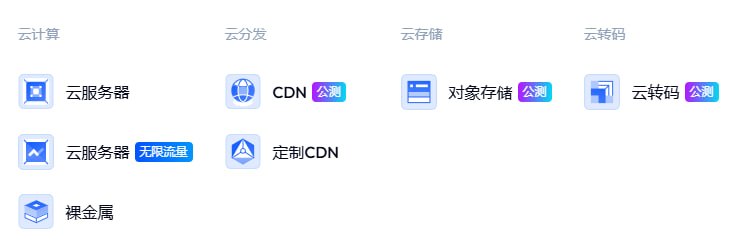
Relying on this self-built data center, VMRack also provides comprehensive service support including bare metal, server colocation, and IP broadcasting, covering various needs from entry-level VPS to enterprise-level deployment. Combined with one-stop solutions such as computing, CDN, storage, and transcoding, users do not need to switch back and forth between multiple providers. The data center also boasts over 200Gbps of free defense support, which all users can enjoy without paying extra fees to enable protection. In terms of payment methods, the habits of different users have also been considered, covering mainstream channels such as Alipay, PayPal, Stripe, and USDT, making the overall entry barrier quite low.
Summary
In general, the key to choosing a good US 9929 line VPS recommendation scheme lies in three aspects: the authenticity of the line, the autonomous control of the data center, and the stability of the infrastructure. Whether building a remote working environment, deploying cross-border businesses, or pursuing low-latency real-time applications, a stable return routing line is often far more important than simply piling up hardware configurations. We hope this article helps you avoid detours when making your choice.

- Products
- VPS Hosting
- VPS HostingUnmetered
- Bare Metal
- GPU Rental
- CDNPublic Beta
- Custom CDN
- Object StoragePublic Beta
- TranscoderPublic Beta